GitHub Essentials for Newcomers
Introduction to Version Control
The Problem with `Final_V3_final.docx`
You’ve probably been there. You're working on a big project, maybe a school paper or a presentation. You save your first draft. Then you make some changes and save it as draft_v2. Soon your folder is a mess of files: project_final, project_final_with_edits, and the dreaded project_final_final_I_mean_it_this_time.
It’s confusing, and it’s risky. What if you delete the wrong file? What if you need a paragraph you wrote three versions ago? This is the exact problem that version control was created to solve. It’s a system for tracking changes to files over time.
Think of it as a time machine for your project. You can rewind to any point in its history to see what it looked like.
This isn't just for text documents. It’s essential for software developers who write thousands of lines of code. But anyone who creates things on a computer can benefit. A Version Control System, or VCS, logs every change, noting who made it, when they made it, and why. It provides a single source of truth, so you never have to guess which file is the real final version.
Working Together Without Chaos
Version control truly shines when you're working with a team. Imagine you and a colleague are both editing the same report. Without a VCS, you might accidentally overwrite each other's work. You'd have to constantly communicate and manually merge your changes, which is slow and prone to error.
A VCS streamlines collaboration. It allows multiple people to work on the same files at the same time. The system is smart enough to help merge the changes together. When two people edit the same line of code, the VCS flags it as a "conflict" so the team can resolve it intentionally, rather than by accident.
This also makes experimentation safe. You can create a separate "branch" of the project to try a risky new idea. The main version remains untouched. If the idea works out, you can merge your branch back into the main project. If it doesn't, you can simply delete the branch. No harm done.
How Systems Evolved
Not all version control systems work the same way. The earliest popular systems were centralized. In this model, there is a single, central server that holds all the files and their history. To work on the project, you "check out" a copy of the files from that server. All changes are saved back to that central server.
The major weakness of a centralized system is its single point of failure. If the central server goes down, nobody can save their changes or collaborate.
To solve this problem, distributed version control systems (DVCS) were created. In a distributed model, every person has a full copy of the entire project history on their own computer. There isn't one central server that everyone depends on. You can save changes locally and share them with colleagues directly or through a common remote repository when you're ready.
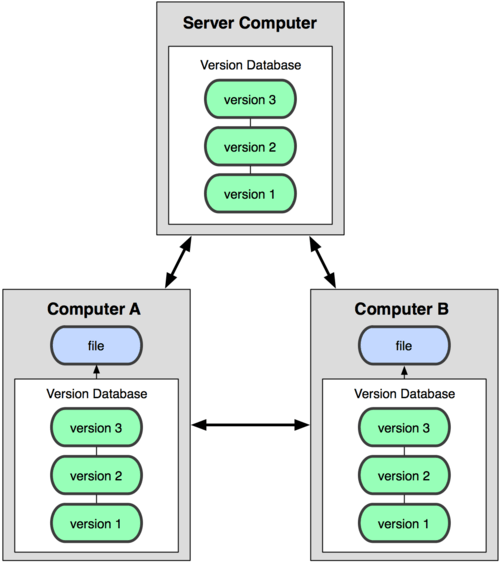
This approach is more flexible and resilient. You can work offline and commit changes locally. It also means the project has many backups by default, since every team member has a full copy. Today, distributed systems like Git are the industry standard for software development, though centralized systems like Subversion are still in use.
Now that you understand what version control is and why it's so important, you're ready to see how these concepts are put into practice.