GitHub Essentials for Developers
Introduction to Version Control
What Is Version Control?
Think about working on a big project, like writing an essay or creating a piece of art. You save different versions as you go: essay_draft1.doc, essay_draft2_final.doc, essay_REALLY_final.doc. It gets messy fast. If you make a mistake, finding the last good version can be a nightmare. Even worse, imagine trying to do this with a team of people all editing the same files.
This is the problem that version control systems solve. A VCS is a tool that tracks and manages changes to a set of files over time. It's like a time machine for your project, allowing you to recall specific versions, see who changed what, and safely experiment without fear of permanently breaking things.
A VCS records changes to files over time so you can recall specific versions later.
In software development, this is essential. Code is constantly changing, with multiple developers often working on the same files. A VCS prevents people from accidentally overwriting each other's work. It also makes it easy to collaborate, fix bugs, and add new features in an organized way. If a new piece of code introduces a problem, you can easily revert to a previous, stable version.
Two Flavors of VCS
Version control systems generally come in two types: centralized and distributed. They both accomplish the same goal, but they work in fundamentally different ways.
In a Centralized Version Control System (CVCS), there is a single, central server that stores all the files and their complete history. Developers “check out” files from this central server to work on them and then “check in” their changes. It’s like a library: you check out a book, and no one else can edit it until you return it.
This model is straightforward, but it has a major weakness: the central server is a single point of failure. If the server goes down, nobody can save their changes or collaborate. If the server's hard drive becomes corrupted, you could lose the entire project history.
A Distributed Version Control System (DVCS) solves this problem. In a DVCS, every developer has a full copy of the entire project history on their local machine. Instead of just checking out the latest version of files, you clone the entire repository.
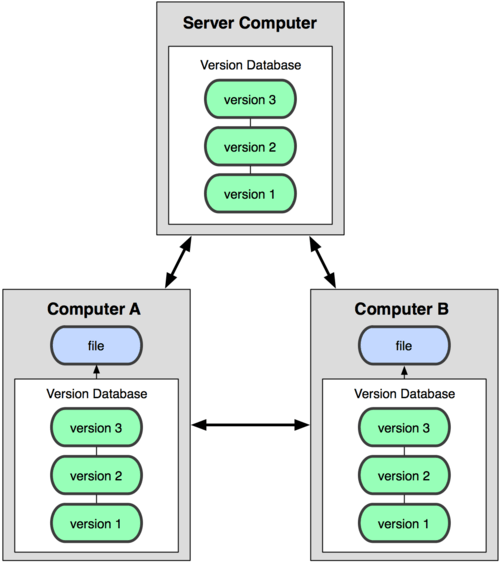
Git is the most popular example of a distributed system. Since every developer has the full history, you can work offline, commit changes locally, and only connect to a central server when you need to share your work with others. Operations like viewing history or comparing versions are lightning fast because they happen on your own computer.
The distributed model provides redundancy. If a central server fails, any developer's local copy can be used to restore it.
Why Git is the Standard
Git's distributed nature makes it incredibly powerful for modern software development. It gives teams flexibility and speed. Developers can work on features in isolation, experiment freely in separate "branches" (which we'll cover later), and then merge their changes back into the main project.
This approach supports non-linear workflows and makes it easy for large, distributed teams to collaborate effectively. It’s a safety net that encourages experimentation and protects the integrity of the project. This is why understanding version control, and specifically Git, is a fundamental skill for anyone involved in creating software.
What is the primary problem that a version control system (VCS) is designed to solve?
What is the key difference between a Centralized Version Control System (CVCS) and a Distributed Version Control System (DVCS)?