GitHub Essentials for Developers
Introduction to Version Control
A Time Machine for Your Work
Imagine you're writing a long report. You save the first draft as report_v1.docx. Then you make some changes and save it as report_v2.docx. Soon, your folder is a mess: report_final.docx, report_final_REALLY_final.docx, report_final_for_review_v3.docx.
Now imagine you're working on this report with a teammate. You email a version back and forth, trying to merge your changes. Someone accidentally overwrites a crucial paragraph. It's confusing, messy, and prone to errors. This is where version control comes in.
A Version Control System (VCS) is software that tracks and manages changes to a set of files over time. It's a safety net that records every modification, allowing you to recall specific versions later.
Think of it as a detailed journal for your project. Whether you're writing code, designing a website, or writing a novel, a VCS lets you:
- See the entire history of changes: Who changed what, when, and why.
- Revert to previous versions: If you make a mistake, you can easily turn back the clock to a version that worked.
- Collaborate without chaos: Team members can work on the same project simultaneously without stepping on each other's toes.
Two Flavors of Version Control
Version control systems generally come in two types: centralized and distributed.
In a Centralized Version Control System (CVCS), all the project's history is stored on a single, central server. Think of it like a library's main server. To work on a file, you "check out" a copy. When you're done, you "check in" your changes. Everyone on the team syncs their work with this one central place.
This model is straightforward, but it has a major weakness: that central server is a single point of failure. If the server goes down, nobody can save their changes or collaborate. If its hard drive gets corrupted, you could lose the project's entire history.
A Distributed Version Control System (DVCS) solves this problem. Instead of just checking out the latest version of the files, every developer gets a full copy of the entire project history on their local machine.
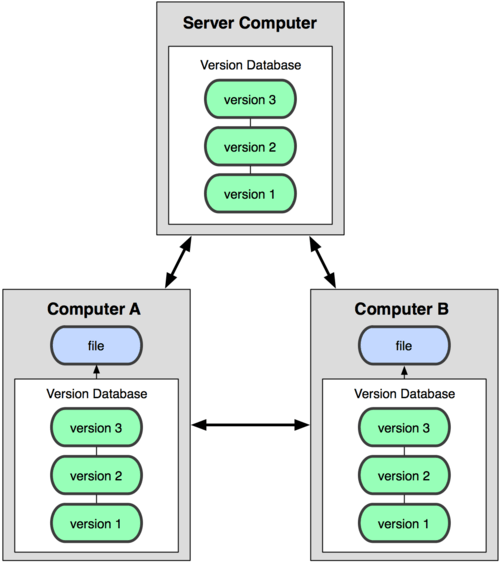
This approach has several key advantages. Since everyone has a complete backup, there's no single point of failure. If the main server is unavailable, you can still work, save new versions (called "commits") locally, and even share changes with other team members directly. Most operations are also much faster because you're working with files on your own computer, not waiting on a network connection to a central server.
Enter Git
Git is the most popular distributed version control system in the world. It was created in 2005 by Linus Torvalds, the same person who created the Linux operating system, to manage the development of Linux itself. It was designed to be fast, efficient, and reliable for huge projects with thousands of collaborators.
Git is an open-source distributed version control system that helps developers manage and track changes to their code over time.
Because Git is a DVCS, it gives developers the flexibility and security that comes with having a full local history. Its design excels at what's called "branching" and "merging," which allows teams to experiment with new features in isolation without affecting the main project. This power and flexibility have made Git the industry standard for software development and many other fields.
Learning version control with Git is a foundational skill. It makes collaboration smoother, protects your work from being lost, and provides a clear, organized history of your project's evolution.