GitHub and Claude Code Collaboration
Introduction to Version Control
Saving Your Work, The Smart Way
Ever worked on a big school paper or a design project and found your folder cluttered with files like report_v1.doc, report_v2.doc, report_final.doc, and report_final_for_real_this_time.doc? It's a common way to keep track of changes, but it's messy and confusing. If you accidentally delete the wrong file or can't remember which version has that one good paragraph, you're in trouble.
Version control is a system that solves this problem. It's like a time machine for your project. It tracks every change you make to your files, allows you to revert to previous versions, and helps you understand how your project has evolved over time. While it's essential for software development, it's useful for anyone who creates things on a computer, from writers and designers to scientists.
Version control is the lab notebook of the digital world: it’s what professionals use to keep track of what they’ve done and to collaborate with other people.
A Brief History of Saving Stuff
Version control systems didn't just appear overnight. They evolved to meet the growing needs of developers working on increasingly complex projects.
The simplest approach is a Local Version Control System. Imagine a little database on your own computer that keeps a record of changes. It's better than the _final_final file naming scheme, but it has a major weakness: everything is stored on one machine. If your hard drive fails, you lose the entire history of your project. Collaborating with others is also a huge pain, involving passing files back and forth manually.
To solve the collaboration problem, Centralized Version Control Systems (CVCS) were developed. With a CVCS, there's a single server that contains all the versioned files. Developers connect to this server to "check out" a copy of the files to work on. When they're done, they "commit" their changes back to the central server.
This was a huge improvement. Everyone on the team can see what everyone else is doing. But it still has that single-point-of-failure problem. If the central server goes down, nobody can save their changes or collaborate. If the server's hard drive gets corrupted, you could lose everything.
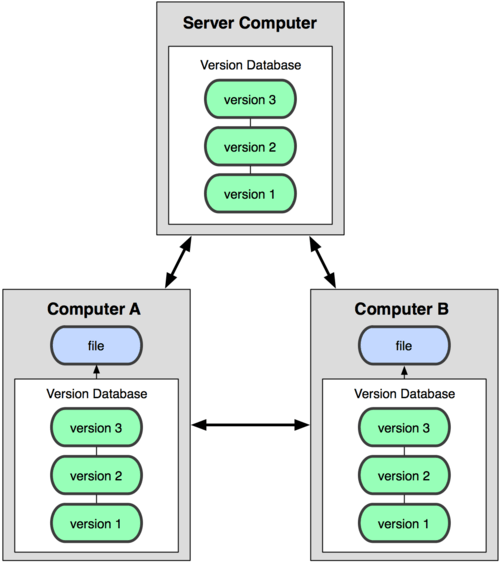
This brings us to the modern standard: Distributed Version Control Systems (DVCS). In a DVCS like Git, every developer gets their own complete copy of the project's history. You don't just check out the latest version of the files; you get a full mirror of the repository.
This is a game-changer. Since everyone has a full backup, you're protected from a single server failing. You can work offline, saving changes to your local copy, and then sync up with others when you're back online. This flexibility allows for powerful workflows and makes collaboration much smoother and safer.
Why Bother?
Using a version control system, especially a distributed one, offers some massive benefits for any project, big or small.
| Benefit | Why It Matters |
|---|---|
| Collaboration | Multiple people can work on the same project without stepping on each other's toes. The system helps manage and merge changes from different people. |
| History Tracking | You have a complete log of who changed what, when, and why. This is incredibly useful for debugging or understanding past decisions. |
| Safety Net | Messed something up? You can easily roll back to a previous, working version of your project. It’s like having unlimited undo. |
| Branching | You can create separate lines of development called "branches" to work on new features or experiments without affecting the main project. If the new feature works, you can merge it back in. If it doesn't, you can just delete the branch. |
Understanding these core concepts is the first step toward managing your projects more effectively. It provides the foundation for everything that follows in modern software development.