GitHub Actions Explained
Introduction to GitHub Actions
Automating Your Workflow
Imagine you've just finished writing a new feature for your project. Before you can merge it, you need to run a series of tests to make sure you didn't break anything. Then, you need to build the code and maybe even deploy it to a staging server for others to review. Doing this manually every single time is tedious and prone to error. This is where automation comes in.
GitHub Actions is a tool that helps you automate your software development tasks right from your GitHub repository. It handles the repetitive work so you can focus on building.
Think of it as a set of instructions you give to GitHub. You can tell it to automatically test your code, build your project, or even publish a package whenever certain things happen, like when you push new code or someone creates a pull request.
The Building Blocks
Every automation in GitHub Actions is called a workflow. A workflow is made up of a few key components that work together in a hierarchy. You define this entire process in a special file written in a format called YAML, which lives in a .github/workflows directory in your repository.
Let's break down this structure.
Events are the triggers that start a workflow. This could be a push to a branch, the creation of a pull_request, or even a set schedule, like running a task every Monday at 9 AM. You have fine-grained control over when your automations run.
Workflows are the top-level process. Each workflow file represents one automated process. For example, you might have one workflow for testing your code and another for deploying it.
Jobs are sets of tasks that run inside a workflow. By default, a workflow with multiple jobs will run them in parallel. You can also configure them to run sequentially if one job depends on another. Each job runs in a fresh virtual environment called a runner.
Steps are the individual commands or actions that make up a job. They are executed in order. A step can be a simple command line script or a pre-packaged action that someone else has built, which you can use to perform common tasks.
Think of it like a recipe. The event is deciding to cook (e.g., it's dinner time). The workflow is the entire recipe. The jobs are major stages like 'prepare ingredients' and 'cook the dish'. The steps are the individual instructions: 'chop onions', 'preheat oven', 'sauté for 5 minutes'.
Why Use Actions?
The main benefit of GitHub Actions is consistency and efficiency. By automating your build and test pipeline, you ensure that the same checks are run on every change. This is a core part of Continuous Integration (CI), a practice that helps teams catch bugs early and improve software quality.
It also saves time. Instead of manually running tests and deploying code, developers can let GitHub Actions handle it. This frees them up to focus on writing code and building features.
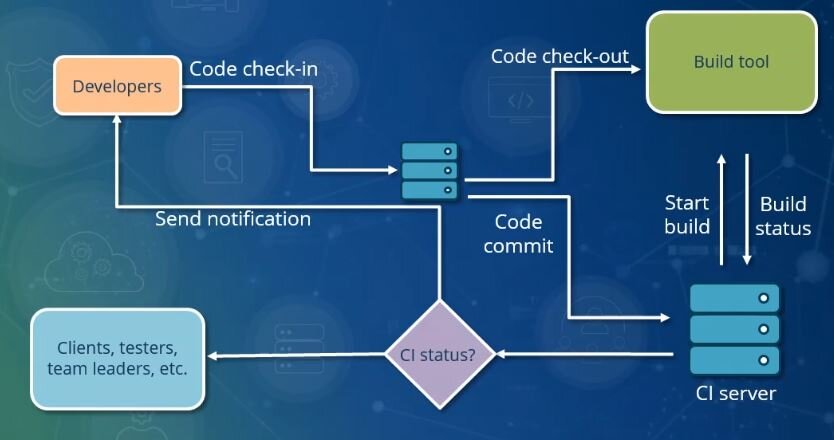
Because it's built directly into GitHub, it integrates seamlessly with your development process. You can see the status of your workflows directly in your pull requests, making it easy to see if your changes passed all the required checks before merging.
Ready to test your understanding?
What is the primary purpose of using GitHub Actions?
Which of the following lists the components of a GitHub Actions process in the correct hierarchical order, from largest to smallest?
With these core concepts, you're ready to start exploring how to build your own automated workflows. You now understand the what, why, and how of GitHub Actions at a high level.