Git Version Control Fundamentals
Introduction to Version Control
What Is Version Control?
Imagine you're writing a long report. You save the first draft as report_v1.docx. You make some changes and save it as report_v2.docx. Then you get feedback and create report_final.docx, followed quickly by report_actually_final_I_swear.docx.
This gets messy fast. What if you want to see a change you made in v2? Or what if you're working with a colleague and you both edit report_final.docx at the same time? Someone's work is going to get overwritten.
This is the exact problem that version control systems (VCS) solve for software developers. A VCS is a tool that tracks and manages changes to code. It's like a time machine for your project, allowing you to go back to any previous state of your code, see who made what changes, and collaborate with a team without stepping on each other's toes.
Using a VCS is fundamental to modern software development. It provides a safety net, making it easy to fix mistakes. It also provides a clear history of the project, which is essential for understanding how the code has evolved. For teams, it’s the backbone of collaboration.
Centralized vs. Distributed
There are two main types of version control systems. The older model is centralized, while the modern standard is distributed.
A Centralized Version Control System (CVCS) uses a single, central server that stores all the files and their history. Developers "check out" files from that central server to work on them. It’s simple to understand, but it has a major weakness: the central server is a single point of failure. If the server goes down, nobody can save their changes or collaborate. If the server's hard drive gets corrupted, you could lose the entire project history.
A Distributed Version Control System (DVCS), like Git, works differently. Instead of just checking out the latest version of files, every developer has a full copy of the entire project history on their local machine. This is called "cloning" the repository.
This approach has huge advantages. Since everyone has a complete backup, there's no single point of failure. Developers can work offline, saving changes locally. When they're ready, they can "push" their changes to a shared server to sync up with the team. This model is more flexible, faster, and much safer.
Core Concepts
Regardless of the system, all VCS tools share a few core concepts and terms. Understanding this vocabulary is the first step to using them effectively.
Repository
noun
The database containing all the files, history, and configuration for a project. Often shortened to "repo."
The repository is the heart of your project. In a DVCS, you have a local copy of the repository and there is also often a central, shared repository that the team uses to coordinate.
Commit
noun
A snapshot of your repository at a specific point in time. Each commit has a unique ID and a message describing the changes.
Think of a commit as a save point in a video game. It captures the exact state of your project. You create commits frequently as you work, which builds up a detailed history of your project.
Branch
noun
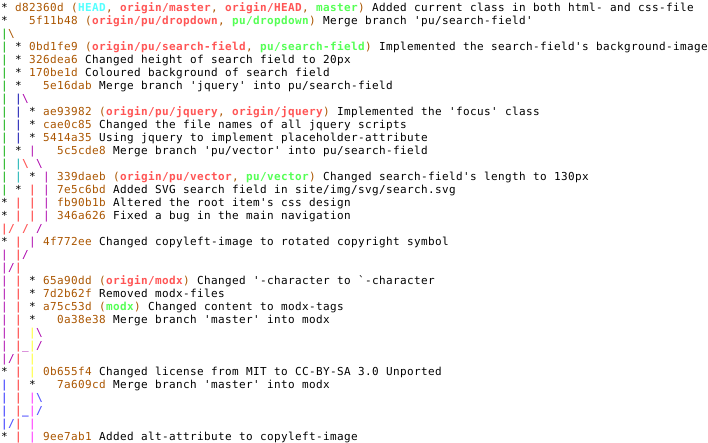
An independent line of development. You can create a branch to work on a new feature without affecting the main codebase.
Branches are one of the most powerful features of modern version control. They allow developers to work in parallel. The main branch, often called main or master, is usually kept stable, while new work happens on separate branches.
Merge
verb
The action of combining the changes from one branch into another. This is how new features are integrated into the main codebase.
The typical workflow: Create a new branch, make your changes and create one or more commits, and then merge that branch back into the main line of development.
These concepts form the foundation of version control. By tracking changes with commits, isolating work with branches, and integrating it with merges, development teams can build complex software efficiently and safely.