Git Fundamentals for Version Control
Introduction to Version Control
Saving Your Work, Smarter
Have you ever worked on a big document and saved it with names like report_v1.doc, report_v2.doc, and report_final_final.doc? This is a basic way of tracking changes, a manual form of version control. It works, but it can get messy fast. What if you want to know exactly what you changed between version 2 and the final version? What if you're working with a team and two people edit the same file at once?
This is where a Version Control System, or VCS, comes in. It's software that helps you track and manage changes to your project's files over time.
A VCS acts like a time machine for your project. You can look at the entire history of changes, see who changed what and when, and revert back to an older version if something breaks. It’s an essential tool for any software developer, but it's also useful for writers, designers, or anyone who works on projects that evolve over time.
Version Control System
noun
A system that records changes to a file or set of files over time so that you can recall specific versions later. It allows multiple people to work on the same project without overwriting each other's changes.
The key advantages are clear: you get a complete history of your project, you can experiment without fear of losing work, and your team can collaborate smoothly. It brings order to the potential chaos of creative and technical projects.
From Central to Distributed
Version control systems weren't always as flexible as they are today. The first widely used models were centralized.
In a Centralized Version Control System (CVCS), there's a single server that holds all the project's files and their history. Developers connect to this server to "check out" the files they need to work on and then "check in" their changes when they're done.
Think of it like a library. There's one central building with all the books. You have to go to the library to check a book out. If the library closes or burns down, no one can access any of the books. Popular CVCS tools included Subversion (SVN) and Perforce.
The main problem with this model is that it has a single point of failure. If the central server goes down, nobody can work. If the server's hard drive gets corrupted, you could lose the entire project history. This limitation led to a new way of thinking.
The Distributed Revolution
The next evolution was the Distributed Version Control System (DVCS). Git is the most popular example of a DVCS. In a distributed system, developers don't just check out the latest version of the files; they clone the entire repository.
A clone is a full copy of the project, including its complete history. This means every developer has a local backup of the entire project on their own machine.
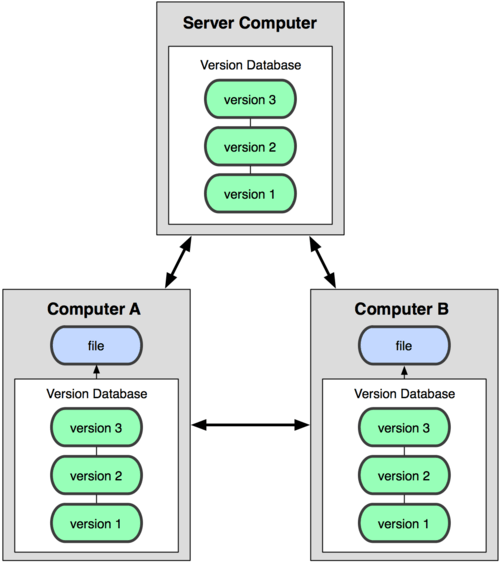
This approach solves the major problems of centralized systems. Since everyone has a full copy, there is no single point of failure. If the main server (which is now just another copy, used for coordination) goes offline, developers can continue to work locally and even share changes with each other directly. Once the server is back, they can push their changes to it.
Working with a DVCS is also much faster. Because you have the entire history on your local machine, most operations—like comparing versions, viewing history, and committing changes—are instantaneous. You only need a network connection when you want to share your work with the rest of the team.
Ready to test your knowledge on these foundational concepts?
What is the primary function of a Version Control System (VCS)?
What is the main weakness of a Centralized Version Control System (CVCS)?
Understanding the 'why' behind version control sets the stage for learning the 'how'. The shift from centralized to distributed systems fundamentally changed how developers collaborate, making workflows more resilient and efficient.