Git Fundamentals
Introduction to Version Control
What Is Version Control?
Have you ever saved a file as report_final.doc, only to create report_final_v2.doc an hour later? Then maybe report_REALLY_final.doc? This messy process is a common problem when working on any project, whether it's a school paper, a graphic design, or a complex piece of software. You need a way to track changes without drowning in a sea of confusing filenames.
A Version Control System (VCS) is a tool that solves this problem. It's like a detailed logbook for your project. A VCS automatically records every change made to your files, who made it, and when. It allows you to look back at any previous state of the project, see what changed between versions, and even revert back to an older version if something goes wrong. This isn't just about saving files—it's about managing the entire history of a project.
Version control is a safety net. It gives you the freedom to experiment, knowing you can always undo your changes and return to a stable point.
Two Flavors of VCS
Not all version control systems work the same way. They generally fall into two categories: centralized and distributed.
Centralized Version Control (CVCS) Imagine a library with a single, master copy of a book. To make an edit, you have to check out the book from the central librarian. While you have it, no one else can work on it. This is the basic idea behind a CVCS. There is one central server that holds all the project's files and their history. Developers "check out" files to work on them and then "check in" their changes.
Systems like Subversion (SVN) and Perforce work this way. It's a simple model to understand, but it has a major weakness: the central server is a single point of failure. If the server goes down, nobody can save their work or collaborate.
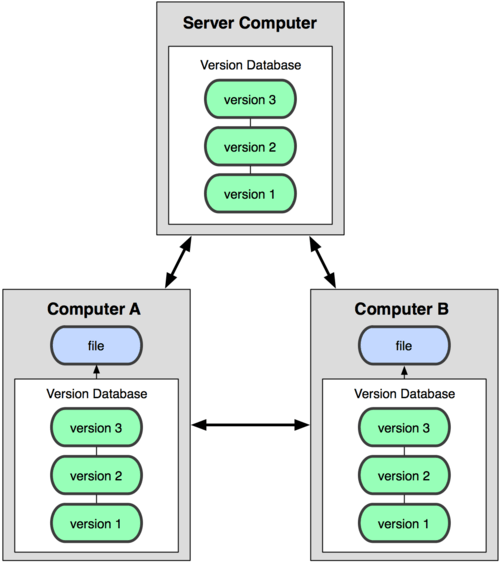
Distributed Version Control (DVCS) A distributed system takes a different approach. Instead of one master copy, every developer gets their own complete copy of the project, including its entire history. You work on your local copy, saving changes as you go. You don't need to be connected to a central server to do your work.
When you're ready, you can "push" your changes to a shared server to make them available to your team, and "pull" changes from others. This model is more flexible and robust. Since everyone has a full backup, there's no single point of failure. If the main server is offline, work can continue uninterrupted. Git and Mercurial are popular examples of a DVCS.
Why It Matters
Using a version control system is a fundamental skill in modern software development. It enables powerful workflows that make teams more efficient and projects more stable.
| Benefit | Description |
|---|---|
| Collaboration | Multiple people can work on the same files simultaneously without overwriting each other's work. The VCS helps merge changes together. |
| History Tracking | You have a permanent record of who changed what, when, and why. This is invaluable for debugging and understanding the project's evolution. |
| Branching | You can create an isolated copy of your code (a "branch") to experiment with new features. If it works, you can merge it back. If it fails, you can delete it without affecting the main project. |
| Backup and Recovery | With a DVCS like Git, every developer's machine is a full backup of the project. If the central server fails, the repository can be restored from any local copy. |
Understanding these core concepts is the first step. By managing a project's history, a VCS provides the foundation for developers to build complex software together, securely and efficiently.
What is the primary purpose of a Version Control System (VCS)?
Which of the following describes a key characteristic of a Distributed Version Control System (DVCS)?