Git Fundamentals
Introduction to Version Control
The Project Time Machine
Imagine you're writing a long story. You finish the first draft, save it as story_v1.doc. Then you revise it and save story_v2.doc. Your friend gives feedback, so you create story_v2_with_edits.doc. Then you have a great new idea for the ending and save story_final.doc. But wait, that ending doesn't work. You need to go back to the version from two days ago. Which file was that again? Was it story_final_for_real_this_time.doc?
This messy process is a common problem in any creative or technical project. A Version Control System (VCS) is software that solves this problem. It tracks every change made to a set of files over time, creating a detailed history. Think of it as a meticulous journal for your project that lets you recall specific versions later, see who changed what, and why.
Instead of saving dozens of nearly identical files, a VCS stores a single project. When you make changes, you “commit” them with a short message describing what you did. The VCS records this snapshot, allowing you to turn back the clock to any previous commit whenever you need to. This is invaluable, especially when working on a team.
Two Flavors of Control
Version control systems generally come in two types: centralized and distributed.
In a Centralized Version Control System (CVCS), the entire history of the project lives on a single, central server. Developers “check out” the latest version of the files to their own computers to work on them. When they're done, they “commit” their changes back to the central server.
This model is straightforward but has a critical weakness. If the central server goes down, nobody can save their changes or collaborate. If the server's hard drive becomes corrupted and there are no backups, the entire history of the project is lost forever.
This brings us to the second type.
In a Distributed Version Control System (DVCS), every developer has a full copy of the project and its history on their own computer. They don't just check out the latest snapshot of the files; they fully mirror the repository.
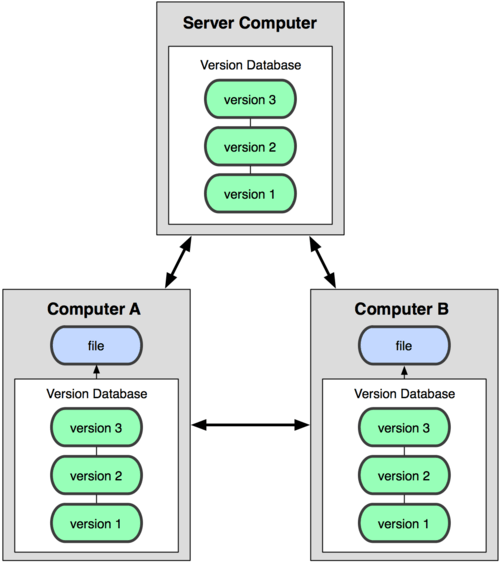
With a DVCS like Git, you can commit changes, view history, and create branches without being connected to a central server. Collaboration still happens through a shared server, but it's more of a synchronization point than a single source of truth. If the main server fails, any developer's local copy can be used to restore it. This makes the system incredibly robust and flexible.
Why Bother with Version Control?
Using a VCS is fundamental to modern software development, and for good reason. It provides several key benefits:
- Collaboration: Multiple people can work on the same project without stepping on each other's toes. The system helps manage and merge changes from different team members.
- History: You have a complete log of every change. This is useful for debugging, as you can see exactly when a problem was introduced.
- Experimentation: A VCS allows you to create a separate "branch" to work on a new feature or experiment with an idea. If it doesn't work out, you can simply discard the branch without affecting the main project. If it does, you can merge your changes back in.
- Safety Net: Mistakes happen. With version control, you can easily revert a file, or even the entire project, back to a previous state. It's the ultimate undo button.
Repository
noun
A central location where data, like code files and their history, is stored and managed. In a DVCS, each user has their own local repository.
Now that you understand the what and why of version control, you're ready to see how tools like Git put these concepts into practice.
Let's check your understanding of these foundational ideas.
What is the primary problem that a Version Control System (VCS) is designed to solve?
In a Distributed Version Control System (DVCS) like Git, what is the major advantage if the central server fails?
Understanding these concepts is the first step toward mastering tools that make building complex software possible.