Git and GitHub Fundamentals
Introduction to Version Control
A Time Machine for Your Code
Imagine you're writing a long story. You write a chapter, save it, and then start editing. You delete a character you decide you don't like, but a week later, you realize that was a huge mistake. How do you get the old version back? If you saved over your file, you might be out of luck.
Now imagine the same scenario, but you're working with a team of writers on the same story. How do you all edit the same document without overwriting each other's work? It can get messy fast, with files named story_final_v2_Johns_edit_FINAL.doc.
This is the problem that Version Control Systems (VCS) solve. A VCS is a type of software that tracks changes to files over time. It creates a detailed history of every modification, allowing you to recall specific versions later. It's like a time machine for your project, letting you rewind to any point in its history.
Think of it as a superpowered save feature. Instead of just one save, you have a timeline of every save you've ever made, complete with notes on what changed.
Why It's a Game Changer
Using a VCS is standard practice in software development for several key reasons:
- Collaboration: Multiple developers can work on the same project simultaneously. The VCS helps manage and merge their changes, preventing people from accidentally overwriting each other's contributions.
- History Tracking: Every change is logged. You can see who changed what, when they changed it, and why. This creates a complete, browsable history of the project from its first line of code to the latest update.
- Safety Net: If a new change breaks the software, you can easily revert the project back to a previous, working state. This freedom to experiment without fear of permanent mistakes encourages innovation and better problem-solving.
- Branching: Developers can create independent branches to work on new features or bug fixes without affecting the main project. Once the work is complete and tested, the branch can be merged back into the main project.
Version control is the backbone of modern software development, offering a systematic approach to tracking changes, managing collaborative efforts, and safeguarding project integrity.
Two Flavors of Control
Version control systems generally fall into two categories: centralized and distributed. They both accomplish the same goal but in structurally different ways.
In a Centralized Version Control System (CVCS), there's a single, central server that holds all the versioned files. Developers check out files from this central place, make changes, and then check them back in. The main advantage is that it's simple to understand and manage. The major drawback? If that central server goes down, nobody can collaborate or save their work. It's a single point of failure.
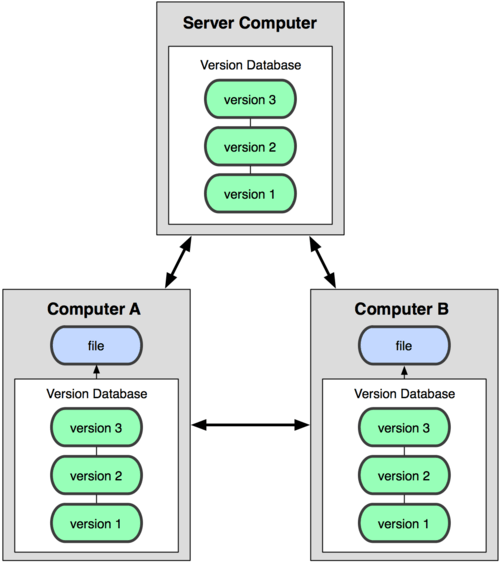
In a Distributed Version Control System (DVCS), every developer gets a full copy of the entire project history on their local machine. Instead of just checking out the latest version of files, they mirror the entire repository. This means you can commit changes, view history, and create branches without needing an internet connection or access to a central server.
Collaboration happens by syncing these local repositories with each other or with a common remote server. Because everyone has a complete backup, it's much more robust. If the main server crashes, any of the developer copies can be used to restore it. Git, the tool you'll be learning about, is a DVCS.
What is the primary problem that Version Control Systems (VCS) are designed to solve?
A key feature of a VCS is having a complete history of a project. This allows developers to revert the entire project to a previous, working state if a new change introduces a major bug.
Understanding these core concepts is the first step. Next, we'll dive into the specific tool that has become the industry standard for version control: Git.