Git and GitHub for Vibe Coders
Introduction to Version Control
What Is Version Control?
Have you ever saved a file as report_final.docx, only to create report_final_v2.docx and then report_REALLY_final.docx? It’s a common way to keep track of changes, but it quickly becomes confusing. Which one is the actual final version? What if you want to undo a change you made three versions ago?
Now imagine this problem, but with a team of ten people working on thousands of code files. It would be chaos. This is where version control comes in.
Version Control System
noun
A system that records changes to a file or set of files over time so that you can recall specific versions later. It's like a time machine for your project.
A Version Control System, or VCS, is software that helps you manage your project's history. Instead of saving dozens of copies of your files, you save one version at a time. The VCS keeps a complete history of every change, who made it, and why. This creates a single source of truth for the entire project.
Why It's Essential
Using a VCS isn't just about avoiding messy filenames. It’s fundamental to modern software development for a few key reasons.
First, it creates a complete project history. You can look back at any point in time to see what your project looked like. If a new change introduces a bug, you can easily compare versions to find the mistake or even revert the project to a previous, working state. It’s a safety net that lets you code with confidence.
Second, it makes teamwork possible. When multiple developers work on the same project, they often need to edit the same files. A VCS provides tools to merge everyone's changes together smoothly. It prevents people from accidentally overwriting each other's work and keeps the project organized.
A VCS allows a team to work concurrently on the same files, then intelligently merge their changes into a unified version.
Finally, version control supports experimentation through a feature called branching. Imagine you want to add a new feature, but you're not sure if it will work. Instead of risking the stable, main version of your project, you can create a separate "branch." This branch is a copy of your project where you can experiment freely. If the feature works out, you can merge your changes back into the main project. If it doesn't, you can simply delete the branch, leaving the original project untouched.
Types of Version Control
Not all version control systems work the same way. They generally fall into two categories: centralized and distributed.
A Centralized Version Control System (CVCS) uses a single central server that stores all the files and their history. Developers "check out" files from that central server to work on them. It's straightforward, but its main weakness is that central server. If the server goes down, nobody can collaborate or save their changes. Subversion (SVN) is a popular example of a CVCS.
A Distributed Version Control System (DVCS) is different. Instead of just one central repository, every developer has a full copy of the entire project history on their own computer. This means you can save changes, view history, and create branches even when you're offline.
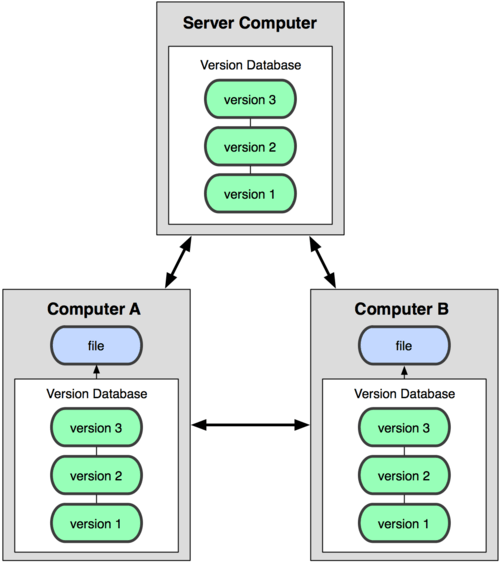
This distributed nature makes DVCSs more flexible and resilient. If the main server is unavailable, work can continue locally. Developers can also share changes directly with each other without needing a central hub. This is the model used by Git, which has become the most popular version control system in the world.
Git is a distributed version control system. It gives you the full history of a project, letting you work locally and offline.
Understanding these concepts is the first step. By tracking changes and enabling collaboration, version control systems like Git form the backbone of modern software development, helping teams build better software, faster.