Git and GitHub Essentials
Introduction to Version Control
The Project Time Machine
Imagine you're writing an important paper. You save the first draft as paper_v1.docx. You make some edits and save it as paper_v2.docx. Then, after feedback, you have paper_final.docx, followed quickly by paper_REALLY_final.docx and paper_final_I_swear_this_is_it.docx.
This gets messy fast. What if you want to see a change you made back in version two? Or what if multiple people are editing the document at once, emailing different versions back and forth? It's chaos.
Version control systems (VCS) solve this problem. A VCS is a tool that tracks changes to a file or set of files over time. It acts like a time machine for your project, allowing you to revert to previous versions, compare changes, and see who did what, and when. While it's essential for software development, it can be used for any kind of digital project.
Version control is the lab notebook of the digital world: it’s what professionals use to keep track of what they’ve done and to collaborate with other people.
Why It's Essential
Using a version control system provides a few huge advantages.
First, it creates a complete history. Every change is saved as a snapshot, along with a note about what was changed and who changed it. This log makes it easy to understand how a project has evolved and helps track down when a bug might have been introduced.
Second, it's a safety net. If you make a mistake that breaks everything, you can simply rewind to a previous, working state. This freedom from fear encourages experimentation. You can try out a new idea without worrying about permanently messing up your project. If the idea doesn't work, you can discard the changes easily.
Finally, and perhaps most importantly, version control is the foundation for collaboration. It provides a structured way for multiple people to work on the same project simultaneously. The system helps manage and merge contributions from different team members, preventing people from accidentally overwriting each other's work.
Two Flavors of Control
Version control systems generally come in two types: centralized and distributed.
Centralized Version Control Systems (CVCS) are built around a single, central server that stores all the files and their history. To work on the project, you "check out" the files from that server. When you're done, you "check in" your changes. Think of it like a library's reference section: there's only one copy of the book, and you have to go there to read it.
This model is straightforward, but it has a major weakness: that central server is a single point of failure. If the server goes down, nobody can save their changes or collaborate.
Distributed Version Control Systems (DVCS) solve this problem. In a distributed system, every person working on the project has a full copy of the entire project and its history on their own computer. They don't just check out the latest version of the files; they mirror the entire repository.
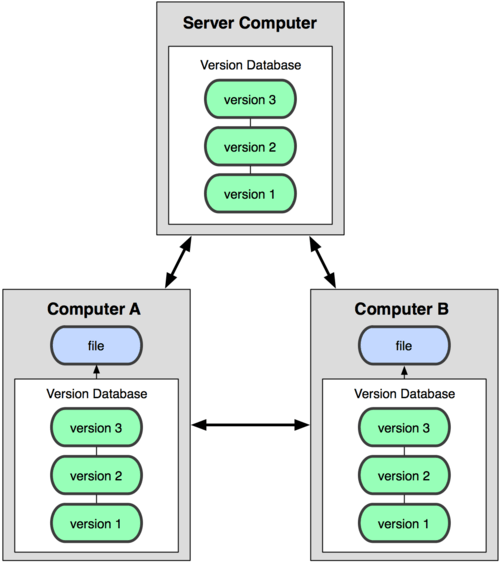
This means you can work completely offline, saving changes to your local copy. When you're ready, you can sync your changes with a shared server or directly with other developers. If the main server goes down, work can continue, and any developer's copy can be used to restore the project. This is the model used by modern systems like Git, which we'll be focusing on.
Now that you understand the what and why, let's test your knowledge.
What is the primary problem that a Version Control System (VCS) is designed to solve?
What is the main advantage of a Distributed Version Control System (DVCS) like Git over a centralized one?
Understanding these core concepts is the first step. Next, we'll look at how to put them into practice.