Git and Gerrit Workflows
Gerrit Architecture
Gerrit's Role as Gatekeeper
In a standard Git workflow, you might push your local changes directly to a branch on a central server. This works, but it can be like merging onto a highway without a yield sign. Gerrit inserts itself as a traffic controller between you and the main project history.
Instead of pushing to a branch like main or develop, you push your commit to a special, virtual destination within Gerrit. This destination acts as a staging area. Your code doesn't become part of the official project history yet. First, it must be reviewed, tested, and explicitly approved.
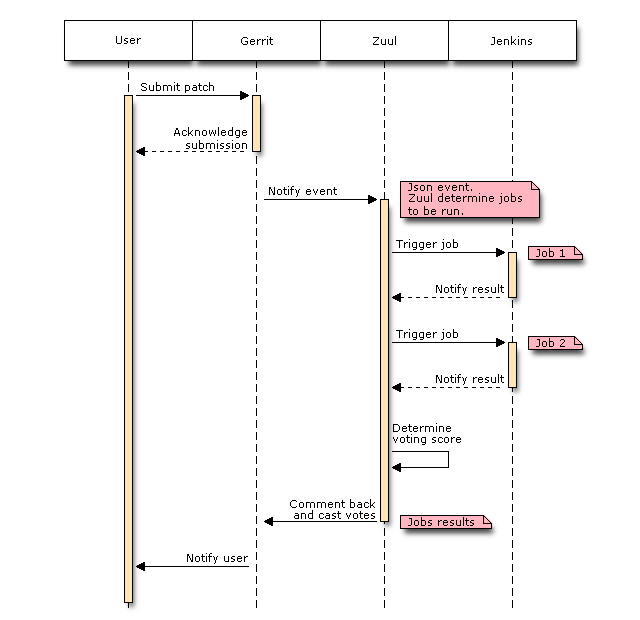
This makes Gerrit an essential component in many enterprise CI/CD pipelines, where code quality and stability are critical. It ensures that every change is vetted before it's integrated, preventing broken code from ever reaching the authoritative repository.
The Magic Namespace
So how do you push code to this staging area? You use a special destination known as a "magic" namespace: refs/for/<branch_name>. When you push to this target, you aren't creating a new branch. Instead, you are submitting your commit for review.
# Instead of this:
# git push origin my-feature

# You do this:
git push origin HEAD:refs/for/main
The HEAD:refs/for/main part tells Git to take the commit at the tip of your current branch (HEAD) and push it to Gerrit's review queue for the main branch. Gerrit intercepts this push, creates a new review item called a "change," and assigns it a unique ID. Your code is now considered 'pushed,' but not yet 'integrated.' It exists only within Gerrit's review system.
Gerrit stores all the metadata about this change—like the author, the reviewers, comments, and verification scores from automated tests—in an internal database. This is typically a lightweight [{
] for smaller setups or a more robust system like MySQL or PostgreSQL for larger installations. This database is the source of truth for all ongoing reviews, completely separate from the Git repository's own history.
From Pushed to Merged
The lifecycle of a commit in a Gerrit-managed workflow is a clear, multi-step process. It ensures every change is properly vetted before becoming a permanent part of the project.
Once a change is pushed, it's visible in Gerrit's web interface. Here, team members can view the diff, leave inline comments, and score the change. Automated build systems also chime in, reporting whether the change passes tests. A change needs a certain score from both humans and bots before it can be submitted.
Only when a change receives the necessary approvals does a project maintainer click the 'Submit' button. At this point, Gerrit performs the final step: it merges the commit into the target branch of the actual, authoritative Git repository. The change is now officially integrated.
This gatekeeper model provides a powerful safety net. It creates a formal, auditable history of every review and ensures that the central repository remains stable and high-quality. For large teams working on complex software, this structured workflow is not just a feature; it's a necessity.