Future of GPU and ARM CPU Integration
Introduction to System Architecture
The Computer's Core Team
Think of a computer not as a single object, but as a team of specialists working together. Each member has a distinct role, and the team's performance depends on how well they cooperate. The four key players are the CPU, the GPU, memory, and storage.
At the heart of it all is a simple goal: to take in information, process it, and produce a result.
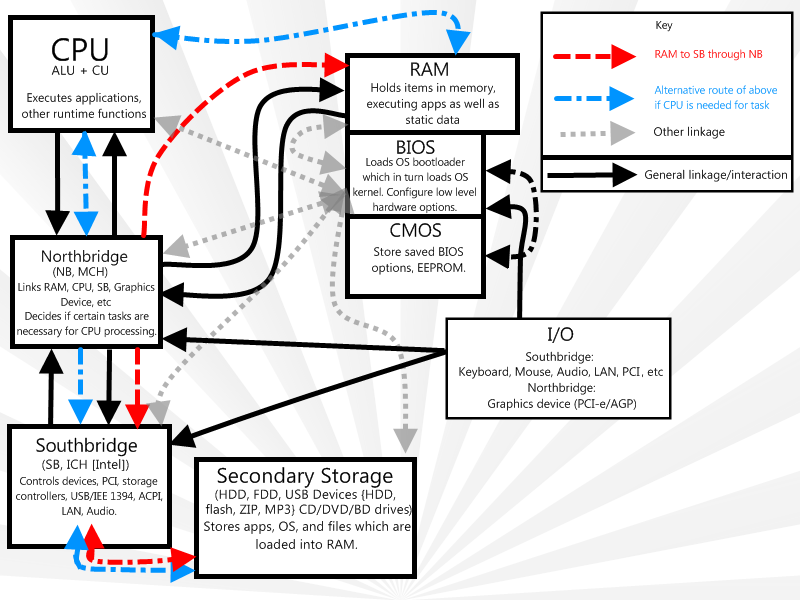
Let’s meet the team.
CPU
noun
The Central Processing Unit. It's the primary component of a computer that executes instructions and performs most of the processing.
The CPU is the brain of the operation. It's a generalist that handles a vast range of tasks, from opening a file to running your web browser. It processes instructions one after another, very, very quickly. Think of it as a master chef in a kitchen, meticulously following a complex recipe step-by-step to create a perfect dish. It can do almost anything, but it focuses on one main task at a time.
GPU
noun
The Graphics Processing Unit. A specialized processor designed to rapidly manipulate and alter memory to accelerate the creation of images in a frame buffer intended for output to a display device.
The GPU is the specialist. Originally designed just for handling graphics, its role has expanded dramatically. A GPU is built for parallel processing. It can tackle thousands of small, similar tasks all at once. Instead of one master chef, imagine an army of kitchen hands all chopping carrots simultaneously. For tasks that can be broken down into many simple, repetitive steps, like rendering a video or training an AI model, the GPU is far more efficient than the CPU.
Memory and Storage
The CPU and GPU are the thinkers, but they need a place to work and a place to store their tools. This is where memory and storage come in.
Memory, or RAM (Random Access Memory), is the computer's workbench. It's a temporary, high-speed space where the CPU and GPU keep the data and instructions they are actively using. When you open an application, it gets loaded from storage into RAM for quick access. The key thing about RAM is that it's volatile, meaning its contents disappear when the computer is turned off. It's a workspace, not a filing cabinet.
Storage (like a Solid-State Drive or Hard Disk Drive) is the filing cabinet. It’s where your operating system, applications, and personal files are kept for the long term. It's much slower than RAM, but it's non-volatile, so your data stays put even without power.
| Component | Analogy | Key Trait |
|---|---|---|
| RAM (Memory) | Workbench | Fast, temporary, volatile |
| Storage (SSD/HDD) | Filing Cabinet | Slower, permanent, non-volatile |
How They All Connect
For this team to function, its members need to communicate. They can't just shout across the room. Instead, they use a network of electronic pathways on the computer's main circuit board, the motherboard. These pathways are called buses.
Think of a system bus as the main highway inside your computer. Data travels along this highway between the CPU, GPU, memory, and storage. Just like a real highway, it has a certain width (bandwidth) that determines how much traffic it can handle at once, and a speed limit that determines how fast that traffic can move.
Specialized, high-speed connections, called interconnects, also exist for components that need to talk to each other very quickly, like the connection between a CPU and its RAM. These are like private express lanes, bypassing the main highway for faster, more direct communication.
The efficiency of these connections is crucial. A super-fast CPU is useless if it's constantly waiting for data to arrive from slow storage or a congested bus.
Now let's check your understanding of these core components.
Which component is best described as the 'brain' of the computer, designed to handle a wide variety of tasks by processing instructions one after another?
A task involves rendering a complex 3D video, which requires performing thousands of similar calculations at the same time. Which component is best suited for this job?
Understanding how these fundamental pieces fit together is the first step in exploring more complex system designs.