Full-Stack Web Development Refresher
Networking Basics
How the Web Connects
When you build a web application, you're not just writing code that runs on a single machine. You're creating something that communicates across a vast network: the internet. To build robust applications, you need to understand the fundamental rules that govern this communication.
Think of it like building a house. You don't need to be an expert in city planning, but you do need to know how your house will connect to water, electricity, and roads. In web development, networking is the infrastructure that connects your application to its users.
Models for Communication
To manage the complexity of network communication, engineers created layered models. These models break down the entire process into smaller, manageable tasks. The two most common are the OSI model and the TCP/IP model. While the OSI model is a comprehensive, seven-layer theoretical framework, the TCP/IP model is a more practical, four-layer model that the modern internet is built upon. For a web developer, TCP/IP is the one that matters most.
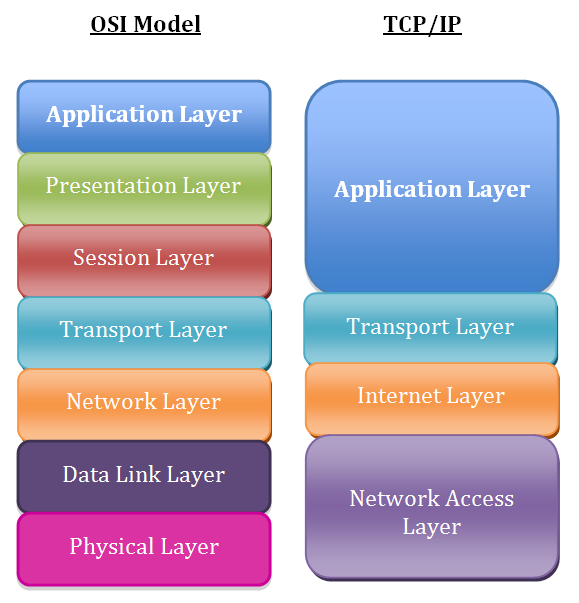
Here’s a quick look at the four layers of the TCP/IP model:
- Application Layer: This is where your web browser and applications live. It's concerned with application-specific protocols like HTTP for browsing, SMTP for email, and FTP for file transfers.
- Transport Layer: This layer ensures data packets are sent and received reliably and in the correct order. The two main protocols here are TCP (Transmission Control Protocol), which is reliable and connection-oriented, and UDP (User Datagram Protocol), which is faster but less reliable.
- Internet Layer: This layer is responsible for addressing and routing packets to their destination across different networks. This is where the Internet Protocol (IP) operates, assigning unique addresses to devices.
- Link Layer: Also known as the Network Interface layer, this is the physical layer that deals with the hardware of sending and receiving data, like Ethernet cables, Wi-Fi, and network interface cards.
Each layer handles its specific job and then passes the data to the next layer, like a package moving down an assembly line. This separation makes the system modular and easier to manage.
Addresses and Names
Every device connected to the internet needs a unique address, just like every house needs a mailing address. This is its IP (Internet Protocol) address. It's a series of numbers that identifies the device on a network. You've probably seen one like 192.168.1.1 (an IPv4 address). A newer format, IPv6, was created to provide a vastly larger number of addresses for the growing internet.
Subnetting
verb
The practice of dividing a single, large network into smaller, more manageable sub-networks, or subnets. This helps reduce network traffic and improve performance.
Remembering long strings of numbers is hard for humans. That's where the Domain Name System (DNS) comes in. DNS is essentially the phonebook of the internet. It translates human-friendly domain names, like www.example.com, into machine-readable IP addresses that computers use to find each other.
Without DNS, we'd have to memorize IP addresses for every website we wanted to visit. It's a critical, yet often invisible, part of how the internet works.
Web Protocols and Gatekeepers
Once your browser knows the server's IP address, it uses the Hypertext Transfer Protocol (HTTP) to request the web page. HTTP is the foundation of data communication for the World Wide Web. It's a request-response protocol: the client (your browser) sends an HTTP request, and the server sends back an HTTP response, which might contain the HTML, CSS, and JavaScript for the page.
You've likely noticed that many URLs start with https instead of http. The 'S' stands for Secure. HTTPS is the encrypted version of HTTP. It uses a protocol called TLS (Transport Layer Security) to scramble the data sent between your browser and the server. This prevents attackers from snooping on sensitive information like passwords or credit card numbers.
Two other key components in a web application's architecture are firewalls and load balancers.
A firewall acts as a security guard for a network. It monitors incoming and outgoing traffic and decides whether to allow or block it based on a set of security rules. This is a first line of defense against malicious attacks.
A load balancer is like a traffic cop for a busy website. If a site gets too many visitors, a single server can get overwhelmed. A load balancer distributes incoming network traffic across multiple servers. This ensures no single server bears too much of the load, improving response times and increasing the reliability of the application.
Understanding these networking fundamentals is crucial. They affect your application's performance, security, and scalability. As a full-stack developer, knowing how the pieces connect will help you build better, more resilient web applications.
Time to check your understanding of these core networking concepts.
Which layer of the TCP/IP model is responsible for routing data packets across different networks using IP addresses?
The Domain Name System (DNS) serves a function most similar to which of the following?