Full-Stack Web Application Development
Modern Frontend Architecture
From Components to Careers
You’ve learned to build components, manage state, and style layouts. That’s the core of frontend development. But building a single-page app for a portfolio is different from contributing to a large, evolving application with a team of developers. The jump requires a new way of thinking: architectural thinking.
Frontend architecture is about creating a structure for your application that is scalable, maintainable, and easy for multiple people to work on simultaneously. It’s less about the code you write and more about how you organize it. Let’s start with the most common way projects have been traditionally organized.
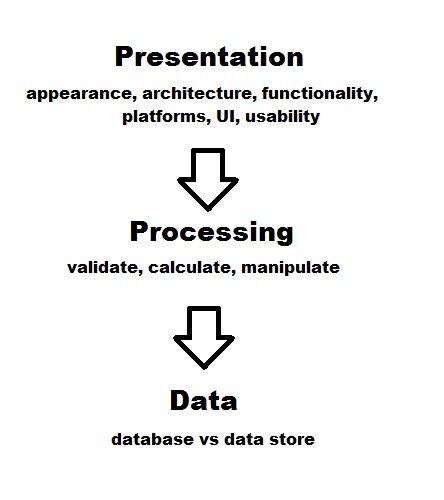
This is a layered, or horizontal, architecture. On the frontend, this often looks like organizing your code by its technical type. You have a folder for all your components, another for all your state management logic (like Redux or Pinia stores), another for API calls, and so on. It seems logical at first, like organizing a toolbox. Screwdrivers go in one drawer, wrenches in another.
src/
├── api/         # All API calls
│   ├── usersApi.js
│   └── productsApi.js
├── components/  # All components
│   ├── UserProfile.jsx
│   ├── ProductList.jsx
│   └── Button.jsx
├── store/       # All state logic
│   ├── userStore.js
│   └── productStore.js
The problem arises when you need to change a feature. To update the user profile, you might have to jump between usersApi.js, UserProfile.jsx, and userStore.js. Each file is in a different corner of your project. For a small app, this is a minor annoyance. For a large application with hundreds of components, it becomes a significant drag on productivity. Every change requires navigating a complex web of dependencies spread across the entire codebase.
Thinking in Slices
Modern frontend development has embraced an alternative: Vertical Slice Architecture . Instead of grouping files by technical type, you group them by feature. A feature is a distinct piece of user-facing functionality, like 'user authentication' or 'product search'.
All the code related to a single feature—components, state, API calls, tests—lives together in the same folder. This is called high cohesion. When you need to work on the user profile, everything you need is in one place.
src/
├── features/
│   ├── authentication/
│   │   ├── LoginButton.jsx
│   │   ├── authSlice.js
│   │   └── authApi.js
│   ├── productSearch/
│   │   ├── SearchBar.jsx
│   │   ├── searchSlice.js
│   │   └── searchApi.js
├── lib/            # Shared libraries, helpers
├── components/ui/  # Truly generic, shared components
│   └── Button.jsx
Notice there's still a shared components/ui folder. This is for truly generic, reusable components like buttons, modals, or input fields that have no business logic tied to them. The key is that they are purely presentational. The LoginButton in the authentication feature might use the generic Button, but it contains the logic for what happens when you click it.
Logic Where It Belongs
This leads to another crucial concept: separating business logic from view logic.
- View Logic is about how things look. Is a button blue? Does a menu slide in from the left? This belongs in your components.
- Business Logic is about what your application does. What happens when a user submits a form? How do you calculate the total price in a shopping cart? This is the core functionality of your app.
In a well-architected app, your components should be as “dumb” as possible. They should focus on displaying data and emitting events when a user interacts with them. The heavy lifting of the business logic should be handled elsewhere, often in custom hooks (in React) or composables (in Vue), which can then be tested in isolation without needing to render a UI. This concept is a cornerstone of Clean Architecture , an approach that prioritizes the separation of concerns to keep the core business rules independent of the framework or UI.
| Client Model | Where Business Logic Lives | Pros | Cons |
|---|---|---|---|
| Thick Client | Mostly on the client (browser) | Rich, responsive UI; works offline. | Complex state management; logic duplication. |
| Thin Client | Mostly on the server | Simpler client code; single source of truth. | Slower UI; high server load. |
Modern frameworks like React and Vue enable a thick client model. They allow you to build complex, stateful applications that feel fast because much of the business logic runs directly in the user's browser. The server becomes more of a data provider via an API. The challenge with a thick client is managing this complexity. Patterns like Vertical Slices and separating business logic from view logic are the tools we use to tame that complexity and build applications that can grow and adapt over time.
By structuring your projects around features and being disciplined about where you put your logic, you're not just organizing files. You're building a foundation that allows your team to build faster, onboard new developers more easily, and maintain the application for years to come.
What is the primary goal of adopting a formal frontend architecture?
In a large application, what is the main problem with a traditional layered (or horizontal) architecture where code is grouped by technical type (e.g., a single components folder, a single api folder)?