Frontend Engineering Fundamentals
Introduction to HTML
The Skeleton of the Web
Every website you visit, from a simple blog to a complex online store, is built on a foundational language called HTML. Think of HTML as the skeleton of a webpage. It provides the essential structure that holds everything together, telling the browser where to put headings, paragraphs, images, and links.
HTML (HyperText Markup Language) is the foundation of web development.
HTML stands for HyperText Markup Language. It's not a programming language that performs logic, but a markup language. It uses tags to describe the different parts of a page. Let's look at how these parts fit together to create a complete document.
Anatomy of a Page
Every HTML document follows a standard structure. It starts with a declaration, <!DOCTYPE html>, which tells the browser it's an HTML5 document. The entire content is then wrapped in <html> tags.
Inside, you'll find two main sections: the <head> and the <body>.
- The
<head>contains meta-information that isn't displayed on the page itself. This includes the page title (which appears in the browser tab), links to stylesheets (which we'll cover later), and other data for search engines. - The
<body>contains all the content you actually see on the page: text, images, videos, and links.
<!DOCTYPE html>
<html>
  <head>
    <title>My First Web Page</title>
  </head>
  <body>
    <h1>Hello, World!</h1>
    <p>This is my first paragraph.</p>
  </body>
</html>
The code above shows a basic but complete HTML page. The pieces inside the angle brackets, like <h1> and <p>, are called tags. Most tags come in pairs: an opening tag (<p>) and a closing tag (</p>). The content goes between them. These complete units are called elements.

Here are some of the most common tags you'll use to structure your content:
<h1>to<h6>: Headings, with<h1>being the most important.<p>: Paragraphs for regular text.<a>: Anchor tags for creating hyperlinks.<img>: For embedding images.<ul>,<ol>, and<li>: For creating unordered (bulleted) and ordered (numbered) lists, with<li>for each list item.<div>and<span>: Generic containers for grouping content.<div>is a block-level element (it takes up the full width available), while<span>is an inline element (it only takes up as much width as necessary).
Meaningful Structure
While you could build a whole website using only <div> and <span> tags, it's not a good idea. Using tags that accurately describe their content is called writing semantic HTML. This practice is crucial for two main reasons: accessibility and SEO (Search Engine Optimization).
Semantic HTML uses tags that convey the meaning of the information they contain, not just how they look. For example, using
<nav>for navigation links is more meaningful than using a generic<div>.
Screen readers, which are used by visually impaired people, rely on semantic tags to understand and navigate a page's structure. Search engines also use this structure to better index your content, which can improve your site's ranking in search results.
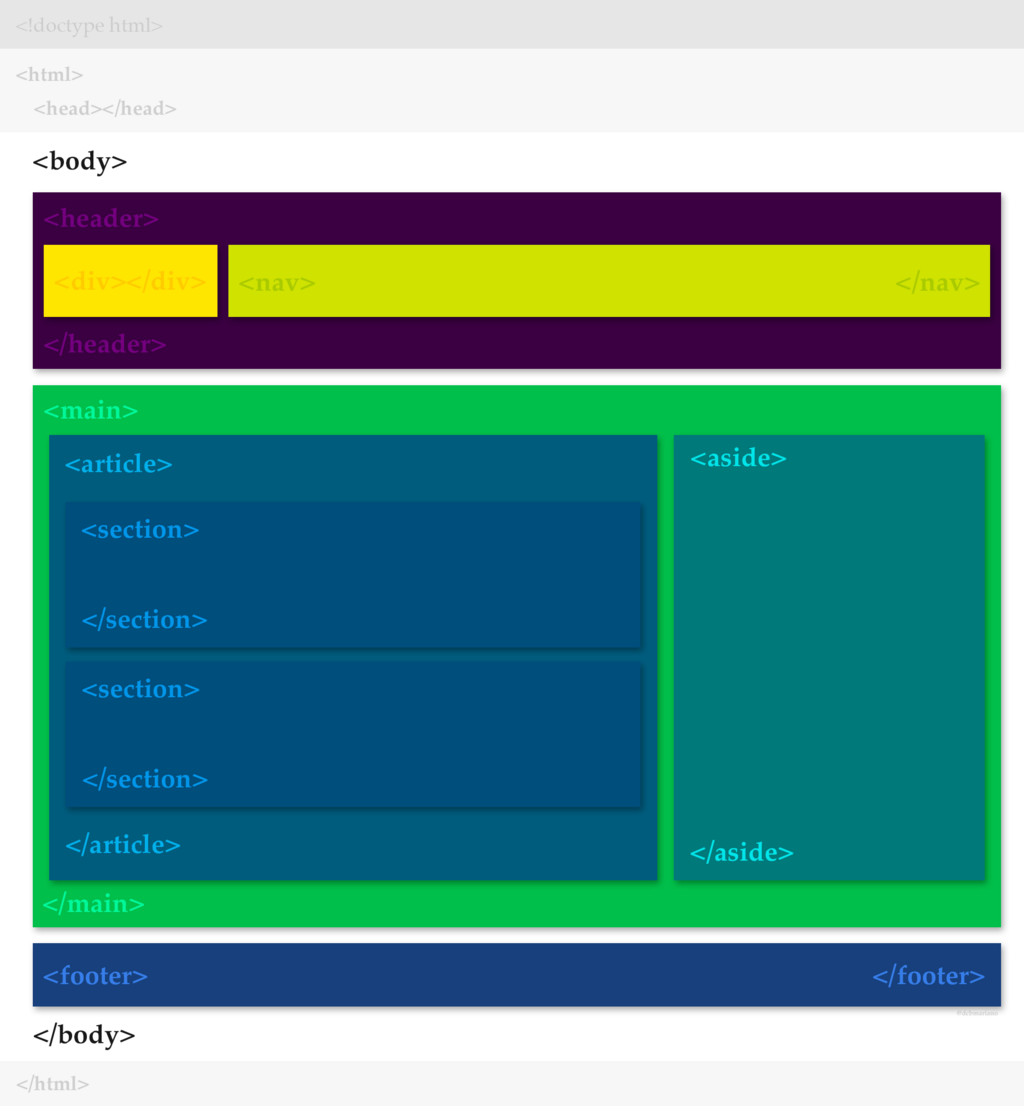
Here are some key semantic tags introduced in HTML5:
<header>: For introductory content or navigation links at the top of a page or section.<footer>: For content at the bottom, like copyright information or contact details.<nav>: For major navigation blocks.<main>: For the primary, unique content of the page.<article>: For self-contained content, like a blog post or news story.<section>: For grouping related content together.<aside>: For content that is tangentially related to the main content, like a sidebar.
Semantic HTML is the use of HTML tags that clearly define the purpose of the content they enclose to make your website code more understandable for both developers and search engines.
Getting User Input
HTML also allows you to collect information from users through forms. Forms are essential for things like contact pages, login screens, and search bars. The <form> element acts as a container for different types of input fields.
<form action="/submit-form" method="post">

  <label for="name">Name:</label>
  <input type="text" id="name" name="user_name">

  <label for="mail">E-mail:</label>
  <input type="email" id="mail" name="user_email">

  <label for="msg">Message:</label>
  <textarea id="msg" name="user_message"></textarea>

  <button type="submit">Send Message</button>

</form>
In this example, the <label> element describes the purpose of an input field, which improves accessibility. The <input> element is very versatile; its type attribute can be set to text, email, password, checkbox, radio, and many others to create different kinds of controls. The <textarea> element provides a multi-line text box, and the <button> creates a clickable button to submit the form.
Ready to test your knowledge? Let's see what you've learned about HTML fundamentals.
What is the primary purpose of HTML?
Every HTML document has two main sections inside the <html> tag. What are they?
You now have the foundational knowledge to structure any webpage. By using common elements and focusing on semantic markup, you can create clean, accessible, and well-organized HTML documents. This is the first and most important step in building for the web.