From Code to Action: How Computer Chips Work
Introduction to Computer Architecture
Inside the Machine
At its heart, a computer is a system of parts working together. It takes in information, thinks about it, and then produces a result. To understand how it all works, we need to look at the three main players: the processor, the memory, and the devices that let us interact with it.

Think of it like cooking. You have ingredients (input), a chef who follows a recipe to transform them (the processor), a countertop to hold ingredients you're currently using (memory), and a finished meal (output). Let's start with the chef.
The Brain of the Operation
CPU
noun
Stands for Central Processing Unit. It's the primary component of a computer that executes instructions.
The Central Processing Unit, or CPU, is the computer's brain. It's a small chip that carries out the commands from a computer program. Every click, every keypress, every calculation is handled by the CPU. It's incredibly fast, performing billions of operations per second. The CPU itself has two main parts that do the heavy lifting.
- Arithmetic Logic Unit (ALU): This is the calculator of the CPU. It performs all mathematical calculations (like addition and subtraction) and logical operations (like AND, OR, and NOT).
- Control Unit (CU): This is the traffic cop. It directs the flow of data inside the CPU, telling the ALU and other components what to do and when to do it by following the instructions in a program.
Together, these two parts fetch instructions from memory, decode what they mean, execute the command, and move on to the next one. But for the CPU to work its magic, it needs a place to hold the instructions and the data it's working on.
A Place for Everything
A computer's memory isn't just one single thing. It's a layered system, often called a hierarchy. The rule is simple: the closer the memory is to the CPU, the faster (and smaller) it is. The farther away it gets, the slower (and larger) it becomes.
Let's break down the layers, from fastest to slowest.
Registers: These are tiny, lightning-fast storage areas located directly on the CPU chip. They hold the specific piece of data or the instruction that the CPU is working on at this very instant.
Cache: This is a small amount of super-fast memory that also lives on or very close to the CPU. It acts as a buffer between the speedy CPU and the much slower main memory. The cache stores frequently used data and instructions so the CPU doesn't have to wait for them to arrive from farther away.
RAM (Random Access Memory): This is your computer's main workspace. When you open a program or a file, it gets loaded from your storage drive into RAM. It's much larger than the cache but also slower. RAM is volatile, which means it forgets everything when the power is turned off.
Storage: This is your hard drive or solid-state drive (SSD). It's where your files, applications, and operating system are kept permanently. It's the largest and slowest level of the memory hierarchy.
Communicating with the World
The CPU and memory are useless if they can't communicate with the outside world. That's where input and output (I/O) devices come in. Input devices get data into the computer, and output devices get data out.
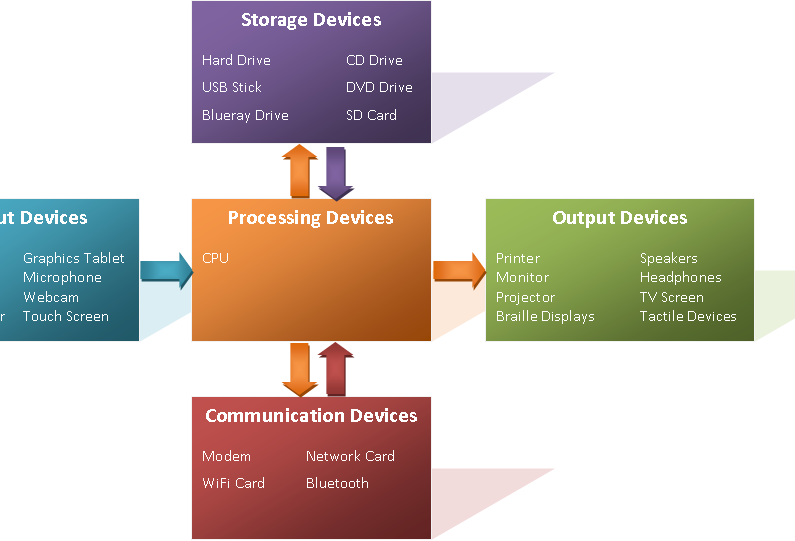
Common input devices include your keyboard, mouse, microphone, and webcam. They translate your actions and the world around you into digital information the computer can understand.
Output devices do the reverse. They take digital information and turn it into something you can see or hear, like a monitor displaying an image, speakers playing music, or a printer creating a document.
So how do all these separate parts—the CPU, memory, and I/O devices—talk to each other? They use a system of electrical pathways called buses. You can think of buses as the highways of the computer, carrying data and control signals from one component to another, ensuring everything works together as a cohesive system.
In the analogy of a computer being like a kitchen, what component acts as the 'chef' that follows the recipe and transforms the ingredients?
Which of the following memory types is the fastest and located directly on the CPU chip?