Foundations of Web Development
Introduction to HTML
The Skeleton of the Web
Every website you visit, from a simple blog to a complex news site, is built on a foundation of HTML. Think of HTML as the skeleton of a webpage. It provides the fundamental structure, defining all the different parts like headings, paragraphs, and images. Without it, a webpage would just be a jumble of text and pictures with no organization.
HTML (Hypertext Markup Language) defines the structure and contents of a web page – where things go, how they are laid out, and what’s on the page
HTML uses a system of tags to mark up the content. These tags tell the web browser—like Chrome, Firefox, or Safari—how to display the information. For example, a tag might tell the browser, "This line of text is a main heading," or "This word should be a clickable link." It's the universal language that all browsers understand to render a page correctly.
Anatomy of an HTML Page
An HTML document has a standard structure that acts as a blueprint. This structure ensures that browsers can interpret and display the content consistently. It starts with a document type declaration and is followed by the core elements that make up every page.
<!DOCTYPE html>
<html>
  <head>
    <title>My First Web Page</title>
  </head>
  <body>
    <h1>Hello, World!</h1>
    <p>This is my very first paragraph on my new page.</p>
  </body>
</html>
Let's break down this basic template:
<!DOCTYPE html>: This is the very first thing in your document. It's not an HTML tag but an instruction that tells the browser the page is written in HTML5, the modern standard.<html>...</html>: This is the root element that wraps all the content on the entire page. All other elements are nested inside it.<head>...</html>: This section contains meta-information about the page that isn't displayed directly on the page itself. This includes things like the page title, links to stylesheets (which we'll ignore for now), and other metadata for search engines.<title>...</html>: The title of the page, which appears in the browser tab or window title bar.<body>...</body>: This is where all the visible content goes—the headings, paragraphs, images, and links that you see on the website.
Common Building Blocks
Once you have the basic structure, you can start adding content using various tags. These tags are like building blocks that let you organize your text and media.
Headings and Paragraphs
Headings are used to structure your page content hierarchically. There are six levels of headings, from <h1> (the most important) to <h6> (the least important). Search engines use these headings to understand the structure and importance of your content. The main text of your page is placed in paragraph tags, <p>.
<h1>This is the main heading</h1>
<h2>This is a subheading</h2>
<p>This is a paragraph of text. It contains sentences that form the body of the content.</p>
<p>This is another paragraph. Browsers automatically add some space between paragraphs.</p>

Lists
HTML supports two main types of lists: unordered (bullet points) and ordered (numbered). Unordered lists use the <ul> tag, and ordered lists use <ol>. Inside both, each list item is defined with an <li> tag.
<!-- An unordered list -->
<ul>
  <li>Apples</li>
  <li>Oranges</li>
  <li>Bananas</li>
</ul>

<!-- An ordered list -->
<ol>
  <li>First, open the box.</li>
  <li>Second, read the instructions.</li>
  <li>Third, assemble the product.</li>
</ol>
Links
The web is built on links. The anchor tag, <a>, creates a hyperlink to other web pages, files, or locations within the same page. The href attribute specifies the link's destination.
<a href="https://www.wikipedia.org">Visit Wikipedia</a>
Images
To embed an image, you use the <img> tag. This is a self-closing tag, meaning it doesn't need a separate closing tag. It requires two main attributes: src (the path to the image) and alt (alternative text for screen readers or if the image fails to load).
<img src="images/cute_cat.jpg" alt="A fluffy kitten sleeping on a rug">
Making Meaning with Semantics
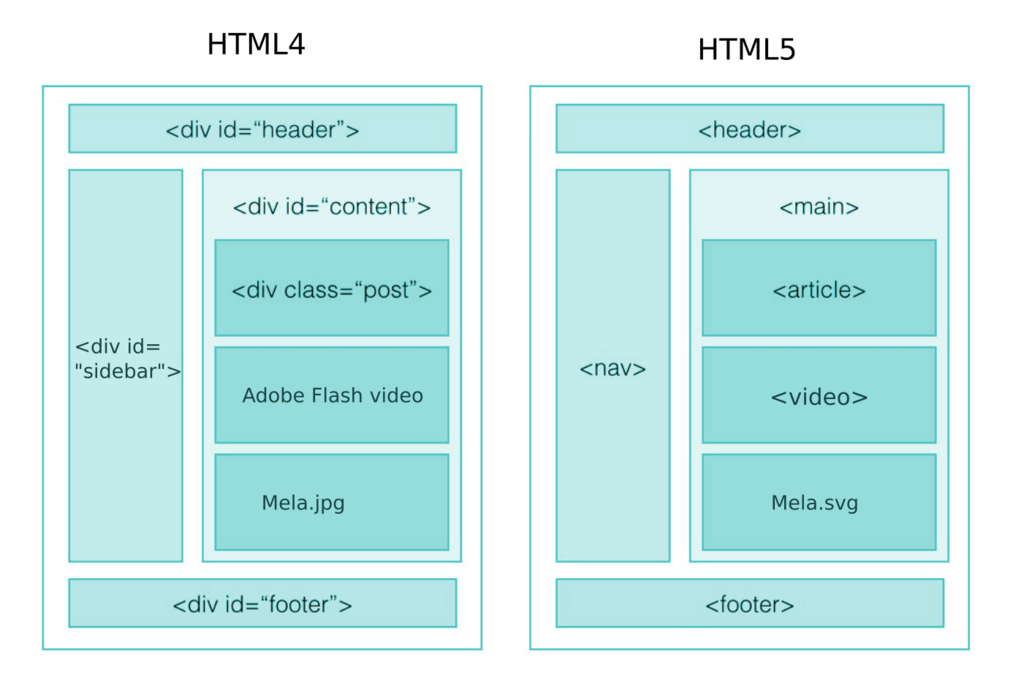
In the early days of the web, developers often used generic <div> tags to group content. Modern HTML encourages the use of semantic tags—tags that describe their meaning and purpose. This makes the code easier to read for both developers and machines, like search engines and screen readers for visually impaired users.
| Semantic Tag | Purpose |
|---|---|
<header> | Introductory content for a section or the whole page. |
<nav> | Contains navigation links. |
<main> | The main, unique content of the page. |
<article> | A self-contained piece of content (e.g., a blog post). |
<section> | A thematic grouping of content. |
<aside> | Content tangentially related to the main content (e.g., a sidebar). |
<footer> | The footer of a section or the page, containing info like copyright. |
Using these tags gives your content a clear, logical structure. A browser will display a page made with <div>s and a page made with semantic tags almost identically by default. The real power is in the meaning they provide, which is crucial for accessibility and search engine optimization (SEO).
Semantic HTML is an invaluable tool for creating well-structured, accessible, and SEO-friendly web pages.
Time to test what you've learned.
What is the primary function of HTML?
All the visible content of a webpage, such as headings, paragraphs, and images, should be placed inside which pair of tags?
With these fundamental building blocks, you now have the tools to structure any web content. The key is to choose the right tag for the job to create pages that are both readable and meaningful.