Foundations of UX Design
Introduction to UX Design
What is User Experience?
User Experience (UX) design is the process of making a product or service useful, easy to use, and enjoyable for people. It’s not just about how something looks; it’s about how it feels to interact with it.
Think about building a house. UX is the architectural plan. It decides the layout of the rooms, the flow of movement from the kitchen to the living room, and whether the light switches are in logical places. It’s about creating a space that is functional and comfortable to live in. The goal is to design an experience that feels intuitive and meets the resident's needs without them even thinking about it.
User experience (UX) encompasses every interaction a user has with your digital product—from the first click to the final transaction.
In the digital world, this means ensuring an app, website, or software is easy to navigate, efficient to use, and solves a real problem for the user. A great UX is often invisible; you only notice it when it’s bad, like when you can't find the 'checkout' button on a shopping site or get lost in a confusing menu.
UX vs. UI
People often use the terms UX and User Interface (UI) interchangeably, but they are distinct fields. While they work closely together, they focus on different aspects of the design process.
If UX is the architectural blueprint of the house, UI is the interior design. UI design covers all the visual and interactive elements—the color of the walls, the style of the furniture, the shape of the doorknobs. It’s about the look and feel of the product.
A product can have a beautiful UI but a terrible UX. Imagine a stunningly designed app (great UI) that is impossible to navigate (awful UX). On the other hand, a highly functional product with a clunky, outdated interface won't be pleasant to use.
Effective products need both. Here’s a quick breakdown:
| User Experience (UX) | User Interface (UI) | |
|---|---|---|
| Focus | The entire journey and overall feel | Visuals and interactive elements |
| Goal | Make the product useful and usable | Make the product beautiful and intuitive |
| Concerns | User research, information architecture, flow | Colors, typography, buttons, layouts |
| Analogy | The blueprint of a house | The interior decoration |
Putting the User First
The single most important principle in UX is user-centered design. This philosophy places the user at the heart of every decision. Instead of building what we think users want, we find out what they actually need.
This involves a few key practices:
Empathy: Understanding the user's motivations, pain points, and context. Who are they, and what problem are they trying to solve?
Usability: Ensuring the product is easy to learn and efficient to use. Can a new user figure it out quickly? Are there unnecessary steps?
Accessibility: Designing products that can be used by people with a wide range of abilities, including those with visual, auditory, or motor impairments.
Iteration: Design is a process, not a single event. It involves creating prototypes, testing them with real users, gathering feedback, and making improvements. This cycle repeats until the experience is smooth.
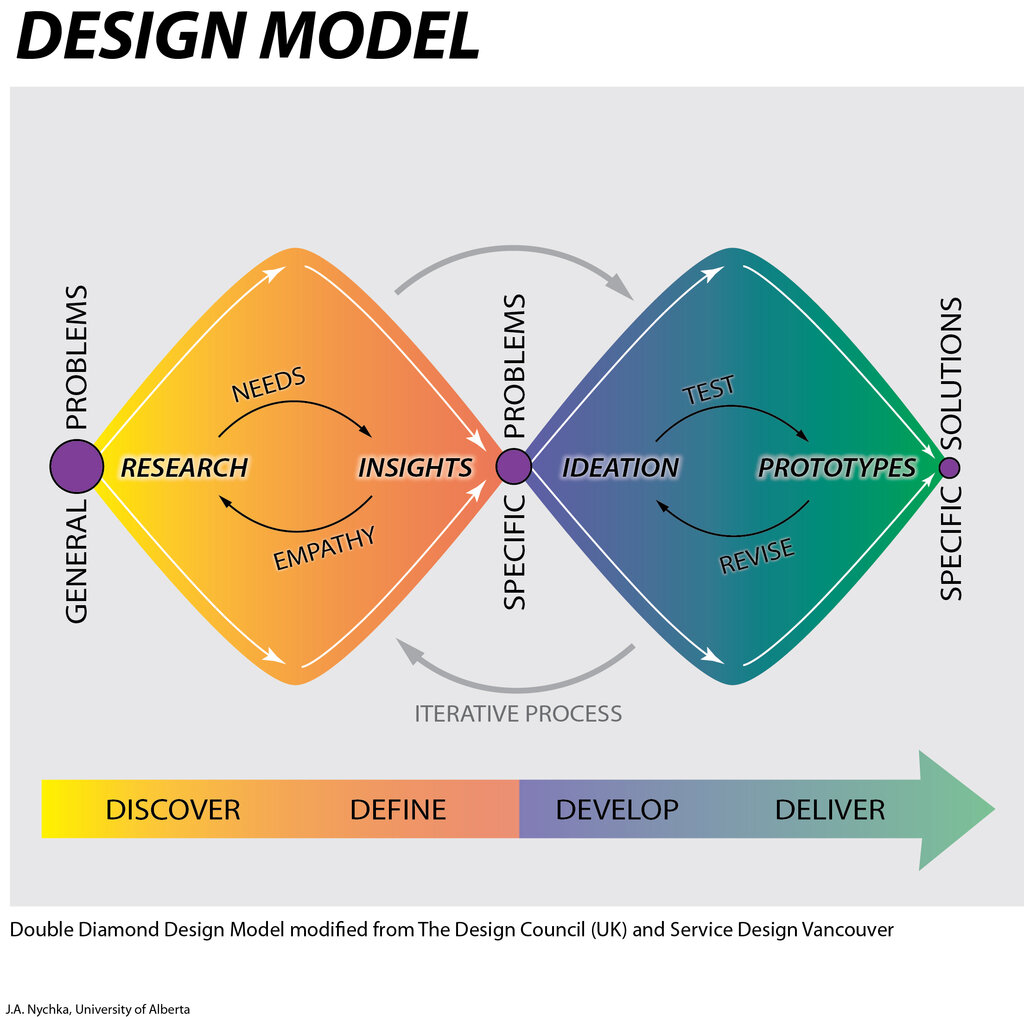
By focusing on the user, businesses create products that people genuinely want to use. This leads to higher customer satisfaction, better engagement, and greater loyalty. When you make life easier for your users, they'll stick around.
Ready to check your understanding?
What is the primary goal of User Experience (UX) design?
Using the analogy of building a house, what does User Interface (UI) design represent?
That's a wrap on the basics of UX design. The key takeaway is that great design is always about the human on the other side of the screen.