Foundations of Computing
Introduction to Computing
What is a Computer?
At its heart, a computer is a machine that follows instructions. It takes information in, processes it based on a set of rules, and then produces a result. Think of it as an incredibly fast and obedient assistant. You give it a task (the input), it performs the necessary steps (the processing), and then it gives you the finished work (the output).
This simple process is the foundation of everything computers do, from sending an email to playing a video game or even guiding a spacecraft. The instructions can be simple, like adding two numbers, or extraordinarily complex, like recognizing a face in a photo. The computer's power comes from its ability to execute billions of these instructions every second, perfectly and without complaint.

The Core Components
Every computer, from a massive supercomputer to the smartphone in your pocket, is built around a few key parts. These parts are the physical pieces you can touch, collectively known as hardware.
Hardware
noun
The physical parts of a computer system, such as the processor, memory, and monitor.
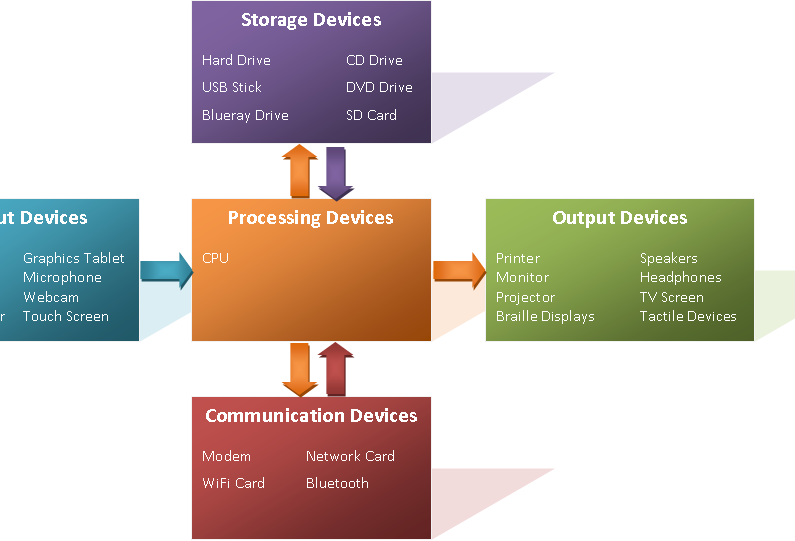
The three main categories of hardware are:
-
The Central Processing Unit (CPU): This is the brain of the operation. The CPU is a chip that reads and executes instructions. It performs calculations, makes logical decisions, and manages the flow of information through the system. When you click your mouse or type on your keyboard, it's the CPU that figures out what to do next.
-
Memory: This is the computer's short-term workspace. When you open a program or a file, it's loaded from storage into memory (specifically, Random Access Memory or RAM) so the CPU can access it quickly. Memory is volatile, which means its contents are erased when the computer is turned off. It's like the top of your desk where you place the papers you're currently working on.
-
Input and Output (I/O) Devices: These are the tools you use to interact with the computer. Input devices bring information into the system. Examples include your keyboard, mouse, and microphone. Output devices send information out of the system. Your monitor, printer, and speakers are all output devices.
Hardware Meets Software
A pile of hardware is just an expensive paperweight without instructions. Those instructions are called software. Software is the collection of programs, data, and rules that tell the hardware what to do.
There are two main kinds of software:
-
Operating System (OS): This is the master program that manages all the other software and hardware on the computer. It's the essential bridge between you and the physical components. Windows, macOS, and Android are all examples of operating systems. They handle fundamental tasks like recognizing keyboard input, sending images to the screen, and managing files.
-
Applications: These are the programs you use to perform specific tasks. A web browser, a word processor, or a photo editor are all applications. They run on top of the operating system, which gives them access to the computer's hardware.
Think of it like this: Hardware is the orchestra's instruments. The operating system is the conductor who directs the musicians. And the applications are the specific pieces of music they play.
When you double-click an application icon, you're telling the operating system to load that program's instructions from storage into memory. The OS then tells the CPU to start executing those instructions, step by step. This seamless interaction between hardware and software is what brings a computer to life.
Ready to check your understanding of these fundamental concepts?
At its core, what is the fundamental three-step process a computer follows?
Which component is considered the 'brain' of the computer, responsible for executing instructions and performing calculations?
Understanding these basic building blocks is the first step in demystifying how computers work. With this foundation, you can start to explore more complex topics.