Foundations of Computer Graphics
Introduction to Computer Graphics
What Are Computer Graphics?
Computer graphics are, simply, pictures created using computers. If you've ever played a video game, watched an animated movie, or just scrolled through apps on your phone, you've seen them in action. They are the visual elements on your screen that aren't live-action video.
At its core, computer graphics is the art and science of turning data into images. This can range from a simple icon on your desktop to the stunning special effects in a blockbuster film. It all starts with a few fundamental ideas about how to represent an image in a way a computer can understand.
The Building Blocks of Images
Every digital image is built from the ground up using one of two methods. Think of it like creating art with either mosaic tiles or with mathematical instructions. The first method uses a grid of tiny dots, and the second uses lines and shapes defined by equations.
Pixel
noun
The smallest unit of a digital image or display. It's a single point of color in a larger grid.
The first method creates what we call raster graphics. These images are made of a grid of pixels. The quality of a raster image depends on its resolution, which is the number of pixels it contains. A high-resolution image has many pixels, allowing for fine detail. A low-resolution image has fewer pixels and can look blocky or “pixelated,” especially when enlarged.
The second method creates vector graphics. Instead of a grid of pixels, vector images are defined by mathematical formulas that describe points, lines, and curves. Because they're based on math, not a fixed number of pixels, you can scale a vector graphic to any size, from a business card to a billboard, and it will never lose quality.
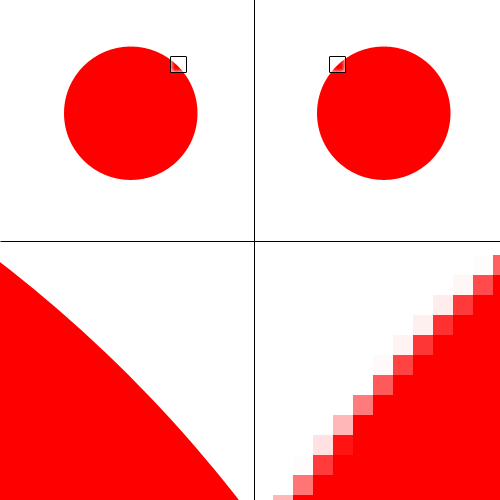
So when should you use one over the other? It depends on the job.
| Graphic Type | Best For | Common File Types |
|---|---|---|
| Raster | Photographs, detailed digital paintings | JPEG, PNG, GIF |
| Vector | Logos, icons, typography | SVG, AI, EPS |
Adding Color
A pixel wouldn't be very useful if it couldn't display color. Computers handle color using different systems, called color models. The two most common are RGB and CMYK.
The RGB model is used for screens, like your monitor, TV, and phone. It creates colors by mixing different amounts of Red, Green, and Blue light. This is an additive model, meaning you start with black (no light) and add light to create color. When all three colors are at full intensity, they create white.
The CMYK model is used for printing. It uses four inks: Cyan, Magenta, Yellow, and Key (which is black). This is a subtractive model. You start with a white surface (like paper) and the inks subtract or absorb certain colors of light. As you add more ink, the color gets darker. Mixing cyan, magenta, and yellow theoretically produces black, but a separate black ink is used for purity and to save on ink.
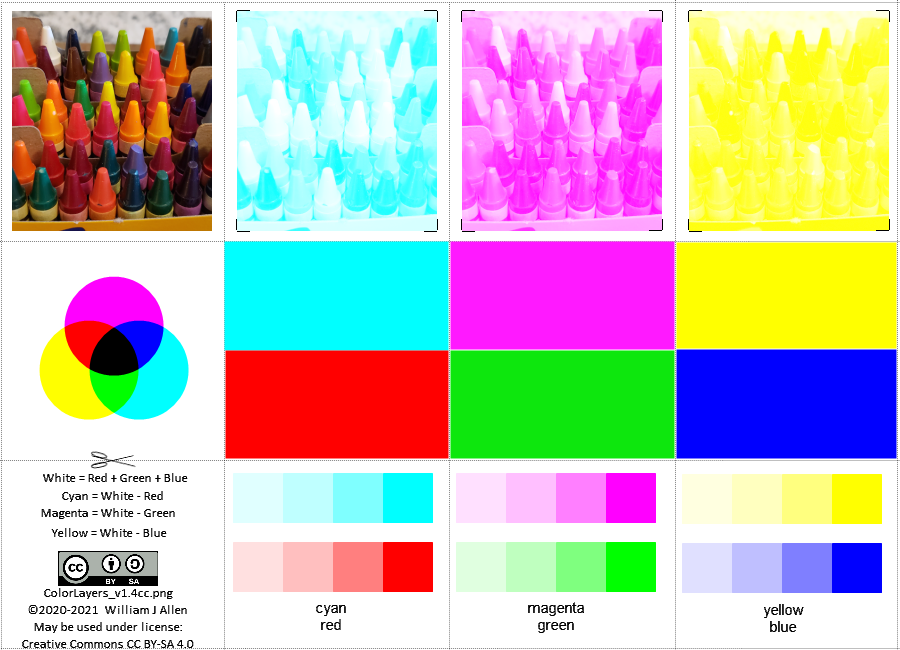
A simple rule of thumb: Design in RGB for anything that will be viewed on a screen, and use CMYK for anything that will be printed on paper.
Tools of the Trade
Creating computer graphics requires both specialized hardware and software.
On the hardware side, the most important component is the Graphics Processing Unit (GPU). Think of the GPU as a specialized brain just for handling visual information. It's designed to perform the millions of calculations needed to render images, animations, and videos quickly and efficiently. This frees up the computer's main brain, the CPU, to handle other tasks.
On the software side, there are countless applications for creating and editing graphics. They generally fall into two categories:
-
Raster editors, like Adobe Photoshop or GIMP, are used for working with pixel-based images. They excel at photo editing, digital painting, and manipulating detailed images.
-
Vector editors, like Adobe Illustrator or Inkscape, are used for creating and manipulating vector-based graphics. They are the standard for logo design, illustration, and creating graphics that need to be resized frequently.
Ready to check your understanding of these core concepts?
A company needs a new logo that will be used on everything from small business cards to large billboards. Which type of graphic is the best choice for this logo?
What is the primary role of a Graphics Processing Unit (GPU) in a computer?
Understanding these fundamentals—pixels, vectors, and color models—is the first step into the vast world of digital imaging. Everything from the simplest icon to the most complex visual effect is built on these basic principles.