Foundations of Computer Graphics Algorithms
Introduction to Computer Graphics
Pixels and Paths
Every image you see on a screen, from a simple icon to a high-resolution photograph, is a form of computer graphics. At its core, computer graphics is the art and science of creating and manipulating images using computers. But how does a machine that thinks in numbers create a picture?
It starts by breaking the image down into basic components. There are two primary ways to do this: raster graphics and vector graphics.
Raster graphics build images out of a grid of tiny squares called pixels. Think of it like creating a mosaic with colored tiles. Each pixel in the grid has a specific color assigned to it. When you put millions of these colored pixels together, they form a detailed image. Photographs are a perfect example of raster graphics. The quality of a raster image is determined by its resolution, which is the number of pixels it contains. More pixels mean more detail.
Pixel
noun
The smallest single unit of a digital image or display. The word is a portmanteau of "picture element".
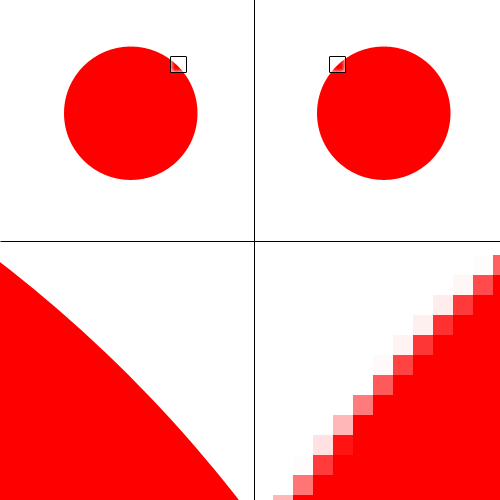
The main drawback of raster images appears when you try to make them bigger. Since the image is just a fixed grid of pixels, scaling it up simply makes each pixel larger. This leads to a blocky, blurry effect called pixelation. The computer is just stretching the existing information, not adding new detail.
Vector graphics take a different approach. Instead of a grid of pixels, a vector image is defined by mathematical equations. It’s essentially a set of instructions. An instruction might say, "Draw a line from point A to point B," or "Create a circle with a radius of 10 units centered at point C, and fill it with blue."
Because these images are based on paths and formulas, they are infinitely scalable. When you enlarge a vector graphic, the computer just recalculates the math for the new size. The lines and curves remain perfectly sharp and clear, no matter how large you make them. This makes vector graphics ideal for logos, icons, and illustrations that need to be used in various sizes.
| Feature | Raster Graphics | Vector Graphics |
|---|---|---|
| Made of | Pixels in a grid | Mathematical paths |
| Scalability | Loses quality when enlarged | Infinitely scalable |
| File Size | Larger, depends on resolution | Smaller, depends on complexity |
| Best for | Photos, complex images | Logos, icons, illustrations |
From Model to Screen
So we know how 2D images are structured. But how do we get the stunning 3D scenes we see in movies and video games? This is where the graphics rendering pipeline comes in. It's a series of steps that a computer's Graphics Processing Unit (GPU) follows to convert a 3D model made of points and polygons into the 2D image you see on your screen.
Let's break down the main stages of this pipeline.
-
Vertex Processing: A 3D model is essentially a collection of vertices (points in 3D space) connected to form polygons, usually triangles. In this first stage, the GPU takes these vertices and performs mathematical transformations on them. It figures out where each vertex should be in the 3D scene relative to the camera or viewpoint.
-
Rasterization: This is the crucial step where the 3D world becomes 2D. The GPU takes the transformed triangles from the previous stage and figures out which pixels on the 2D screen they cover. It essentially lays a pixel grid over the 3D shapes and determines which pixels fall inside each triangle.
-
Fragment Processing: After rasterization, we have a collection of pixels (now called fragments) for each shape. This stage is all about color. The GPU runs a small program for each fragment to calculate its final color. This is where lighting, shadows, and textures are applied to make the scene look realistic. Once every fragment's color is determined, the image is complete and sent to your screen.
This pipeline happens incredibly fast, repeating dozens or even hundreds of times per second to create the illusion of smooth motion in a game or animation.
You are designing a company logo that will be used on everything from small business cards to large billboards. Which graphics format would be the best choice to ensure the logo remains sharp and clear at any size?
What is the phenomenon called when a raster image is enlarged and the individual pixels become visible, resulting in a blocky or blurry appearance?
Understanding these basic building blocks—raster and vector formats, and the rendering pipeline—is the first step into the world of computer graphics.