Fixing Website Formatting with HTML CSS
HTML Basics
The Skeleton of the Web
Every website you visit, from a simple blog to a complex news site, is built on a foundation of HTML. HTML stands for HyperText Markup Language, and it's the standard language used to create and structure the content of a webpage. Think of it like the skeleton of a human body—it provides the fundamental structure that everything else is built upon.
HTML, or HyperText Markup Language, provides the skeleton for your web content.
HTML works by using tags to define different types of content. Most tags come in pairs: an opening tag like <p> and a closing tag like </p>. Everything between these two tags is called an element. This simple system tells a web browser how to display the content, whether it's a heading, a paragraph, or a list.
Every HTML document follows a basic structure. It’s a blueprint that ensures browsers can understand and render your page correctly.
<!DOCTYPE html>
<html>
  <head>
    <title>My First Webpage</title>
  </head>
  <body>
    <!-- Content goes here -->
  </body>
</html>
Let's break that down:
<!DOCTYPE html>: This declaration is always the first line. It tells the browser that the document is an HTML5 page.<html>: This is the root element that wraps all the content on the entire page.<head>: This element contains meta-information about the page, like the title that appears in the browser tab. This information isn't displayed on the page itself.<body>: This is where all the visible content of your webpage goes—the text, images, and links that your visitors will see.
Adding Basic Content
Once you have the basic structure, you can start adding content inside the <body> tags. The most common elements you'll use are headings and paragraphs.
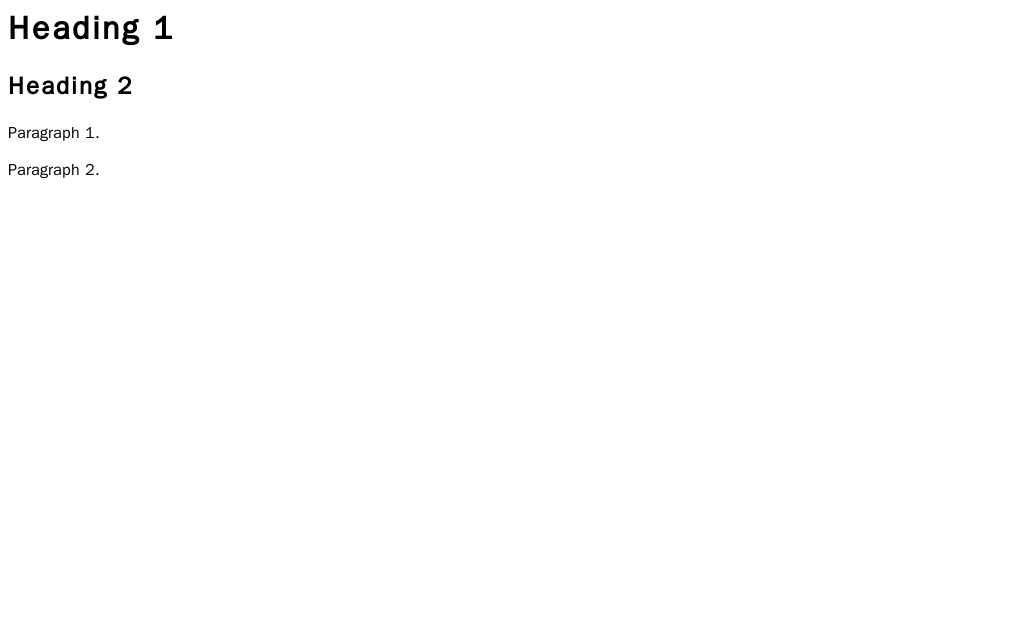
Headings are used to structure your content and are defined with <h1> through <h6> tags. <h1> is the most important heading, typically used for the main title of a page, while <h6> is the least important. Search engines use headings to understand the structure and topic of your content.
Paragraphs are the main blocks of text on your page. You create a paragraph by wrapping your text in <p> tags.
<body>
  <h1>This is the Main Title</h1>
  <p>This is a paragraph of text. It introduces the main topic of the page.</p>
  <h2>This is a Subheading</h2>
  <p>This is another paragraph, providing more details under the subheading.</p>
</body>
Sometimes you need to organize information into lists. HTML gives you two primary options: unordered (bulleted) lists and ordered (numbered) lists.
- An unordered list starts with a
<ul>tag. Each item in the list is then wrapped in a<li>(list item) tag. - An ordered list starts with an
<ol>tag, but its items also use the<li>tag.
<h3>My Grocery List (Unordered)</h3>
<ul>
  <li>Milk</li>
  <li>Bread</li>
  <li>Cheese</li>
</ul>

<h3>My Top 3 Movies (Ordered)</h3>
<ol>
  <li>The Godfather</li>
  <li>The Shawshank Redemption</li>
  <li>Pulp Fiction</li>
</ol>
Linking and Images
What makes the web a "web" is the ability to link documents together. This is done with the anchor tag, <a>.
The anchor tag's most important property is its href attribute. An attribute provides additional information about an element and is always included in the opening tag. The href attribute specifies the destination URL of the link.
<p>You can learn more about web development on the <a href="https://developer.mozilla.org">MDN Web Docs</a>.</p>
In that example, href="https://developer.mozilla.org" is the attribute. It tells the browser where to go when a user clicks the text "MDN Web Docs."
To embed an image into your page, you use the <img> tag. This is an empty tag, meaning it doesn't have a closing tag. It requires two main attributes: src and alt.
| Attribute | Description |
|---|---|
src | Specifies the path or URL to the image file. |
alt | Provides alternative text for the image. This text is displayed if the image can't be loaded and is crucial for screen readers used by visually impaired visitors. |
<img src="images/cute_puppy.jpg" alt="A golden retriever puppy playing in the grass.">
Using descriptive
alttext is a key part of making your website accessible to everyone.
With these basic elements—headings, paragraphs, lists, links, and images—you have all the tools you need to structure a simple but complete webpage.
Ready to test your knowledge? Let's see what you've learned about the building blocks of the web.
What does HTML stand for?
In an HTML document, which tag is used to contain all the visible content that a user sees on the page?
You now have a solid grasp of HTML's core purpose and its most common elements. This foundation is the first and most important step in building for the web.