Fix Your Website's Formatting with HTML CSS
HTML and CSS Basics
The Blueprint and the Paint
Every website you visit is built on two core technologies: HTML and CSS. Think of them like building a house. HTML (HyperText Markup Language) is the blueprint and the raw structure—the foundation, walls, and roof. CSS (Cascading Style Sheets) is the paint, wallpaper, and furniture that give the house its look and feel.
Think of HTML as the bricks that you need to build anything for the web.
HTML uses tags to define different types of content. An HTML document has a standard structure that browsers understand. It tells the browser what to display and in what order.
<!DOCTYPE html>
<html>
<head>
    <title>My First Web Page</title>
</head>
<body>
    <h1>This is a heading</h1>
    <p>This is a paragraph.</p>
</body>
</html>
Let's break that down:
<!DOCTYPE html>: This tells the browser the document is an HTML5 page.<html>: This is the root element that wraps all the content.<head>: This contains meta-information about the page, like the title that appears in the browser tab.<body>: This holds the actual content that users see on the page.
Inside the body, you see elements like <h1> for a main heading and <p> for a paragraph. These are defined by opening (<p>) and closing (</p>) tags. Some tags also have attributes, which provide extra information. For example, a link tag <a> has an href attribute to specify the URL.
<a href="https://www.example.com">Visit this site!</a>

Building with Meaning
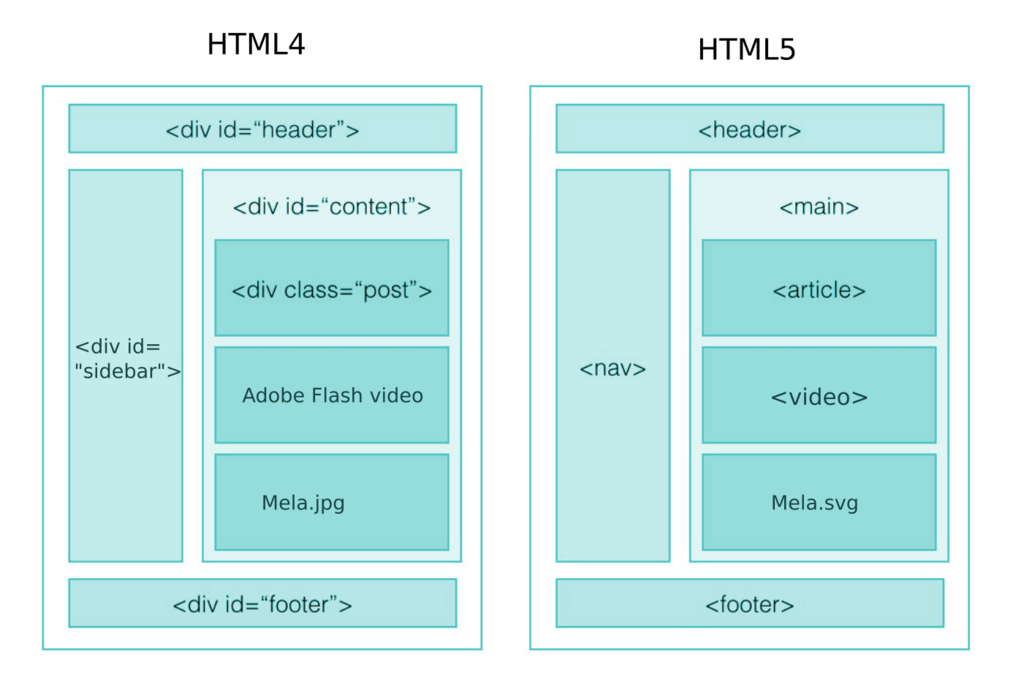
You could build a whole website using just <div> tags for structure, but it wouldn't be very descriptive. This is where semantic HTML comes in. Semantic tags describe the meaning of the content they hold.
Instead of a generic
<div>, you can use<header>,<footer>,<nav>, and<article>. These tags tell the browser, search engines, and screen readers what each part of your page is for.
Why does this matter? Two big reasons:
- Accessibility: Screen readers for visually impaired users can understand the page layout better. A user can easily jump to the main navigation (
<nav>) or the main content (<main>). - SEO (Search Engine Optimization): Search engines like Google can better index your site because they understand the structure and importance of your content. An
<h1>tag carries more weight than a generic<span>.
Adding Style with CSS
HTML provides the structure, but CSS brings it to life. CSS lets you control colors, fonts, spacing, and layout. The core principle here is the separation of content and presentation. Your HTML file should only contain your content and its structure. Your CSS file should handle all the styling. This makes your code cleaner, easier to manage, and more flexible.
CSS works by selecting an HTML element and applying a set of rules to it. The syntax is simple: a selector, followed by a declaration block in curly braces. Each declaration includes a CSS property and its value.
/* This is a CSS comment */
p {
  color: navy;
  font-size: 16px;
}
In this example, p is the selector—it targets all paragraph elements. color and font-size are properties, and navy and 16px are their values. This simple rule would turn all the paragraph text on your page navy blue.
How to Apply CSS
There are three ways to add CSS to an HTML document. While all of them work, one is strongly preferred.
1. External Stylesheet
This is the best practice. You write your CSS in a separate .css file and link to it from your HTML file's <head> section. This way, you can use the same stylesheet for multiple pages, making sitewide changes easy.
<!-- In your index.html file -->
<head>
  <link rel="stylesheet" href="styles.css">
</head>
/* In your styles.css file */
body {
  font-family: sans-serif;
}

h1 {
  color: #333;
}
2. Internal Stylesheet
You can place CSS rules directly inside the <head> of an HTML document by wrapping them in <style> tags. This is useful for single-page styling but isn't reusable across multiple pages.
<head>
  <style>
    p {
      color: green;
    }
  </style>
</head>
3. Inline Styles
Finally, you can apply styles directly to an HTML element using the style attribute. This method is generally avoided because it mixes content with presentation, making the code harder to read and maintain.
<h1 style="color: red; text-align: center;">A Red, Centered Heading</h1>
To avoid this mistake, use CSS to style your web pages and keep your HTML code clean and easy to read.
Ready to check your understanding?
In the analogy of building a house, what do HTML and CSS represent?
Which HTML tag contains the visible content of a webpage, such as headings and paragraphs?
By keeping your HTML structured and your CSS separate, you're building a solid foundation. This approach makes your websites accessible, search-engine friendly, and much easier to update in the long run.