Fix Your Website Formatting with HTML CSS
HTML Basics
The Skeleton of the Web
Every webpage you visit, from a simple blog to a complex news site, is built on a foundation of HTML. Think of a webpage like a human body. If CSS is the clothing and JavaScript is the nervous system that makes it move, then HTML is the skeleton—the essential structure that holds everything together.
HTML, or HyperText Markup Language, provides the skeleton for your web content.
Let's break down that name: "HyperText Markup Language."
- HyperText refers to text that contains links to other texts. It's the "hyper" that lets you jump from page to page on the web.
- Markup Language means it's a language that uses special markers, called tags, to annotate a document. These tags tell a web browser how to structure and display the content. Unlike a programming language, it doesn't perform logic; it just describes the content.
Anatomy of an HTML Document
Every HTML document follows a standard structure. It's like a template that ensures browsers can understand and render the page correctly. Here is the basic blueprint for any webpage.
<!DOCTYPE html>
<html>
  <head>
    <title>My First Webpage</title>
  </head>
  <body>
    <h1>This is a heading</h1>
    <p>This is a paragraph of text.</p>
  </body>
</html>
Let's look at each part:
-
<!DOCTYPE html>: This is the very first thing in your document. It tells the browser, "Hey, the document you're about to read is written in modern HTML (specifically, HTML5)." -
<html>...</html>: This is the root element that wraps all the content on the entire page. -
<head>...</head>: This section contains meta-information about the page. The content here isn't displayed on the page itself. It includes things like the page title (which appears in the browser tab), links to stylesheets (CSS), and character set information. -
<body>...</body>: This is where the magic happens. All the visible content of your webpage—headings, paragraphs, images, links, tables—goes inside the body.

Tags, Elements, and Attributes
To build anything with HTML, you need to understand its three core components: tags, elements, and attributes.
Tags are the keywords enclosed in angle brackets, like <p>. Most tags come in pairs: an opening tag (<p>) and a closing tag (</p>). The closing tag is identical to the opening one, but with a forward slash before the tag name. Some tags, like image tags, are self-closing.
An element is the complete package: the opening tag, the content inside, and the closing tag. So, <p>Hello, world!</p> is a complete paragraph element.
Attributes provide extra information about an element. They are always placed in the opening tag and usually come in name/value pairs like name="value".
For example, to create a link, you use the <a> (anchor) tag. But just having <a>Click here</a> isn't enough. The browser needs to know where to go. That's where the href (hypertext reference) attribute comes in.
<!-- This is a link to another website -->
<a href="https://www.example.com">Visit Example.com</a>

<!-- This is an image -->
<img src="puppy.jpg" alt="A photo of a cute puppy">
In the <img> tag example, src specifies the source file for the image, and alt provides alternative text. This alt text is crucial: it's read aloud by screen readers for visually impaired users and is displayed if the image fails to load.
| Tag | Purpose |
|---|---|
<h1> - <h6> | Headings, from most to least important |
<p> | A paragraph of text |
<a> | A hyperlink |
<img> | An image |
<ul> | An unordered (bulleted) list |
<ol> | An ordered (numbered) list |
<li> | A list item (used inside <ul> or <ol>) |
The Importance of Meaning
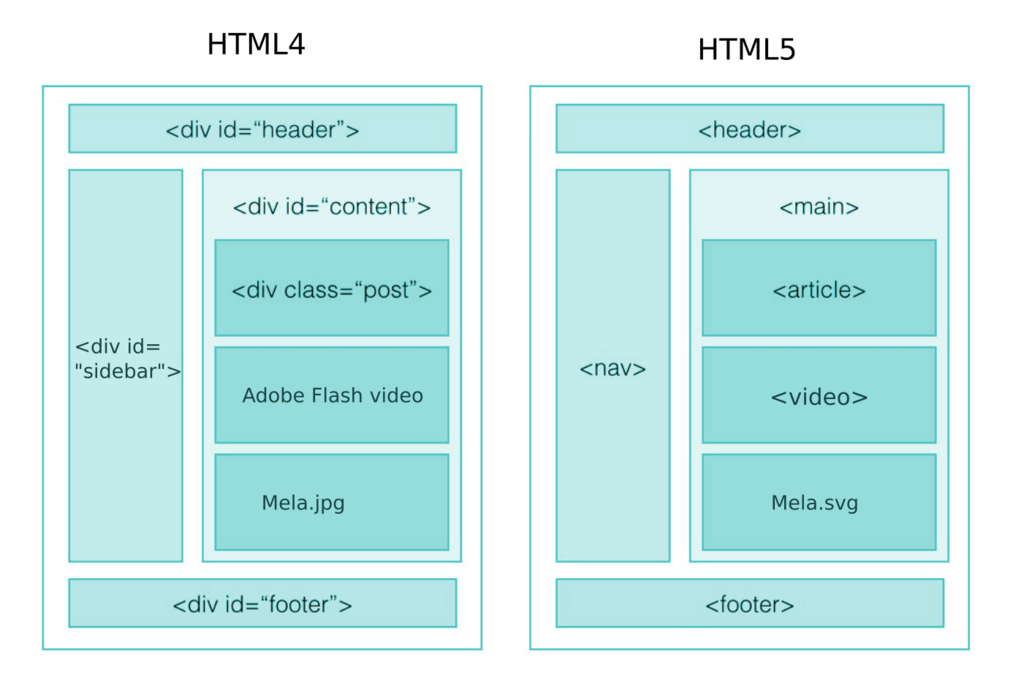
In the early days of the web, developers often used generic tags like <div> to group content. While this works, modern web development emphasizes using tags that describe the meaning of the content, not just its appearance. This practice is called semantic HTML.
Semantic HTML means choosing the HTML element that best describes its content, rather than just using a generic one.
Instead of using <div> for everything, semantic HTML provides specific tags for common webpage sections. For instance:
<header>: For introductory content or navigation links at the top of a page.<nav>: Specifically for major navigation blocks.<main>: For the primary, unique content of the page.<article>: For self-contained content, like a blog post or news story.<footer>: For the bottom of a page, often containing copyright info or contact details.
Why bother with semantics? Three big reasons:
- Accessibility: Screen readers use these tags to help visually impaired users navigate a page. A
<nav>tag clearly says, "This is the main navigation." - SEO (Search Engine Optimization): Search engines like Google understand semantic tags better, which can help your site rank higher.
- Readability: Your code becomes much easier for you and other developers to understand and maintain.
It's time to review what you've learned about the fundamental building blocks of the web.
Ready to test your knowledge? This quiz will cover the structure of an HTML document and the roles of tags, elements, and attributes.
What is the primary purpose of the <!DOCTYPE html> declaration at the very beginning of an HTML file?
In the HTML snippet <p class="intro">Welcome!</p>, the entire line of code is best described as what?
Understanding these core principles of HTML is the first major step in web development. With this structure in place, you're ready to start adding style.