Fix Website Formatting with HTML CSS
HTML Basics
The Skeleton of a Web Page
Every web page you visit is built using HyperText Markup Language, or HTML. It’s not a programming language; it's a markup language. Think of it as the skeleton that gives a web page its structure. HTML uses a system of tags to define different parts of a document, like headings, paragraphs, and links.
HTML tells the browser what each piece of content is, not how it should look. The styling comes later with CSS.
All HTML documents share a fundamental structure. It tells the browser that it's reading an HTML file and where the main content lives. Here is the most basic HTML page you can create:
<!DOCTYPE html>
<html>
<head>
  <title>My First Web Page</title>
</head>
<body>
  <h1>Hello, World!</h1>
  <p>This is my first page.</p>
</body>
</html>
Let's break that down:
<!DOCTYPE html>: This declaration is always the first line. It tells the web browser which version of HTML the page is written in (in this case, HTML5).<html></html>: This is the root element. All other elements go inside it.<head></head>: This section contains meta-information about the page, like the title that appears in your browser tab. It's stuff for the browser, not for the main viewing area of the page.<body></body>: This is where the visible content goes—all the text, images, and links you want your visitors to see.
Elements and Tags
HTML is made of elements. An element is a single component of a web page, like a paragraph or a heading. We create these elements using tags.
Most tags come in pairs: an opening tag and a closing tag. The opening tag starts the element, and the closing tag ends it. A closing tag is the same as the opening tag, but with a forward slash / before the name.
Opening tag + Content + Closing tag = Element
For example, to create a paragraph, you wrap your text in <p> and </p> tags. The whole thing is the paragraph element:
<p>This is a paragraph element.</p>
It's crucial to nest tags correctly. If you open a tag inside another element, you must close it before closing the outer element. Think of them like Russian nesting dolls.
Incorrect nesting can break your page layout or cause it to display unpredictably. Always close the most recently opened tag first.
The Meaning of Tags
Using the right tag for the right job is called writing semantic HTML. It means choosing tags that describe the meaning of the content, not just how it looks. For example, use <h1> for the main heading of a page, not just because it makes text big and bold. This has huge benefits.
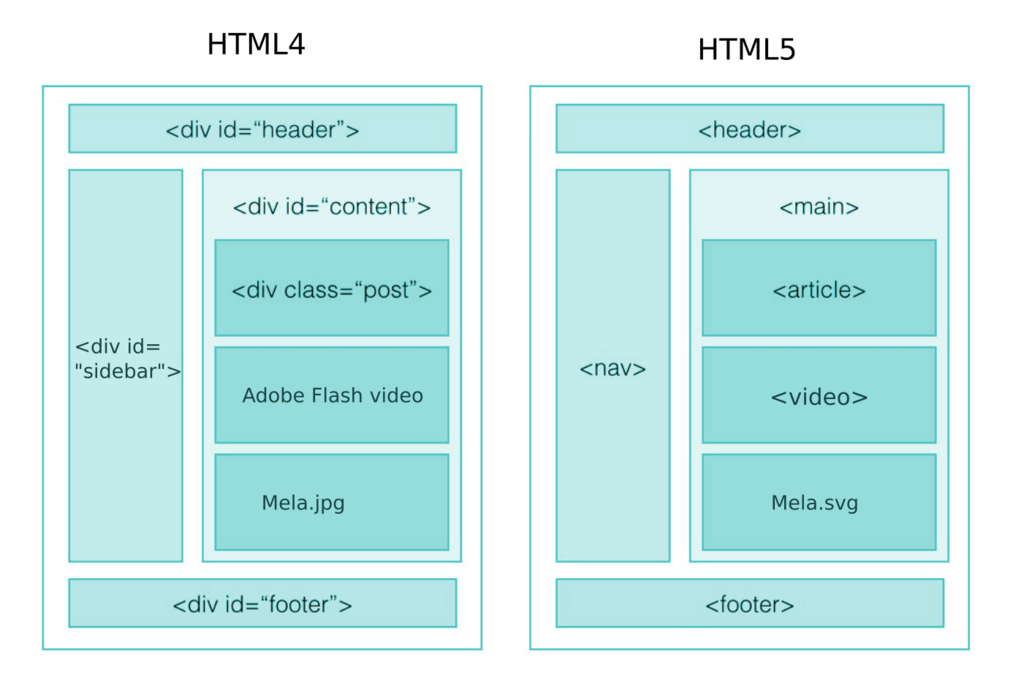
First, it helps search engines like Google understand your content, which can improve your site's ranking (this is Search Engine Optimization, or SEO). Second, it makes your website accessible to people who use screen readers. A screen reader can announce "Heading Level 1" when it encounters an <h1> tag, giving visually impaired users a clear sense of the page structure.
One of HTML's main jobs is to give text structure so that a browser can display an HTML document the way its developer intends.
Here are some fundamental semantic tags for structuring text:
<h1>through<h6>: Heading elements.<h1>is the most important, and<h6>is the least.<p>: A paragraph.<ul>: An unordered list (bullets).<ol>: An ordered list (numbers).<li>: A list item, which goes inside a<ul>or<ol>.<a>: An anchor tag, used to create links. It requires anhrefattribute to specify the destination URL.
<h1>Main Title</h1>
<p>A paragraph explaining the topic.</p>
<h2>A Sub-heading</h2>
<ul>
  <li>First bullet point.</li>
  <li>Second bullet point.</li>
</ul>
<p>Read more at <a href="https://www.example.com">this website</a>.</p>
Using semantic tags properly creates a clear, logical, and accessible structure for any web page. It’s the foundation upon which everything else is built.
What is the primary role of HTML in web development?
Which of the following lines of HTML code shows the correct way to nest elements?