Fix Website Formatting with HTML CSS
HTML Basics
The Skeleton of a Web Page
Every web page you visit is built with HyperText Markup Language, or HTML. Think of HTML as the skeleton of a website. It provides the basic structure and holds all the content, like text, images, and links. Without it, a web page would just be a jumble of information with no clear organization.
HTML, or HyperText Markup Language, provides the skeleton for your web content.
An HTML document has a standard structure that browsers read to display the page correctly. It always starts with a document type declaration, <!DOCTYPE html>, which tells the browser it's an HTML5 document. The rest of the content is wrapped in an <html> tag.
Inside the <html> tag, there are two main sections: <head> and <body>.
- The
<head>section contains meta-information about the page, like the title that appears in your browser tab. This information isn't displayed on the page itself. - The
<body>section holds all the visible content—the text, images, and links you actually see and interact with.
<!DOCTYPE html>
<html>
  <head>
    <title>My First Web Page</title>
  </head>
  <body>
    <!-- All visible content goes here -->
  </body>
</html>
Adding Content with Tags
To add content to a web page, you use HTML tags. Most tags come in pairs: an opening tag like <p> and a closing tag like </p>. The content goes between them. These tags tell the browser what kind of content it's looking at.

For text, the most common tags are headings and paragraphs. Headings are created with <h1> through <h6>. <h1> is the most important heading, usually the main title of the page, while <h6> is the least important. Regular paragraph text is wrapped in <p> tags.
Here’s how you’d structure a simple article:
<h1>The Main Title</h1>
<p>This is the first paragraph of the article. It introduces the main topic.</p>

<h2>A Subheading</h2>
<p>This paragraph provides more detail about a specific point mentioned in the introduction.</p>
HTML also makes it easy to create lists. For a bulleted list, you use an unordered list tag, <ul>, with each item wrapped in a list item tag, <li>. For a numbered list, you use an ordered list tag, <ol>.
To create a link, you use the anchor tag, <a>. The href attribute within the tag specifies the URL the link should point to.
<ul>
  <li>First item in a bulleted list.</li>
  <li>Second item.</li>
</ul>

<ol>
  <li>First item in a numbered list.</li>
  <li>Second item.</li>
</ol>

<p>Visit our <a href="https://www.example.com">website</a>!</p>
Images and Meaning
To insert an image, you use the <img> tag. This tag is self-closing, meaning it doesn't need a separate closing tag. It requires two key attributes:
src: The source attribute, which is the path or URL to the image file.alt: The alternative text, which describes the image. This text is crucial for accessibility, as it's what screen readers will announce to visually impaired users. It also displays if the image fails to load.
<img src="images/logo.png" alt="Our company logo">
Beyond just structuring content, good HTML uses tags that describe the meaning of the content. This is called semantic HTML. Using semantic tags makes your site more accessible and easier for search engines to understand.
For example, instead of using a generic <div> tag for everything, you can use more descriptive tags to define different sections of your page.
Semantic tags like
<header>,<footer>,<nav>,<main>, and<article>give structure and meaning to your content, telling the browser and search engines what each part of the page represents.
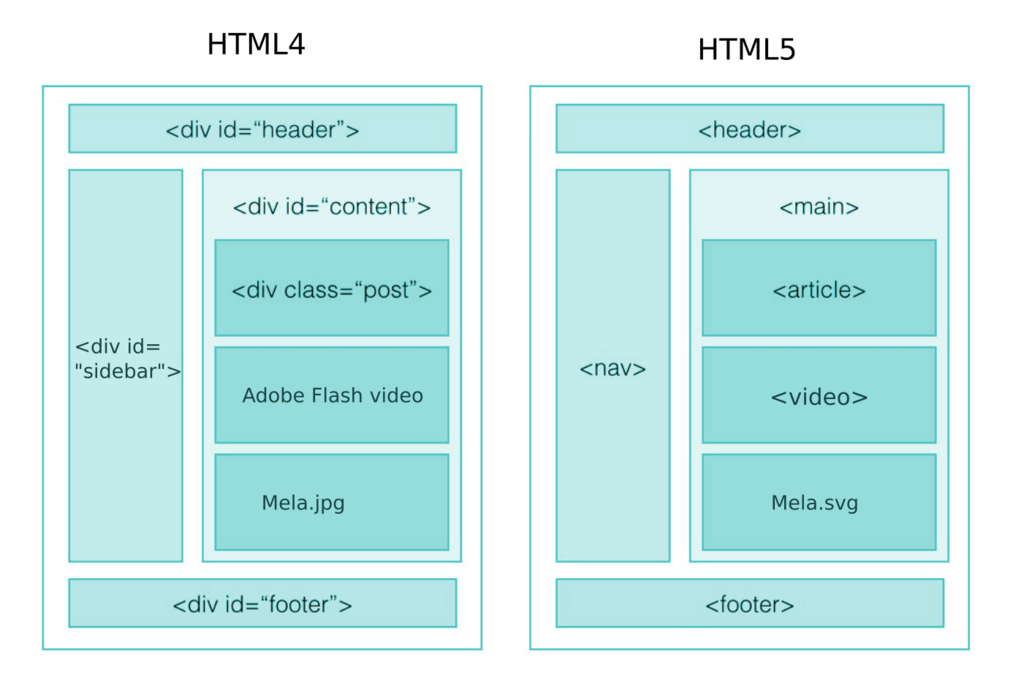
Using semantic HTML is like giving the browser a clear blueprint of your page. A <nav> tag clearly indicates a block of navigation links, while an <article> tag encloses a self-contained piece of content, like a blog post. This practice makes your code cleaner and your website more robust.
Time to check your understanding of these foundational concepts.
What is the primary role of HTML in web development?
In an HTML document, all the visible content that a user sees in their browser is placed inside which pair of tags?
With these basic elements, you have the fundamental tools to structure any web page. Every complex website you see is built upon these simple, powerful building blocks.