Figma Design System Mastery
Introduction to Design Systems
What Is a Design System?
Imagine building something with LEGO bricks. You have a collection of standard pieces in specific colors and sizes, along with an instruction book showing how they fit together. You don't have to create a new brick every time you need one. You just grab what you need from the box.
A design system is the digital equivalent of that LEGO set. It's a collection of reusable components, guided by clear standards, that helps teams build digital products consistently and efficiently.
A design system acts as the single source of truth for an entire organization, ensuring everyone is building with the same set of tools and rules.
This isn't just about making things look good. It’s about creating a shared language that both designers and developers can use. When a designer talks about a "primary button," the developer knows exactly what component to use, how it should look, and how it should behave. This alignment prevents confusion and speeds up the entire product development process.
A design system enables a product team to create a product faster by making the design reusable.
The Core Components
A design system typically has two main parts: a style guide and a component library. Think of them as the rules and the building blocks.
Style Guide
noun
The foundation of a design system. It's a document that details the specific visual design rules for a product or brand.
The style guide answers questions like:
- Colors: What are our primary, secondary, and accent colors? What colors do we use for success messages or error warnings?
- Typography: What fonts should we use for headings versus body text? What are the standard font sizes and weights?
- Spacing: How much space should be between elements to ensure a clean, uncluttered layout?
- Tone of Voice: How should our product communicate with users? Should the language be formal, friendly, or playful?
This guide ensures that no matter who is designing a new screen, the fundamental look and feel will remain consistent.
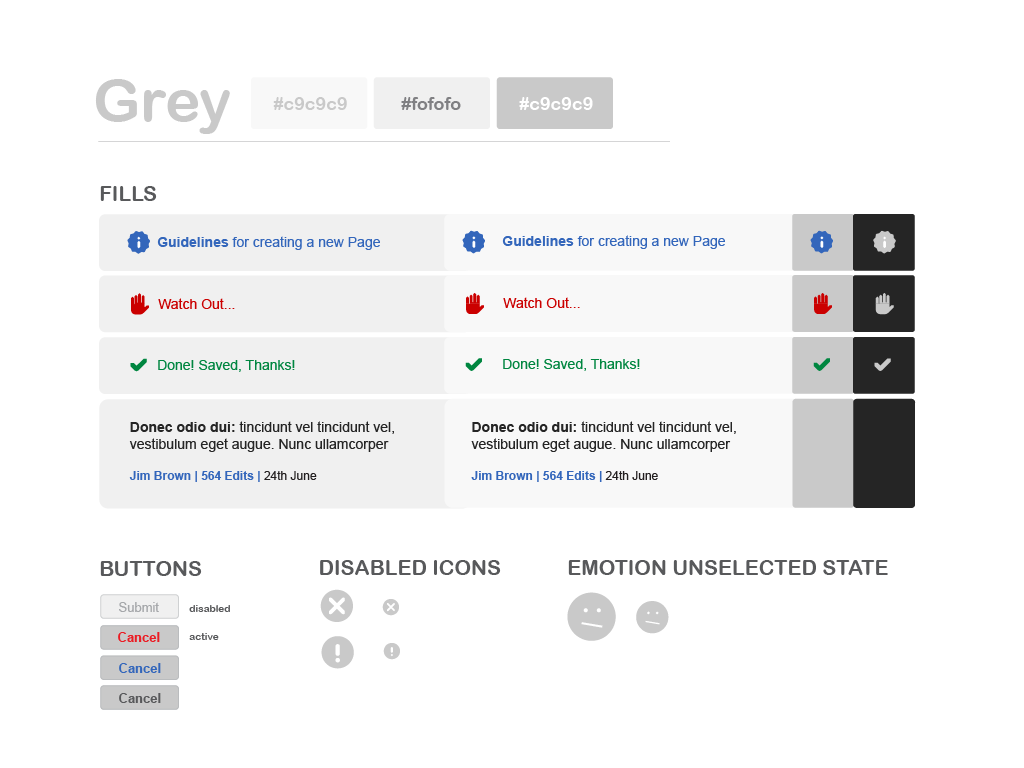
The second key part is the component library.
Component
noun
A reusable, self-contained piece of the user interface (UI) that can be combined with other components to build an application.
If the style guide provides the rules, the component library provides the actual pieces. These are pre-built UI elements that designers can drag and drop into their designs and developers can implement with ready-to-use code. Common examples include:
- Buttons
- Input fields
- Navigation menus
- Modals and dialog boxes
- Icons
By using pre-made components, teams can assemble new pages quickly without having to redesign and rebuild basic elements from scratch.
Do You Need a Design System?
Not every project needs a full-blown design system from day one. A simple, one-page website probably doesn't require one. But as projects grow in scale and complexity, the benefits become much clearer.
Consider a design system if you find your team asking these questions:
- What shade of blue are we supposed to use for links?
- Why does the button on this page look different from the button on that page?
- Do we already have an icon for this? I'll just make a new one.
- How long will it take to design this new feature? (And the answer is always longer than you'd like).
These are all signs of inconsistency and inefficiency—problems that a design system is built to solve. It's an investment that pays off by creating a more cohesive product and a more efficient workflow for your team.
Start thinking about your design system once you begin to reuse the same values and see patterns emerge.
Think of it as scaling your design efforts. For a small team working on a single product, informal rules might work. But for multiple teams working on a suite of products, a shared system becomes essential for maintaining quality and coherence.
What are the two main parts of a typical design system?
According to the text, a design system is most beneficial for a large company with multiple teams working on a suite of products.
In short, a design system is a toolkit for building better products faster. By establishing a shared set of rules and reusable components, it aligns teams and creates a consistent experience for users.