Exploring Operating System Types
Introduction to Operating Systems
What is an Operating System?
Think of an operating system (OS) as the general manager of a busy company. The company has different departments (the hardware, like the processor, memory, and storage) and employees (the software applications, like your web browser or text editor). The manager doesn't do the specific work of each department, but makes sure they all work together smoothly, have the resources they need, and don't get in each other's way. Without the manager, it would be chaos.
That's exactly what an OS does for your computer. It's the core software that manages all the hardware and software resources. It acts as an intermediary, translating the requests from your applications into instructions that the computer's hardware can understand. When you click save on a document, you're not talking directly to the hard drive. You're telling the application, which then tells the OS, which then instructs the hard drive to store the file.

The main purpose of an OS is to make the computer easy to use and to ensure applications can run efficiently without interfering with each other.
The Four Core Jobs
Every modern operating system juggles four fundamental responsibilities. These functions work in the background, making sure your computing experience is seamless.
- Process Management: Deciding which applications get to use the processor and for how long.
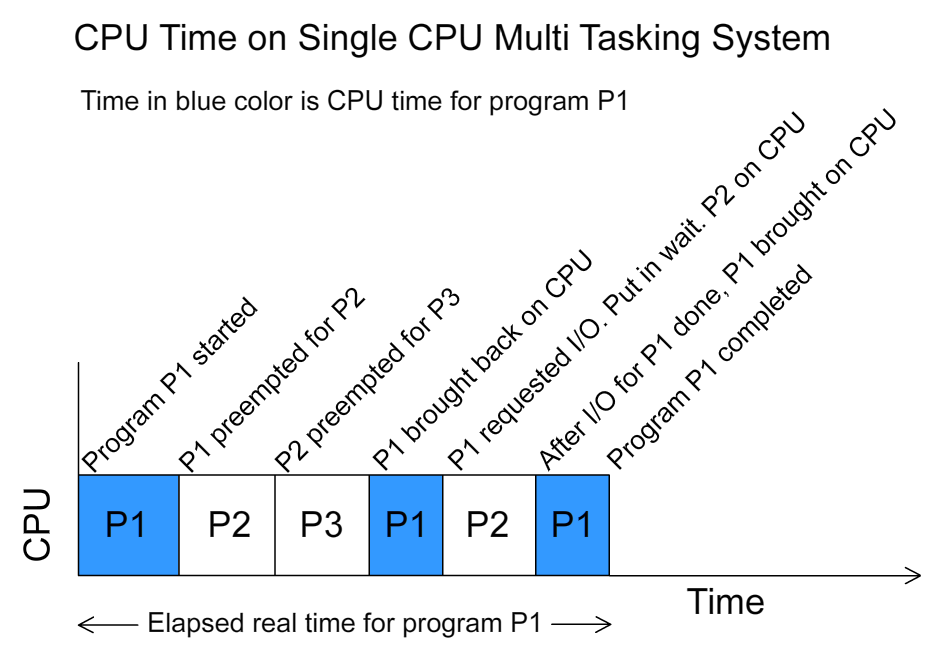
A running program is called a process. If you have multiple applications open—like a music player, a web browser, and a game—they all need to use the computer's Central Processing Unit (CPU). Since a typical CPU can only execute one instruction at a time, the OS has to be clever. It rapidly switches between processes, giving each one a tiny slice of CPU time. This happens so fast that it creates the illusion that everything is running simultaneously. This is called multitasking.
- Memory Management: Allocating the computer's workspace (RAM) to different processes.
Random Access Memory (RAM) is the computer's short-term working memory. When you open an application, the OS finds a free spot in RAM and allocates it to that process. When you close the application, the OS cleans up that space, making it available for something else. This prevents programs from overwriting each other's data and ensures that the limited memory is used efficiently. The OS keeps a detailed map of who is using what part of memory at all times.
- File System Management: Organizing and keeping track of all your files and folders.
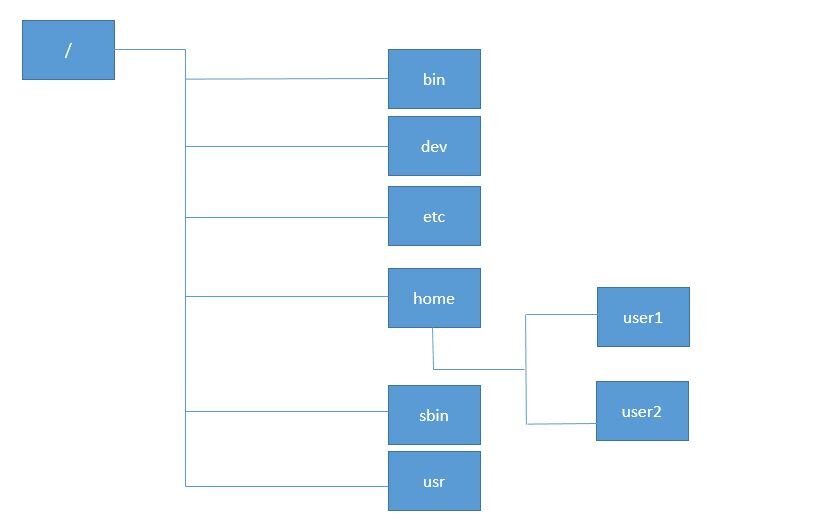
Your computer's hard drive or solid-state drive can hold vast amounts of data. Without a system for organization, finding anything would be impossible. The OS provides a file system, which is a hierarchical structure of directories (folders) and files. It manages how data is stored, named, and retrieved, handling everything from file permissions (who can read or write a file) to tracking where each piece of a file is physically located on the disk.
- Providing a User Interface: Giving you a way to interact with the machine.
The User Interface (UI) is the part of the OS you can see and interact with. Early computers used a Command-Line Interface (CLI), where users typed text commands to get things done. Today, most operating systems use a Graphical User Interface (GUI), which features windows, icons, menus, and a pointer. This visual, metaphor-driven approach makes computers much more intuitive and accessible for everyone.

A Brief History
Operating systems weren't always so sophisticated. In the early days of computing, there was no OS. Programmers interacted directly with the hardware by flipping switches or plugging in cables—a slow and error-prone process.
Then came batch systems. Programmers would prepare their jobs on punch cards and hand them to an operator. The operator would feed these jobs to the computer in a batch, one after another. It was efficient for the computer, but there was no direct interaction. You'd submit your job and come back hours later for the printout.
Time-sharing systems were the next big leap. These systems allowed multiple users to connect to a single powerful computer through terminals. The OS would rapidly switch between each user's tasks, giving everyone the impression they had the machine all to themselves. This was the birth of interactive computing.
Finally, these ideas merged into the multitasking systems we use today on our personal computers. These operating systems are powerful enough to manage dozens of background processes and user applications at once, all while providing a responsive and intuitive graphical interface. From flipping switches to tapping screens, the evolution of the OS is the story of making computers more powerful and more human-friendly.
Ready to check your understanding?
Based on the "busy company" analogy, what is the primary role of an operating system?
How does an operating system create the illusion that multiple programs are running at the same time on a single CPU?
Understanding these basic concepts is the first step toward seeing how different types of operating systems are designed for different tasks.