Excel Data Wrangling Mastery
Understanding Data Cleaning
The Art of Tidying Up Data
Before you can analyze data, you need to make sure it's clean. Think of it like cooking. You wouldn't start chopping vegetables without washing them first. Data cleaning is the process of washing your data—finding and fixing errors, inconsistencies, and other issues in your dataset to make it accurate and reliable for analysis.
Raw data collected from surveys, sales records, or web forms is rarely perfect. People make typos, leave fields blank, or enter information in different formats. This messiness can lead to misleading conclusions. Cleaning is the essential first step that turns a chaotic spreadsheet into a trustworthy source of information.
Data cleaning is one of the most crucial steps in any data analysis project.
Common Data Problems
Most messy datasets share a few common problems. Once you know what to look for, spotting these issues becomes much easier.
Inconsistency
noun
When the same data is entered in different ways. For example, a column for 'State' might contain 'CA', 'Calif.', and 'California' for the same state.
Other frequent issues include duplicate entries, where the exact same record appears more than once, and structural errors like extra spaces before or after text, which can throw off calculations. You'll also encounter missing data—blank cells where information should be.
| Order ID | Customer Name | State | Items | Sale Date |
|---|---|---|---|---|
| 101 | Jon Smith | NY | 3 | 01/15/2023 |
| 102 | Jane Doe | CA | 5 | 01/16/2023 |
| 103 | Jon Smith | New York | 2 | 01/17/2023 |
| 104 | Peter Jones | FL | 1 | 01/18/2023 |
| 102 | Jane Doe | CA | 5 | 01/16/2023 |
| 105 | Sara Davis | 4 | Jan 19 2023 |
In the table above, you can see several problems. Order ID 102 is a duplicate. The 'State' column has inconsistent entries ('NY' and 'New York') and a missing value. 'Customer Name' has an extra space before 'Peter Jones', and the 'Sale Date' column uses different formats.
Garbage In, Garbage Out
Why does all this matter? Because unclean data leads to flawed analysis. If you try to calculate total sales by state from the table above, New York's sales would be split between 'NY' and 'New York', giving you an inaccurate picture. Duplicate orders would inflate your sales numbers.
This principle is often called "Garbage In, Garbage Out" (GIGO). If you feed your analysis tool bad data, you will get bad results, no matter how sophisticated your methods are.
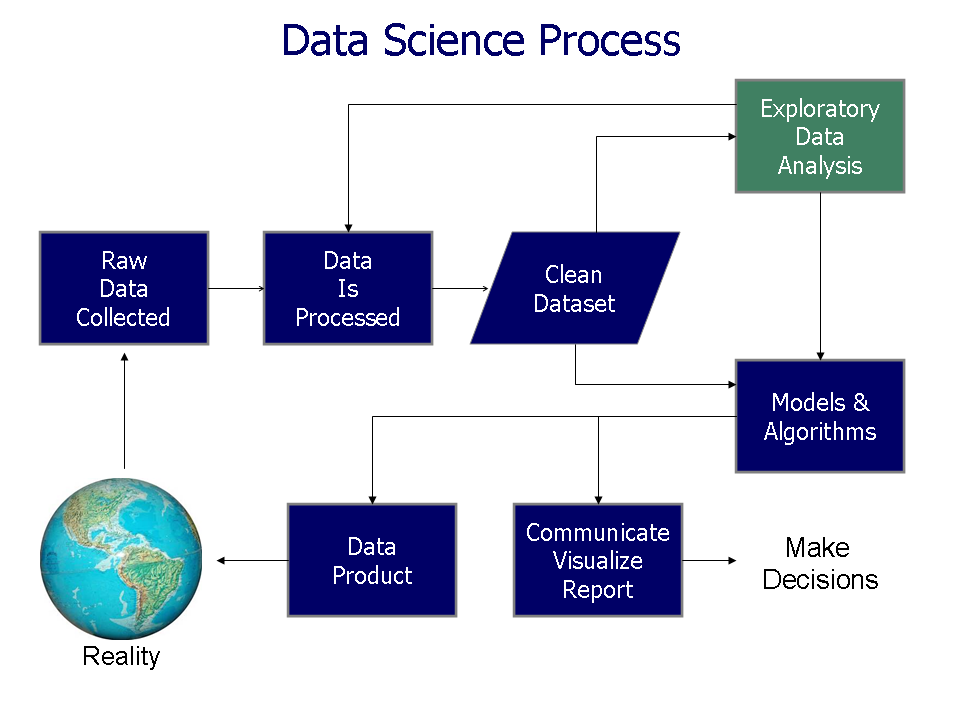
Making business decisions based on faulty analysis can be costly. It could lead you to focus on the wrong customer segment, mismanage inventory, or create inaccurate financial forecasts. Clean, reliable data is the foundation of sound decision-making.
Principles of Good Cleaning
Effective data cleaning isn't about randomly fixing cells. It's a systematic process guided by a few key principles.
First, always work on a copy of your data. Never clean the original, or 'raw,' dataset. This ensures you can always go back to the source if you make a mistake.
Second, be consistent. Decide on a standard format for things like dates, names, and categories, and apply it uniformly across the entire dataset. For example, choose one format for states ('NY') and stick with it.
Finally, document your steps. It might seem like extra work, but keeping a simple log of the changes you've made (like 'Removed 15 duplicate rows' or 'Standardized state codes to two-letter abbreviations') helps others understand your process and ensures the cleaning is repeatable.
Now that you understand what data cleaning is and why it's so important, you're ready to learn the specific Excel tools that make it happen.
What is the primary goal of data cleaning?
Which of the following is the most likely consequence of analyzing unclean data?