Excel Data Cleaning and Analysis
Understanding Data Quality Issues
The Trouble with Messy Data
Think of data as the ingredients for a recipe. If you use fresh, high-quality ingredients, you'll likely end up with a delicious meal. But if you use expired milk or rotten vegetables, the result will be disappointing, no matter how good the recipe is.
Data works the same way. Before you can analyze it to find insights or make decisions, you need to make sure it's 'clean.' Raw data collected from surveys, sales records, or user sign-ups is almost never perfect. It often arrives with a host of problems that can spoil your analysis before you even begin.
Data cleaning is one of the most crucial steps in any data analysis project.
Recognizing these issues is the first step toward fixing them. When we talk about "data quality issues," we're talking about any errors, inconsistencies, or gaps that make the data unreliable. Let's look at the most common culprits.
Common Data Problems
Data problems tend to fall into a few common categories. Once you learn to spot them, you'll see them everywhere.
Duplicate Entries This is exactly what it sounds like: the same piece of information recorded more than once. Imagine a customer list where "John Smith" appears three times because he signed up with slightly different email addresses. If you try to count your unique customers, your total will be wrong. Duplicates inflate numbers and skew results.
Inconsistent Formats Computers are very literal. They don't know that "CA," "Calif.," and "California" all mean the same thing. Inconsistent formatting happens when the same type of data is entered in different ways. This could be dates (1/15/2024 vs. Jan 15, 2024), phone numbers ((555) 123-4567 vs. 5551234567), or text entries. These inconsistencies make it nearly impossible to sort, filter, or group your data correctly.
Incomplete Data Blank cells and missing values are the ghosts in the dataset. This is called incomplete or missing data. Maybe a customer didn't provide their age, or a sales entry is missing the purchase price. This creates gaps in your information. You can't calculate an accurate average sale price if some prices are missing, and you can't understand customer demographics if age data is spotty.
A blank cell isn't just empty space. It's a missing piece of the story, and you can't analyze what isn't there.
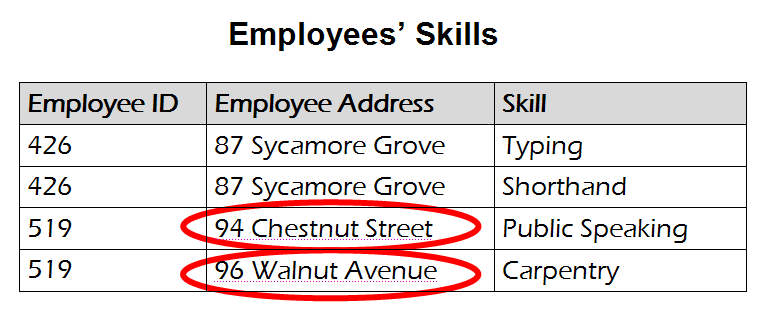
Inaccuracies Sometimes, the data is just plain wrong. This could be a simple typo, like a product price entered as $500 instead of $50.00, or a more subtle error, like a customer's address assigned to the wrong city. These inaccuracies directly mislead your analysis because they present false information as fact.
Why Clean Data Matters
Poor data quality isn't just a minor annoyance; it has real consequences. Imagine a marketing team that wants to send a promotional offer to customers in California. If their data has inconsistent state names, they might miss a large portion of their target audience. Or consider a company that uses sales data to manage inventory. If duplicate entries make it seem like a product is selling twice as fast as it really is, they'll end up over-ordering and wasting money.
Ultimately, the goal of working with data is to make better, more informed decisions. But those decisions are only as good as the data they're based on. Garbage in, garbage out.
Let's check your understanding of these common data quality issues.
Why is it crucial to address data quality issues before performing analysis?
A dataset of customer locations contains entries like 'NY', 'N.Y.', and 'New York'. Which data quality issue does this represent?
Learning to spot these problems is the essential first skill in any data journey. By identifying duplicates, inconsistencies, gaps, and errors, you're preparing your data for reliable analysis.