Ethical Android Hacking
Android Architecture
The Layers of Android
The Android operating system on your phone isn't a single piece of software. It's a stack of different layers, each with a specific job. Think of it like a building: a solid foundation supports the floors above, and each floor provides different services. Understanding this structure is key to seeing how apps work and where security issues can arise.
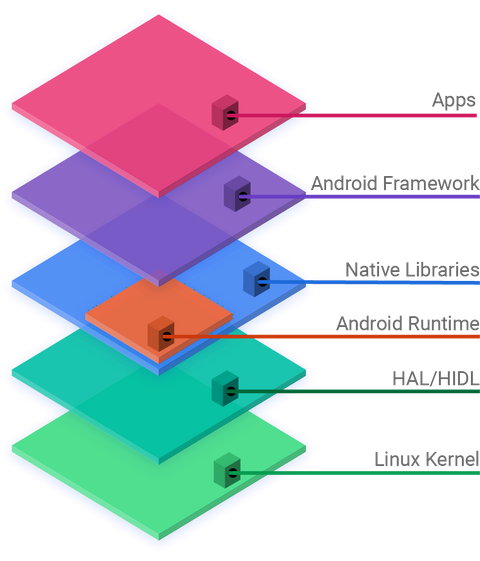
Let's break down this stack, starting from the very bottom.
The Foundation: Linux Kernel
At the base of Android is the Linux kernel. This is the core that talks directly to your phone's hardware—the processor, memory, camera, and screen. The kernel is the ultimate manager, handling essential, low-level tasks.
It manages the device's memory, making sure each app gets the resources it needs without interfering with others. It also controls processes, deciding which apps get to use the processor and when. Most importantly for security, the kernel enforces a permission model that isolates applications from each other and from the core system. An app can't just access the camera or your contacts; it has to ask the kernel for permission first.
The kernel acts as a bridge between the software (apps) and the hardware (your phone's physical components).
Running the Code: Libraries and ART
Sitting on top of the kernel are two crucial components that apps rely on: a set of native libraries and the Android Runtime (ART).
The native libraries are written in low-level languages like C and C++. They provide the horsepower for demanding tasks. When you watch a video, play a game, or browse a secure website, your phone is using these specialized libraries for things like media playback, 2D and 3D graphics rendering, and SSL encryption.
Alongside these libraries is the Android Runtime, or ART. When a developer writes an Android app, they typically use a high-level language like Kotlin or Java. ART's job is to take that code and translate it into native instructions that the device's processor can execute directly. It's the engine that makes your apps run. ART compiles apps into this native format when they are first installed, which helps them launch faster and run more efficiently.
The Toolkit: Application Framework
The next layer up is the application framework. This is the toolbox that developers use to build their apps. Instead of having to write code from scratch to handle a phone call, display a notification, or figure out the phone's location, developers can use pre-built services provided by this framework.
This layer includes managers for key phone functions:
- Activity Manager: Manages the lifecycle of apps (what happens when an app starts, pauses, or stops).
- Content Providers: Enables apps to share data with each other in a structured, secure way.
- Notification Manager: Handles all the notifications you see at the top of your screen.
- View System: Provides the UI elements like buttons, lists, and text boxes that make up an app's screen.
Using this framework ensures apps behave consistently and follow Android's rules.
The Final Layer: System Apps
At the very top of the stack are the applications themselves. This layer includes the apps that come pre-installed on your device, like the Phone, Contacts, Camera, and Settings apps. These are often called system apps.
There's no real difference between these pre-installed apps and the ones you download from the Play Store. They are all built using the same application framework and run on the same Android Runtime. The key distinction is that system apps often have more permissions to access core parts of the operating system.
What is the foundational layer of the Android OS stack that communicates directly with the hardware?
Which component is responsible for translating app code written in Java or Kotlin into native instructions that the device's processor can execute?