Enterprise Python Data & AI Infrastructure
NumPy Memory Internals
The Anatomy of an ndarray
A NumPy array, or ndarray, is more than just a grid of numbers. From a systems perspective, it's a sophisticated structure that separates its metadata from the raw data it represents. This separation is key to NumPy's efficiency and flexibility.
Every ndarray consists of two main parts:
- A data buffer: A contiguous, one-dimensional block of memory holding the actual values of the array. The data is stored in a uniform type, like
int64orfloat32. - A metadata header: A small Python object that describes how to interpret the data buffer. It contains information like the data type (
dtype), the number of dimensions (ndim), the shape of the array (shape), and, most importantly, the strides.
This design means that operations like transposing or reshaping an array don't necessarily require moving any data in memory. Instead, NumPy can often just create a new metadata header with different shape and strides values that points to the exact same data buffer. This is what makes many NumPy operations incredibly fast and memory-efficient.
Strides and Offsets
The strides attribute is the key to navigating the data buffer. It's a tuple where each element specifies the number of bytes you need to jump in memory to get to the next element along a particular axis.
Consider a 3x4 array of 64-bit integers (int64), where each element takes up 8 bytes. If the array is stored in standard C-order (row-major), the elements of each row are contiguous in memory.
To move to the next column (along axis 1), you jump 8 bytes (one element). To move to the next row (along axis 0), you jump 32 bytes (four elements, since a row has 4 elements).
So, the strides for this array would be (32, 8). The memory location of any element A[i, j] can be calculated directly.
C vs. Fortran Order
The way elements are laid out in the flat data buffer is determined by the array's order. The two most common are C-order (row-major) and Fortran-order (column-major).
- C-order (row-major): The last axis is the most contiguous. Rows are stored one after another. This is the default in NumPy and C/C++.
- Fortran-order (column-major): The first axis is the most contiguous. Columns are stored one after another. This is the default in Fortran and other scientific computing environments like R and MATLAB.
This choice has significant performance implications, especially due to CPU cache locality and hardware prefetching. Accessing data in the same order it's stored in memory is much faster because the CPU can fetch a whole block of needed data (a cache line) at once.
| Order | Description | Strides for a 3x4 int64 array | Best for... |
|---|---|---|---|
| C-order | Rows are contiguous | (32, 8) | Row-wise iteration |
| Fortran-order | Columns are contiguous | (8, 24) | Column-wise iteration |
If you perform a row-wise sum on a Fortran-ordered array, you'll experience poor cache performance because the elements of a single row are spread far apart in memory, leading to a cache miss for almost every element access. The reverse is true for column-wise sums on a C-ordered array. This is why knowing your data's layout and your access patterns is critical for optimizing high-performance code.
Views vs. Copies
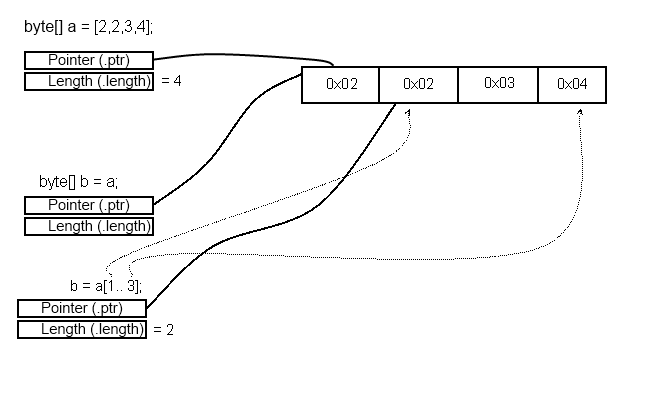
Understanding when NumPy returns a view versus a copy is essential for writing memory-efficient and bug-free code. A view is a new ndarray object that shares the data buffer of the original array, while a copy allocates a new block of memory and duplicates the data.
Operations that typically create views:
- Slicing:
arr[1:5, :]creates a view. It generates a new metadata header with a modified shape and potentially a different starting offset, but points to the same underlying data. - Reshaping:
arr.reshape(2, 6)usually returns a view, as long as the data remains contiguous in a way that can be represented by new strides. For example, reshaping a C-order array into another C-order shape is a view. - Transposing:
arr.Tis a classic example of a view. It simply swaps theshapeandstridestuples.
Operations that create copies:
- Fancy Indexing: Accessing elements with a list or another array, like
arr[[0, 2, 5]], always produces a copy. The resulting elements may not be contiguous in the original buffer, so they must be copied to a new one. - Boolean Indexing:
arr[arr > 5]creates a copy for the same reason as fancy indexing. - Type Conversion:
arr.astype(np.float64)creates a copy if the new data type has a different size than the original.
Modifying a view will change the original array, which can be a powerful feature or a subtle source of bugs if you're not careful. You can check if an array shares memory with another using np.shares_memory() or inspect the .base attribute of a view, which points to the original array.
Sometimes an operation that should return a view, like arr.T, might force a copy later if you try to pass it to a C/C++ extension that requires C-style contiguity. The extension cannot work with the transposed strides, so NumPy must create a contiguous copy first.
For advanced, low-level memory manipulation without allocation, numpy.lib.stride_tricks offers functions like as_strided. This function lets you create an array view with an arbitrary shape and stride, effectively giving you direct control over how the memory buffer is interpreted. It is an extremely powerful but dangerous tool, as it allows you to create invalid memory views that can corrupt data or crash your program. Use it with extreme caution and only when you know exactly what you're doing.
What are the two primary components that make up a NumPy ndarray object from a systems perspective?
Which of the following NumPy operations will create a copy of the array's data, rather than a view?
By understanding the internal data layout of an ndarray, you can write more efficient code, diagnose performance bottlenecks, and create seamless integrations with low-level libraries. It's the difference between using a tool and truly mastering it.