Engineering Dynamic Layouts and Physics Based Web UI
Force-Directed Layout Fundamentals
Beyond the Box Model
Traditional web layouts, governed by the CSS box model, are predictable and static. Elements sit in containers, following rules of flow, flex, or grid. But what if UI elements behaved like physical objects in a system, each with its own mass and velocity, interacting with others through invisible forces? This is the core idea behind force-directed layouts.
In this model, UI components aren't just boxes on a screen; they're nodes in a dynamic graph. The relationships between them act as edges, creating a system that can organize itself organically. Think of the old Google "Anti-Gravity" experiment, where page elements broke free from their grid and floated in a simulated physical space, repelling each other but held together by a central gravity point. This wasn't random chaos—it was a system governed by simple physics rules translated into code.
The Physics of Interaction
To create a self-organizing layout, we need to simulate two fundamental forces: repulsion to prevent elements from collapsing into a single pile, and attraction to keep related elements connected. These forces are calculated for every node in the system during each frame of the animation.
The goal is to reach a state of equilibrium, where the forces balance out and the layout becomes stable and readable.
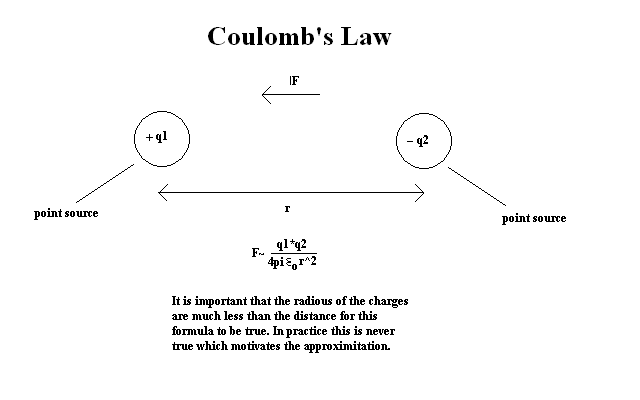
For repulsion, we borrow a principle from electromagnetism: , which describes the force between electrically charged particles. In our UI simulation, every node is treated as a negatively charged particle that repels every other node. The force is strongest when nodes are close and weakens as they move apart. This ensures elements have personal space and don't overlap.
For attraction, we use , which describes the force exerted by a spring. When two nodes are connected by an edge (like a parent and child component), we simulate a spring between them. This spring pulls them together if they are too far apart or pushes them apart if they are too close, trying to maintain an ideal resting length.
Calculating Motion
With our forces defined, we need a way to translate them into motion. At each step of the simulation, we calculate the net force on every node and use that to update its position. This is handled by a numerical integrator. The simplest approach is Euler integration, but it has a major flaw: it can be unstable. If the time steps between calculations are too large, errors accumulate and nodes can fly off to infinity.
// Simplified Euler Integration Logic
function updatePosition(node, force, timeStep) {
  // Calculate acceleration (Force = mass * acceleration)
  let acceleration = force / node.mass;

  // Update velocity
  node.velocity += acceleration * timeStep;

  // Update position
  node.position += node.velocity * timeStep;
}
A much better choice for this type of simulation is (or its close relative, Velocity Verlet). Instead of using velocity to calculate the next position, it uses the previous position, the current position, and the current acceleration. This makes it more numerically stable and computationally efficient, as it doesn't require storing velocity for each particle explicitly at each step. The resulting motion is more realistic and less prone to exploding.
| Integrator | Pros | Cons |
|---|---|---|
| Euler | Simple to implement | Prone to error, can become unstable. |
| Verlet | Stable, computationally cheap. | Slightly more complex to set up initially. |
| Velocity Verlet | Stable, explicitly tracks velocity. | Requires more memory than standard Verlet. |
By combining these physics principles—repulsion, attraction, and a stable integration method—we can create UIs that are not just functional but also feel alive, responding and adapting in a way that is both intuitive and visually compelling.