Embedded Systems Programming for Robotics
Microcontroller Basics
The Brains of the Operation
Think of the computer or phone you're using right now. It can do thousands of things: browse the web, play music, edit photos. It's a generalist. A microcontroller, on the other hand, is a specialist. It's a tiny computer on a single chip, designed to do one specific job over and over again with extreme reliability.
Your microwave, your car's engine management system, a robot arm, a smart thermostat — they all have microcontrollers running the show behind the scenes.
These devices are the heart of what we call embedded systems. An embedded system is a combination of computer hardware and software designed for a dedicated function, often within a larger mechanical or electrical system. The microcontroller is the component that executes the program and controls the system.
Microcontroller
noun
A small, self-contained computer on a single integrated circuit (IC) containing a processor core, memory, and programmable input/output peripherals.
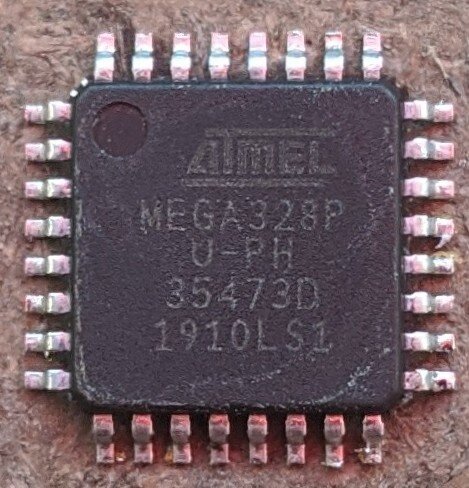
Inside the Chip
A microcontroller isn't just one thing; it's a system-on-a-chip. It bundles together all the essential components of a computer into a single, compact package. The three main parts are the CPU, memory, and I/O peripherals.
Central Processing Unit (CPU): This is the brain. It's not as powerful as the CPU in your laptop, but it doesn't need to be. Its job is to fetch instructions from memory, decode them, and execute them to carry out a specific task.
Memory: A microcontroller has two main types of memory. Think of it like a chef in a kitchen.
- Flash Memory (or ROM): This is the chef's recipe book. It stores the program—the set of instructions the microcontroller follows. This memory is "non-volatile," meaning it remembers the information even when the power is off.
- RAM (Random Access Memory): This is the chef's countertop. It's a temporary workspace for holding data while the program is running, like the current state of a sensor or a calculated value. This memory is "volatile," so its contents are erased when the power is turned off.
Input/Output (I/O) Peripherals: These are the microcontroller's senses and limbs, allowing it to interact with the world. They connect the CPU to external components like sensors, motors, and lights. Peripherals can be simple General Purpose I/O (GPIO) pins that can be turned on or off, or more complex modules for communication (like UART, SPI, and I2C) or timing events.
A World of Microcontrollers
Just like with cars, there are many different makes and models of microcontrollers, each with its own strengths. They are often grouped into families based on their core architecture.
| Family | Key Features | Common Use Cases |
|---|---|---|
| AVR | Simple architecture, easy to use, large community. | Hobbyist projects, Arduino boards, simple automation. |
| PIC | Low power consumption, wide range of options. | Industrial controls, consumer appliances, battery-powered devices. |
| ARM Cortex-M | Powerful and efficient, highly scalable from simple to complex tasks. | Smartphones, high-end robotics, Internet of Things (IoT) devices. |
Choosing the right microcontroller depends on the needs of the project: How much processing power is required? How much memory? What specific peripherals are needed? For a simple blinking light, an AVR is perfect. For a complex drone that needs to process camera data in real-time, an ARM Cortex-M processor would be a better fit.
Understanding these core components—CPU, memory, and peripherals—is the first step toward unlocking the power of these tiny computers. They are the fundamental building blocks for creating countless electronic devices and robotic systems.