DSA and System Design Essentials
Introduction to Data Structures
Organizing Information
Think about your music library. You could have all your songs in one giant, unsorted list. Finding a specific track would be a nightmare. Or, you could organize them by artist, then by album, then by track number. Suddenly, finding what you want is fast and simple.
In programming, a data structure is just a way of organizing information. The goal is to set up your data so that your program can access and work with it efficiently. The choice of data structure can be the difference between a program that runs in a fraction of a second and one that takes minutes.
Data structures are the building blocks of efficient code. They provide the framework for storing and managing data.
Two Main Flavors
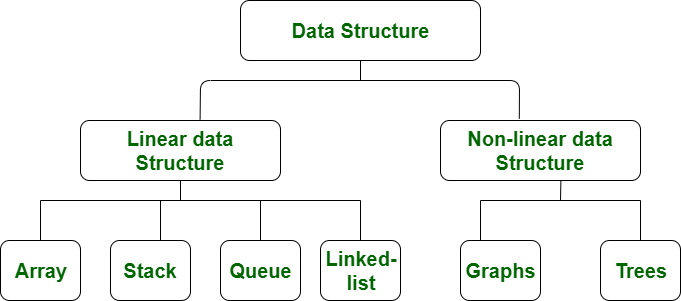
Data structures generally fall into two categories: linear and non-linear. The difference is all about how the data elements relate to each other.
Linear Structures
In a linear structure, data elements are arranged one after another in a sequence. Think of a train, where each car follows the one before it. The most common linear structures are:
- Arrays: An array is like a row of numbered boxes. Each box holds one piece of data, and you can instantly access any box if you know its number (its index). They are simple and fast for accessing elements.
- Linked Lists: A linked list is like a chain. Each link holds a piece of data and also has a pointer to the next link in the chain. They're more flexible than arrays for adding or removing elements from the middle.
- Stacks: Imagine a stack of plates. You can only add a new plate to the top or take a plate from the top. This is called "Last-In, First-Out" (LIFO). The undo function in a text editor is a great example of a stack.
- Queues: Think of a line at a grocery store. The first person to get in line is the first person to get served. This is "First-In, First-Out" (FIFO). Queues are often used to manage tasks, like a print queue.
Non-Linear Structures
In non-linear structures, data elements aren't in a simple sequence. An element can be connected to multiple other elements, creating complex relationships.
- Trees: A tree has a root element and a hierarchy of child elements, much like a family tree or a company's organizational chart. The file system on your computer is a tree structure, with folders (branches) and files (leaves).
- Graphs: A graph is a network of nodes connected by edges. Think of a social network, where people are nodes and friendships are the edges connecting them. City maps are also graphs, with cities as nodes and roads as edges.
Putting Them to Work
Choosing the right data structure depends entirely on the problem you're trying to solve. You wouldn't use a hammer to turn a screw.
| Data Structure | Use It When You Need To... | Real-World Example |
|---|---|---|
| Array | Store a fixed number of similar items and access them quickly by position. | A list of monthly high temperatures for a year. |
| Linked List | Store a list of items that will grow or shrink often. | The playlist in your music app; it's easy to add or remove songs. |
| Stack | Process items in reverse order of how they were added. | The 'Back' button in your web browser tracks your history as a stack. |
| Queue | Process items in the exact order they were added. | A customer service system handling support tickets. |
| Tree | Represent hierarchical data. | The structure of an HTML document (DOM tree). |
| Graph | Represent complex relationships and networks. | GPS navigation finding the shortest route between two locations. |
Understanding these fundamental structures is the first step toward writing smarter, faster, and more powerful software. By organizing your data thoughtfully, you lay the foundation for solving complex problems.
Ready to check your understanding?
What is the primary purpose of a data structure in programming?
Your web browser's 'back' button functionality, which takes you to the previously visited page, is a classic real-world example of which data structure?