Docker Images Explained
Introduction to Docker
The “Works on My Machine” Problem
Every developer has heard it. A piece of software works perfectly on one computer but breaks on another. The reason is usually a small difference in the environment: a different operating system, a conflicting library, or an outdated dependency. These tiny variations cause big headaches and waste a lot of time.
This is where Docker comes in. It’s a tool designed to solve this exact problem by creating consistent, predictable environments for applications to run in. Think of it like a standard shipping container for software. Before shipping containers, loading a ship was a complex puzzle of differently shaped boxes. Now, everything goes into the same type of container, which can be easily moved and stacked by any crane, on any ship, in any port.
Docker packages an application and all its dependencies into a single, standardized unit called a container. This ensures the application runs the same way everywhere.
Containers vs. Virtual Machines
You might be thinking, “This sounds like a virtual machine.” It’s similar, but with a key difference. A virtual machine (VM) emulates an entire computer, including a full guest operating system. This makes VMs heavy and slow to start up.
Containers are much more lightweight. Instead of bundling a whole operating system, a container shares the host machine’s OS kernel. It only packages the application code and the specific libraries and files it needs to run. This makes containers smaller, faster, and more efficient.
This efficiency is a huge benefit. Developers can run more containers on a single machine than VMs, and applications start almost instantly. This speeds up development, testing, and deployment.
How Docker Works
The Docker ecosystem has a few core components that work together. The client is what you interact with through commands. It sends instructions to the Docker daemon, the background service that manages everything. This all happens on a Docker host, which is the machine where your containers run.
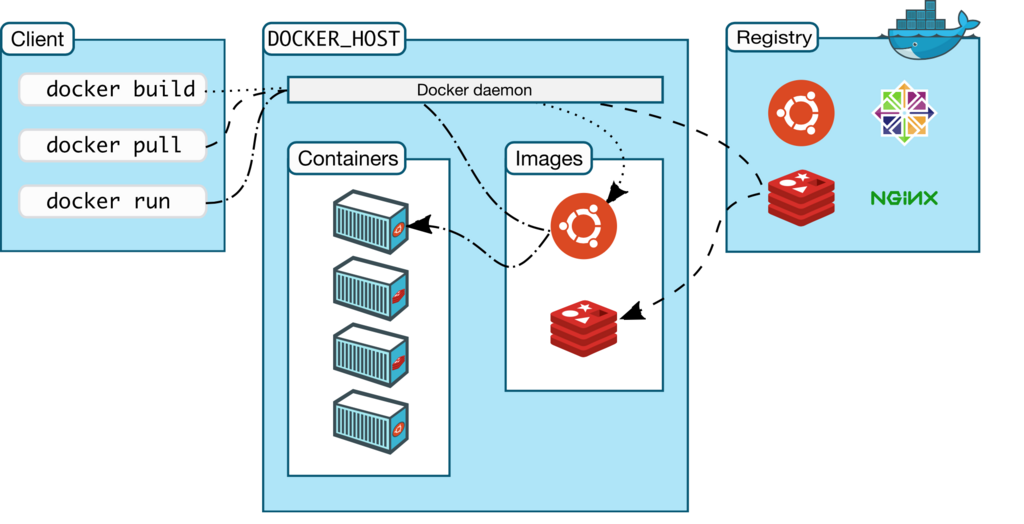
Let's break down the key concepts:
Image
noun
A read-only template used to create containers. It contains the application code, libraries, tools, and other files needed for an application to run.
An image is like a recipe or a blueprint. You define everything your application needs in a special file called a Dockerfile, and Docker uses it to build the image. Images are built in layers, which makes them efficient to store and share.
Container
noun
A runnable instance of an image. It is a live, isolated environment that runs on the host machine’s operating system.
If an image is the recipe, a container is the cake you baked from it. You can create, start, stop, move, and delete containers based on an image. Each container is isolated from others and from the host machine, providing a secure and predictable environment.
Finally, there's the Registry. This is a system for storing and distributing Docker images. The most well-known registry is Docker Hub, which hosts thousands of public images you can use as a starting point for your own applications.
What is the primary problem Docker was designed to solve?
A key difference between a Docker container and a traditional virtual machine (VM) is that a container shares the host machine's operating system kernel, making it more lightweight.
This is just the start of what Docker can do. By packaging applications into portable containers, Docker makes building and shipping software simpler and more reliable.