Docker Fundamentals
Introduction to Docker
The “It Works On My Machine” Problem
Every developer knows the feeling. You’ve spent weeks building an application. It runs perfectly on your laptop. You hand it off to a teammate or deploy it to a server, and suddenly... it breaks. Missing files, different software versions, and subtle operating system differences can cause chaos. This is often called the “it works on my machine” problem.
Docker solves this by packaging an application and all its dependencies into a standardized unit for software development.
Think of it like a real-world shipping container. Before they were invented, shipping goods was a nightmare. Crates of different sizes and shapes were difficult to load, unload, and transport. The standardized shipping container changed everything. It didn't matter what was inside; the container itself could be handled by any ship, train, or crane in the world.
Docker does the same thing for software. It puts your application and everything it needs to run—code, libraries, system tools, runtime—into a neat package called a container. This container can run on any computer that has Docker installed, regardless of the underlying operating system. The application inside behaves the same way everywhere.
Containerization
noun
The process of packaging software code and all its dependencies so that it is isolated from other processes and can run uniformly and consistently on any infrastructure.
You might be thinking, “Isn't this just a virtual machine?” Not quite. While both isolate applications, they do it very differently.
A Virtual Machine (VM) emulates an entire computer, including a full copy of an operating system. If you want to run three applications, you need three VMs, each with its own OS. This is like building three separate houses, each with its own foundation, plumbing, and electricity, just to house one person in each.
Containers, on the other hand, share the host machine's operating system kernel. They only package the application and its unique dependencies. This is more like building an apartment building. All the apartments share the building's main foundation and utilities, making them much lighter and faster to set up than individual houses.
The Benefits of Docker
The lightweight and portable nature of Docker containers offers several key advantages for developers and operations teams.
Consistency and Portability: Docker eliminates the “it works on my machine” problem. A containerized application runs the same way no matter where you deploy it: on a developer’s laptop, a testing server, or in the cloud.
Efficiency: Containers start in seconds because they don't need to boot up a full operating system. They also use fewer CPU and memory resources than VMs, allowing you to run many more containers on the same hardware.
Scalability: Need to handle more traffic? Just spin up more identical containers of your application. Scaling up or down is fast and simple.
Simplified Deployment: The entire process of building, testing, and deploying software becomes faster and more reliable. This is a core principle of modern software practices like Continuous Integration and Continuous Deployment (CI/CD).
Where Did Docker Come From?
The idea of isolating processes isn't new. Unix-like systems have had concepts like chroot since 1979. However, these early technologies were complex and difficult to use.
Docker, Inc. (originally a company called dotCloud) released Docker as an open-source project in 2013. They created a simple, powerful set of tools that made containerization accessible to everyone. Docker packaged existing Linux containerization features into a user-friendly format, and the developer community quickly embraced it. It turned a niche technology into a standard for modern software development.
To use Docker, you'll interact with three fundamental concepts:
- Image: A read-only template with instructions for creating a container. An image includes the application code, libraries, and dependencies. You can think of it as a recipe for your application environment.
- Container: A runnable instance of an image. It's the live, running version of your application. If an image is the recipe, the container is the cake you baked from it.
- Dockerfile: A text file that contains the commands to assemble an image. It's the step-by-step instructions in your recipe.
Developers write a Dockerfile, use it to build an image, and then run that image as one or more containers.
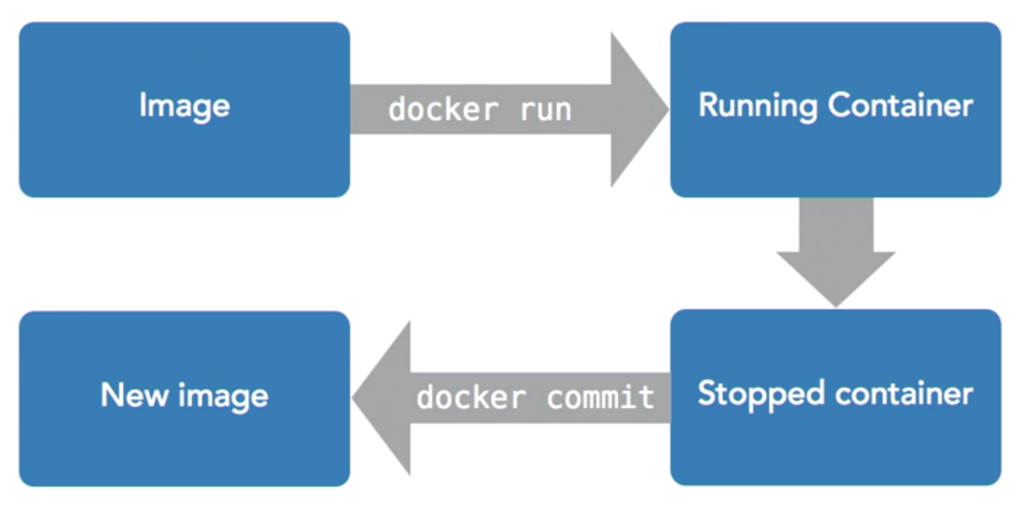
Docker also includes registries, like Docker Hub, which are storage and distribution systems for images. You can pull pre-built images from a public registry or push your own for others to use.
Time to check your understanding.
What is the primary problem Docker was created to solve, often referred to as the “it works on my machine” issue?
Which statement accurately describes the key architectural difference between Docker containers and Virtual Machines (VMs)?
By packaging applications into isolated, portable containers, Docker has fundamentally changed how software is built, shipped, and run. It provides a consistent environment that simplifies development and accelerates deployment.