Docker Fundamentals
Introduction to Docker
What Is Docker?
Imagine a developer builds an application on their laptop. It works perfectly. They hand it off to a teammate for testing, but it immediately breaks. The tester is missing a specific version of a programming language, or their operating system has a slightly different configuration. This is the classic "it works on my machine" problem, a headache that has plagued software development for decades.
Docker solves this problem by packaging an application and all its dependencies—like libraries, system tools, and code—into a single, isolated unit called a container. Think of a shipping container. Before they existed, loading a ship was a chaotic process with different-sized boxes and crates. The standardized shipping container made it possible to pack goods once and move them anywhere, by boat, train, or truck, without repacking.
Docker containers do the same for software. They provide a standardized way to package and run an application, ensuring it works consistently across any environment, from a developer's laptop to a massive cloud server.
This process is called containerization. Unlike traditional virtual machines (VMs) that virtualize an entire operating system, containers virtualize the OS at a higher level. They share the host system's kernel but run as isolated processes in user space. This makes them incredibly lightweight and fast.
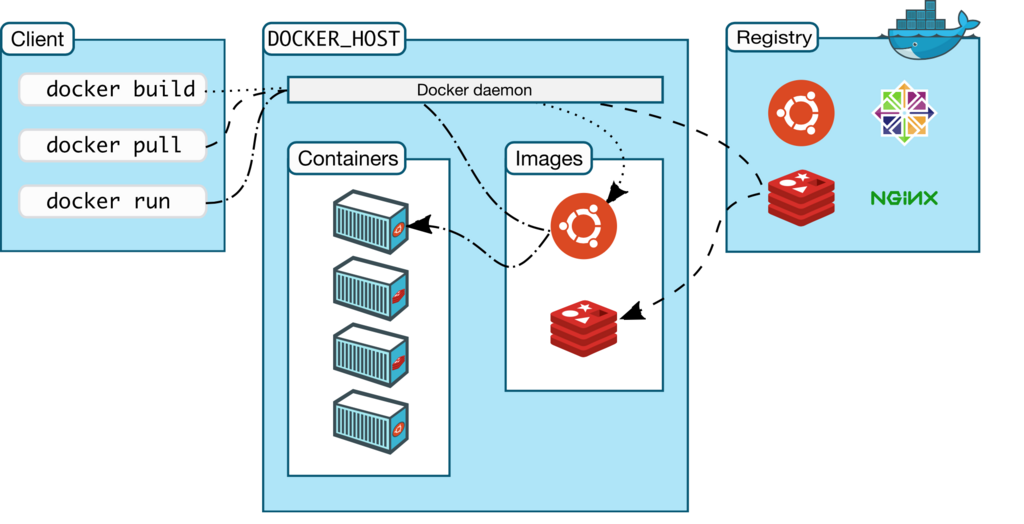
Key Benefits
Using Docker brings several major advantages to the software development lifecycle.
Rapid Development & Deployment: Containers allow developers to set up local development environments that mirror production, reducing surprises when the code is deployed. Because containers are lightweight, they can be started, stopped, and replicated in seconds, speeding up the build, test, and release cycle.
Scalability: Need to handle more traffic? Just spin up more identical containers of your application. This makes scaling services up or down simple and fast, whether you're running on a single server or across a cluster of machines.
Resource Efficiency: Since containers share the host operating system's kernel and don't require a full guest OS, they use far less memory and storage than virtual machines. You can run many more containers on a single host than you could VMs, leading to better hardware utilization and lower costs.
Installing and Verifying Docker
To get started, you'll need to install Docker Desktop, which includes the Docker Engine, the command-line client, and other tools. The installation process is straightforward for most operating systems.
- Windows: Download the installer from the official Docker website. You'll need Windows 10 or 11 (64-bit) and to enable the WSL 2 feature.
- macOS: Download the appropriate installer for your Mac (Intel or Apple Silicon) from the Docker website.
- Linux: Docker provides dedicated packages for most major distributions, like Ubuntu, Debian, Fedora, and CentOS. Follow the specific instructions for your distribution on the Docker documentation site.
Once the installation is complete, you can verify that everything is working correctly by running a simple test container.
Open your terminal or command prompt and run the following command:
docker run hello-world
If Docker is installed correctly, it will pull a small "hello-world" image from the Docker Hub registry and run it in a container. You'll see a confirmation message in your terminal that explains what just happened. This confirms your setup is ready to go.
With that simple command, you've successfully run your first containerized application.