Docker Fundamentals Explained
Introduction to Docker
Solving the “It Works on My Machine” Problem
Every developer has heard it, and most have said it: “But it works on my machine!” An application runs perfectly on a developer's laptop, but fails when it’s moved to a testing server or a production environment. This happens because the environments are different. Maybe the server has a different operating system version, a missing library, or conflicting software.
Docker solves this problem by packaging an application and all its dependencies—libraries, system tools, code, and runtime—into a standardized unit called a container. Think of it like a shipping container. It doesn't matter what's inside; the container itself has a standard shape and can be moved and stacked by any crane, ship, or truck that supports it. Docker containers work the same way. They run on any computer that has Docker installed, regardless of the underlying operating system or hardware.
Docker is an open-source platform designed to automate the deployment, scaling, and management of applications using containerization.
From Servers to Containers
To understand why Docker is so useful, let's look at how software deployment has evolved.
Traditional Deployment: In the past, you would run applications on a physical server. Each server had its own operating system, and you'd install your application and all its dependencies directly onto it. This led to resource conflicts, where one application could hog resources or have dependencies that clashed with another application on the same machine.
Virtualization: The next step was virtual machines (VMs). A VM is an emulation of a full computer system. You can run multiple VMs on a single physical server, each with its own complete guest operating system. This solved the isolation problem, but it was inefficient. Each VM required a full OS, taking up gigabytes of space and significant memory and CPU power.
Containerization: Containers are the next evolution. Unlike VMs, containers share the host machine's operating system kernel. They package up just the application and its dependencies, making them incredibly lightweight and fast. A single server can run many more containers than VMs, and they can start up in seconds instead of minutes.
The Core Components
The Docker world revolves around a few key concepts. Understanding them is the first step to mastering Docker.
Image
noun
A read-only template with instructions for creating a Docker container. An image is like a recipe or a blueprint. It contains the application code, a runtime (like Python or Node.js), libraries, and settings needed to run the application.
Images are often based on other images. For example, you might start with an official Ubuntu image, then add your Python application and its dependencies on top of it, creating a new, customized image.
Container
noun
A runnable instance of an image. If an image is the recipe, the container is the cake you baked from it. You can create, start, stop, move, or delete a container. Each container is an isolated, lightweight package that runs a specific application.
Because containers are isolated, you can run multiple containers from the same image at the same time on the same host, and they won't interfere with each other.
Engine
noun
The core software that builds, runs, and manages Docker containers. The Docker Engine is a client-server application. The server part is a long-running process called a daemon, which does the heavy lifting of creating and managing images and containers. The client is a command-line interface (CLI) that lets you interact with the daemon.
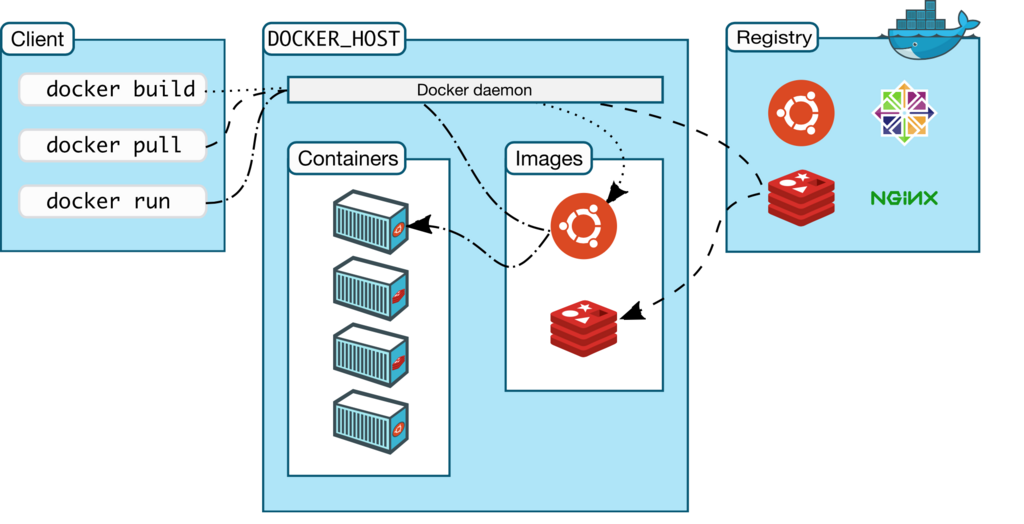
The diagram above shows how these pieces fit together. You use the Docker client (your terminal) to send commands like docker run to the Docker daemon (the engine). The daemon then checks for the image locally. If it doesn't have it, it pulls the image from a remote registry (like Docker Hub, a public library of images) and uses it to create and run a new container.
Key takeaway: An Image is a template. A Container is a running instance of that template. The Docker Engine makes it all happen.
Ready to check your understanding of these foundational concepts?
What is the primary problem that Docker aims to solve?
How does a Docker container differ from a Virtual Machine (VM)?
Now that you have a solid grasp of what Docker is and the problems it solves, you're ready to move on to see it in action.