Docker Fundamentals
Introduction to Docker
The “Works on My Machine” Problem
Every developer knows the feeling. You spend weeks building an application. It runs perfectly on your laptop. You hand it off to be tested or deployed, and then you hear the dreaded words: “It’s not working.”
This is the classic “works on my machine” problem. It happens because the environment on your computer is different from the environment where the application is being run. Maybe your laptop has a different version of a programming language, a specific library, or a unique configuration file. These small differences can cause big problems, leading to bugs, crashes, and delays.
The goal is to create a consistent environment for an application, from the developer's laptop all the way to the production server.
For years, developers and system administrators have tried to solve this. The journey from messy, unreliable deployments to clean, predictable ones has had a few major stops along the way.
From Servers to Virtual Machines
In the early days, applications were often installed directly onto a physical server. If you wanted to run three different applications, you might need three separate servers. This was expensive and inefficient. One application might use only 10% of its server’s resources, leaving the other 90% wasted. Even worse, if two applications needed different versions of the same dependency, you couldn't run them on the same server without conflicts.
Enter the virtual machine, or VM. A VM is essentially an entire computer, complete with its own operating system (OS), running on top of another computer’s hardware. A piece of software called a hypervisor allows you to run multiple VMs on a single physical server, each completely isolated from the others.
This was a huge improvement. It solved the dependency conflict problem and made much better use of hardware. But VMs have their own drawbacks. They are large, since each one includes a full copy of an operating system. They can take several minutes to boot up and consume a lot of memory and CPU power.
Enter the Container
Docker is an open-source platform designed to automate the deployment, scaling, and management of applications using containerization.
Docker introduced a more efficient approach called containerization. Think of a shipping container. It doesn't matter if it's holding electronics, bananas, or car parts; the container itself has a standard size and shape. This allows it to be moved by any standard crane, ship, or truck.
A Docker container does the same thing for software. It packages an application and all its dependencies—libraries, configuration files, and runtimes—into a single, standardized unit. This container can then run on any computer that has Docker installed, regardless of the underlying operating system or hardware.
This approach provides several key benefits:
- Consistency: The “works on my machine” problem disappears. If it runs in a container on a developer's laptop, it will run the same way in a container on a server.
- Efficiency: Containers are incredibly lightweight. Unlike VMs, they don’t need their own guest operating system. Instead, they share the host machine’s OS kernel. This means they use far fewer resources and can start up in seconds.
- Scalability: Because containers are so light, you can run many more of them on a single server than you could with VMs. Need to handle more traffic? Just spin up a few more identical containers.
The diagram above shows the key difference. Virtual machines require a full guest operating system for each application, which is bulky. Containers share the host operating system's kernel, making them much lighter and faster.
How Docker Works
Docker's architecture has a few main components that work together. You don't need to be an expert in them to start, but it helps to know the key players.
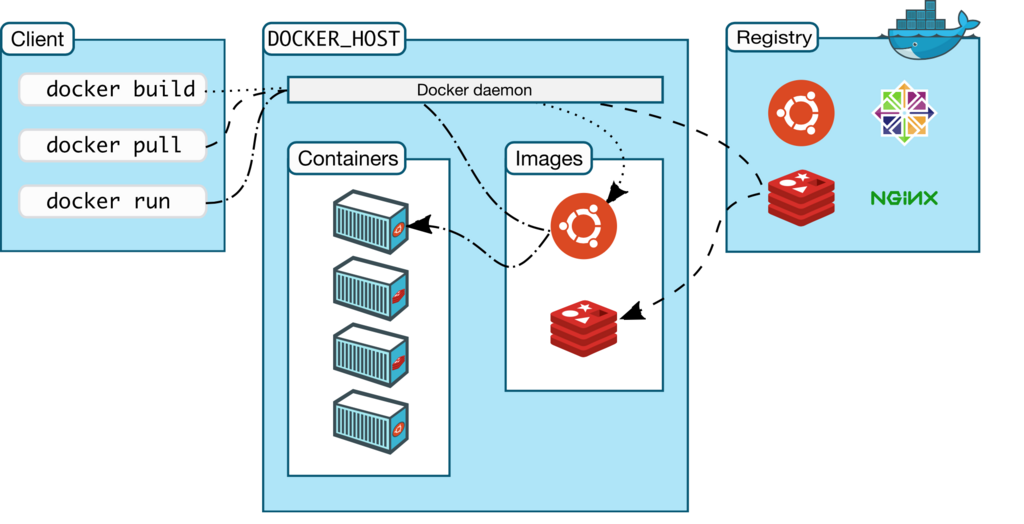
Let's break down this diagram:
-
Docker Daemon: This is the brain of the operation. The daemon (
dockerd) is a background service that runs on your host machine. It listens for commands and manages Docker objects like images, containers, and networks. -
Docker Client (CLI): This is how you interact with Docker. When you type a command like
docker run, you are using the Docker client. The client sends your command to the Docker daemon, which then carries it out. -
Docker Registry: This is where Docker images are stored. Think of it like a GitHub for Docker images. Docker Hub is the default public registry, but you can also run your own private one. When you run a command like
docker pull, the daemon fetches the requested image from the configured registry.
These pieces work together to build, run, and share applications. A developer specifies an application's environment in a simple text file called a Dockerfile, uses the client to tell the daemon to build an image from it, and then runs that image as a container anywhere Docker is installed.
What is the primary cause of the “works on my machine” problem in software development?
What is a major drawback of using Virtual Machines (VMs) compared to containers?
By packaging applications into isolated, portable containers, Docker solves long-standing problems in software development and deployment, making the entire process more reliable and efficient.