Docker Fundamentals
Introduction to Docker
Solving the 'It Works on My Machine' Problem
Every developer has heard it. A piece of software works perfectly on one computer but breaks on another. This is usually because of small differences in the environment, like the operating system version, installed libraries, or system settings.
This inconsistency makes developing, testing, and deploying software difficult and unpredictable.
Docker solves this problem by packaging an application and all its dependencies—code, libraries, tools, and settings—into a single, isolated unit called a container. This container can run on any computer that has Docker installed, ensuring the application behaves the same way everywhere. No more surprises.
Docker's Core Components
To understand how Docker works, you need to know about its three main components: images, containers, and the Docker Engine.
Image
noun
A read-only template with instructions for creating a Docker container. It's like a blueprint or a recipe for your application environment.
An image contains everything needed to run your application: the code, a runtime (like Python or Node.js), system tools, and libraries. You can build your own images or use ones created by others from a public registry like Docker Hub.
Container
noun
A runnable instance of an image. If an image is the blueprint, a container is the actual house built from that blueprint.
Containers are the live, running version of images. They are lightweight, portable, and isolated from each other and the host machine. You can start, stop, move, and delete containers with simple commands. Because they are isolated, you can run multiple containers on the same machine without them interfering with one another.
The Docker Engine is the underlying client-server application that builds and runs these containers. It's the core of Docker, managing all the images, containers, and networking. It acts as the command center, taking instructions from the user and making everything happen.
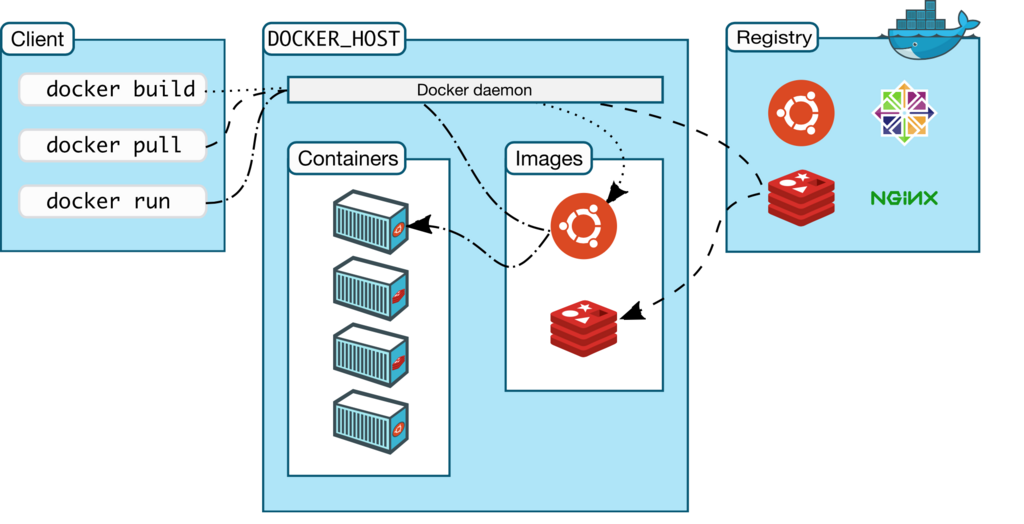
The Benefits of Using Docker
Packaging applications in containers provides several key advantages.
Consistency & Portability: Containers run the same regardless of where they are deployed. A container developed on a laptop will run identically on a testing server, a production server, or in the cloud.
Efficiency: Containers share the host machine's operating system kernel, making them much more lightweight than traditional virtual machines (VMs). They start faster and use fewer resources, allowing you to run more applications on the same hardware.
Isolation: Each container runs in its own isolated environment. This means an application in one container won't affect applications in other containers, which improves security and stability.
Now that you understand the basic concepts, you're ready to see how these pieces fit together to build and run applications.
What is the primary problem that Docker is designed to solve?
In the Docker ecosystem, what is a 'container'?