Docker for Network Engineers
Docker Basics
What Is Docker?
Docker is a tool that makes it easier to create, deploy, and run applications. It does this by using containers, which are lightweight, standalone packages that include everything needed to run a piece of software: the code, runtime, system tools, libraries, and settings.
This solves the classic developer problem: "It works on my machine." By packaging the application and its environment together, Docker ensures that it runs the same way everywhere, from a developer's laptop to a production server.
Containers vs. Virtual Machines
To understand Docker's value, it helps to compare containers to virtual machines (VMs). Both allow you to run multiple applications in isolation on a single physical machine, but they do so in fundamentally different ways.
A VM virtualizes the hardware. It runs a full copy of an operating system on top of a hypervisor, which manages the physical hardware. Each VM gets its own dedicated resources and is quite large, often gigabytes in size. They can be slow to start up.
Containers, on the other hand, virtualize the operating system. They sit on top of a single host OS and share its kernel. Instead of packaging a whole OS, a container only includes the application and its specific libraries and dependencies. This makes them extremely lightweight, fast to start, and efficient.
This efficiency is a game-changer. You can run many more containers on a server than you could VMs, which means better resource utilization and lower costs.
Core Docker Concepts
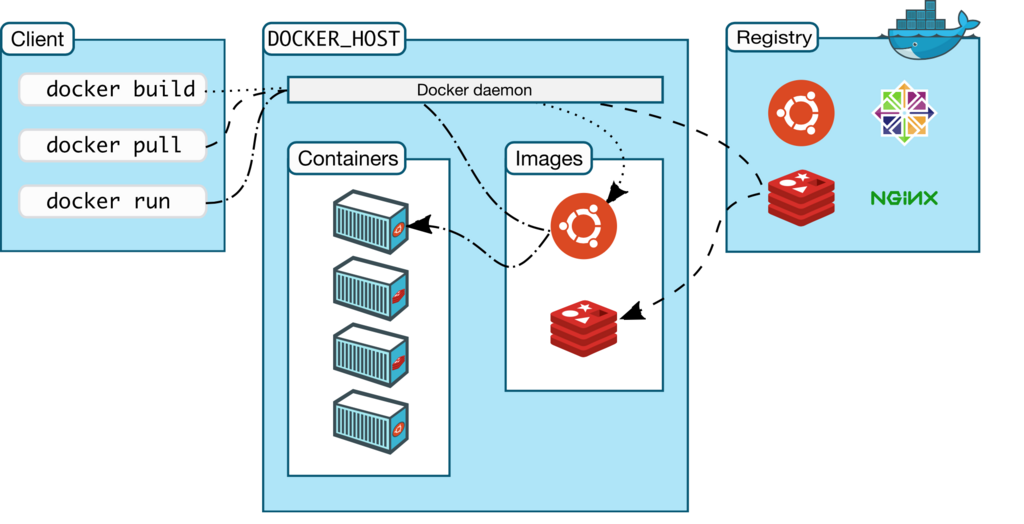
To work with Docker, you need to understand three main components: the Docker Engine, Images, and Containers.
Image
noun
A read-only template with instructions for creating a Docker container. It's like a blueprint or a recipe.
Images are often based on other images, with additional customization. For example, you might start with a base Ubuntu image, add an Apache web server and your application code, and save that combination as a new image.
Container
noun
A runnable instance of an image. It's the actual running software created from the image's instructions.
You can create, start, stop, move, and delete containers. Each container is an isolated and secure application platform.
Think of it this way: An image is the recipe, and the container is the cake you bake from that recipe. You can bake many identical cakes (containers) from a single recipe (image).
Docker Engine is the underlying client-server application that powers everything. It has three main components:
- A server, which is a long-running program called a daemon process. It's responsible for creating and managing Docker objects like images, containers, and networks.
- A REST API, which programs can use to talk to the daemon and instruct it on what to do.
- A command-line interface (CLI) client. This is how most people interact with Docker, using commands like
docker runto control the daemon.
The Benefits of Docker
Using Docker provides several key advantages for deploying software.
| Benefit | Description |
|---|---|
| Portability | Containers package everything an app needs, so they can run on any machine with Docker installed, regardless of the underlying OS. |
| Efficiency | Because containers share the host OS kernel and don't require a guest OS, they are much smaller and start almost instantly. |
| Consistency | Docker creates a consistent environment for an application from development through testing and into production, reducing bugs and deployment issues. |
| Isolation | Each container runs in its own isolated environment, so one application won't interfere with another on the same host. |
This combination of features makes Docker a powerful tool for modern software development, especially for building and scaling network services.
What is the fundamental difference between how Docker containers and Virtual Machines (VMs) operate?
In the Docker Engine architecture, what is the role of the daemon process?