Docker Compose Fundamentals
Introduction to Docker
The “Works on My Machine” Problem
Every developer has heard it. A piece of software works perfectly on one computer but fails spectacularly on another. The cause is usually a subtle difference in the environment: a different operating system version, a missing library, or conflicting software. This inconsistency is a huge headache for building and shipping applications reliably.
Docker is a tool designed to solve this exact problem. It packages an application and all its dependencies—libraries, system tools, code, and runtime—into a single, isolated unit called a container. This container can then run on any computer that has Docker installed, regardless of the underlying operating system or configuration.
Think of a container as a standardized box for software. Everything the application needs to run is inside the box, ensuring it behaves the same way everywhere.
Containers vs. Virtual Machines
You might be thinking, "This sounds like a virtual machine (VM)." While they solve similar problems, their approach is fundamentally different. A VM virtualizes the physical hardware. It runs a complete guest operating system on top of the host machine's OS. This means each VM has its own kernel and OS files, making it large and slow to start.
Containers, on the other hand, virtualize the operating system itself. They share the host system's kernel and isolate the application's processes from the rest of the system. This makes them incredibly lightweight and fast.
Because they don't need a full operating system, containers are measured in megabytes (instead of gigabytes for VMs), and they can start up in seconds. This efficiency allows you to run many more containers on a single server than you could with VMs, making better use of your hardware resources.
Images and Containers
In the Docker world, two terms are central: images and containers. It's crucial to understand how they relate.
A Docker image is a read-only template that contains the instructions for creating a container. It's like a recipe or a blueprint. It specifies everything the application needs to run: the code, a runtime (like Python or Node.js), system tools, libraries, and settings.
A Docker container is a runnable instance of an image. If an image is the recipe, the container is the cake you baked from it. You can create, start, stop, move, and delete containers based on a single image. Each container is an isolated environment, and any changes you make inside a container don't affect the image or other containers.
| Concept | Analogy | Description |
|---|---|---|
| Image | Recipe | A read-only template with instructions. |
| Container | Cake | A runnable, isolated instance created from an image. |
Images are built in layers. Each instruction in the build process creates a new layer on top of the previous one. Docker is clever about this; it caches these layers, which makes building images fast and efficient. You can find thousands of pre-built images for popular software on Docker Hub, a public registry for Docker images.
The Docker Engine
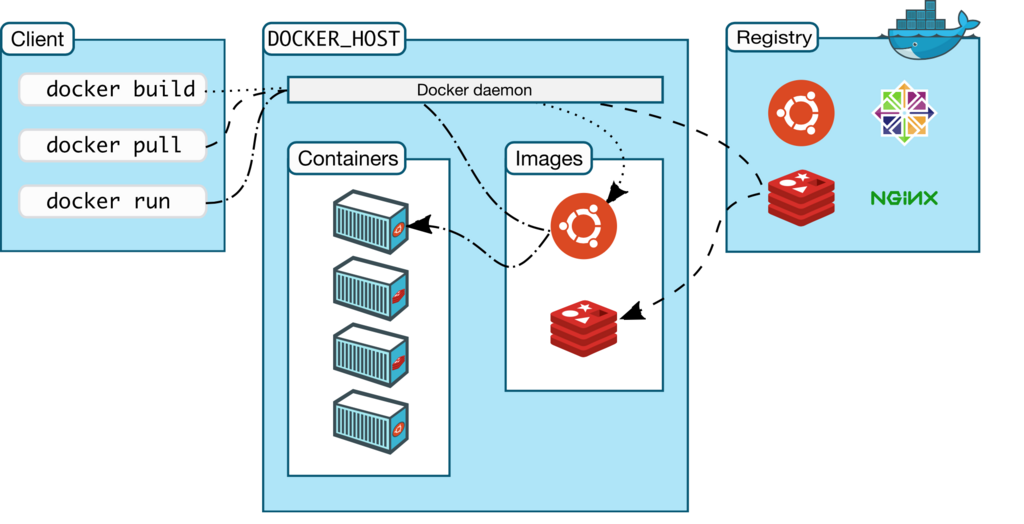
The magic behind all this is the Docker Engine. It's the core component of Docker that runs on your machine and is responsible for building and running containers. The Docker Engine is a client-server application with three main parts:
1. A Server: This is a long-running program called a daemon process. The daemon listens for API requests and manages Docker objects like images, containers, networks, and volumes.
2. A REST API: The API specifies how applications can talk to the daemon and instruct it on what to do.
3. A Command Line Interface (CLI) Client: The
dockercommand is what you use to interact with Docker. The client sends your commands (likedocker runordocker build) to the daemon, which carries them out.
When you type a command like docker run hello-world, the Docker client tells the daemon to run a container from the hello-world image. The daemon checks if it has that image locally. If not, it pulls the image from the Docker Hub registry, and then it creates and runs a new container based on that image.
What is the primary problem Docker was designed to solve?
How do Docker containers fundamentally differ from traditional Virtual Machines (VMs)?
And that's the basic idea. Docker packages applications into portable containers, making software development and deployment more consistent and efficient.