Docker Cleanup Commands Explained
Docker Basics
The “It Works on My Machine” Problem
Every developer has heard it. A piece of software works perfectly on one computer but breaks on another. These inconsistencies happen because of differences in operating systems, library versions, or system configurations.
Docker solves this by packaging an application and all its dependencies—like libraries, system tools, and code—into a single, isolated unit called a container. This container can run reliably on any machine that has Docker installed, ending the “it works on my machine” problem for good.
Docker is a tool that makes it easy to create, deploy, and run applications in containers.
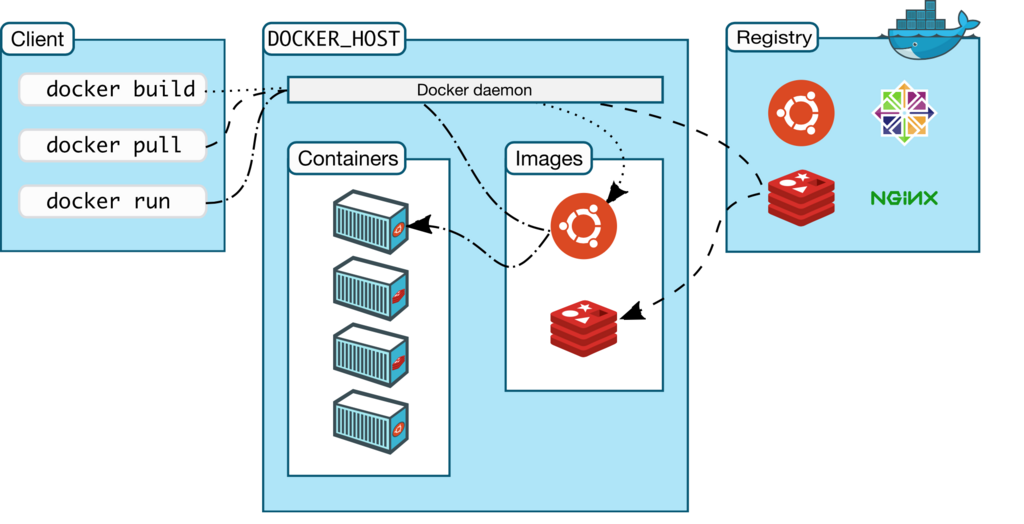
The system has three main parts:
- Client: This is how you interact with Docker. When you type commands like
docker runinto your terminal, you're using the Docker client. - Host: The Docker host runs the Docker daemon, a background process that manages all the heavy lifting of building, running, and distributing containers.
- Registry: This is a storage system for Docker images. Think of it like GitHub, but for Docker images. Docker Hub is the most common public registry.
Core Docker Components
To work with Docker, you need to understand a few key building blocks. The most important are images and containers.
An image is a blueprint. A container is a running instance of that blueprint.
Imagine you have a recipe for a cake (the image). The recipe lists all the ingredients and instructions. When you follow the recipe to actually bake a cake, you get a real, edible cake (the container). You can use the same recipe to bake many identical cakes.
Image
noun
A read-only template with instructions for creating a Docker container. It includes the application code and all its dependencies.
Container
noun
A runnable instance of an image. It is a lightweight, standalone, and executable package of software that includes everything needed to run it.
Two other important components are volumes and networks.
- Volumes are used to persist data generated by and used by Docker containers. Think of a container as temporary. If you stop and remove it, any data created inside it is lost. A volume connects a folder on your host machine to a folder inside the container, so the data lives on even if the container is gone.
- Networks allow containers to communicate with each other and with the outside world. By default, containers are isolated, but Docker networks let you connect them in a secure and predictable way.
Basic Commands
Let's look at the essential commands for managing Docker containers. The most fundamental command is docker run.
docker run hello-world
Here's what happens when you run this command:
- Docker checks if you have the
hello-worldimage locally. - If not, it pulls the image from Docker Hub.
- It then creates a new container from that image.
- Finally, it runs the container, which prints a welcome message and then exits.
To see what containers are currently running, use the ps command.
# List currently running containers
docker ps
The hello-world container stops right after it runs, so you won't see it with docker ps. To see all containers, including stopped ones, add the -a flag.
# List all containers, including stopped ones
docker ps -a
You can manage the lifecycle of a container with stop and rm. To stop a running container, you need its ID, which you can get from docker ps.
# Stop a container using its ID
docker stop <container_id>
Once a container is stopped, you can remove it to clean up your system. You cannot remove a container that is still running.
# Remove a stopped container
docker rm <container_id>
| Command | Description |
|---|---|
docker run [image] | Creates and starts a container from an image. |
docker ps | Lists all running containers. |
docker ps -a | Lists all containers, including stopped ones. |
docker stop [id] | Stops a running container. |
docker rm [id] | Removes a stopped container. |
Time to check your understanding of these core concepts.
What is the primary problem Docker is designed to solve?
In the common Docker analogy, if a Docker image is a recipe, what is a Docker container?