Docker and Kubernetes for App Deployment
Introduction to Docker
What Is Docker?
Have you ever heard a developer say, “Well, it works on my machine”? This classic problem happens when software runs perfectly on one computer but fails on another because of differences in their setups. Docker is a tool designed to solve this exact issue.
It uses something called containerization. Think of a physical shipping container. It doesn't matter what's inside—bananas, electronics, or car parts—the container can be moved from a ship to a train to a truck without any changes. Docker containers do the same thing for software. They package an application with all its necessary parts, like code, libraries, and settings, into a single, isolated unit.
A container is a standardized package that holds everything your application needs to run. This ensures your software works the same way everywhere.
The Docker Architecture
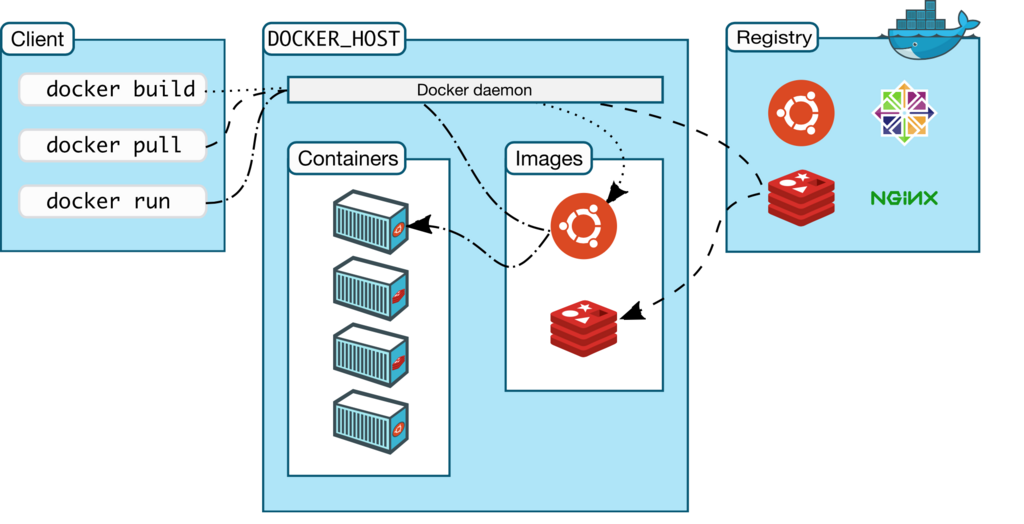
Docker's architecture has three main parts: the client, the host, and the registry. They work together to build, run, and share containerized applications.
-
Docker Client: This is how you interact with Docker. When you type commands like
docker runinto your terminal, you're using the Docker client. It sends your instructions to the Docker daemon. -
Docker Host: This is the machine where the magic happens. It runs the Docker daemon (or Docker Engine), a background service that listens for commands from the client. The daemon manages all the heavy lifting: building images, running containers, and handling storage.
-
Registry: This is a library for storing and sharing Docker images. The most common registry is Docker Hub, which is like a GitHub for Docker images. You can pull public images from the registry or push your own for others to use.
Images and Containers
The two most fundamental concepts in Docker are images and containers. It's easy to confuse them, but the difference is simple.
image
noun
A read-only template with instructions for creating a Docker container. It's like a blueprint or a recipe.
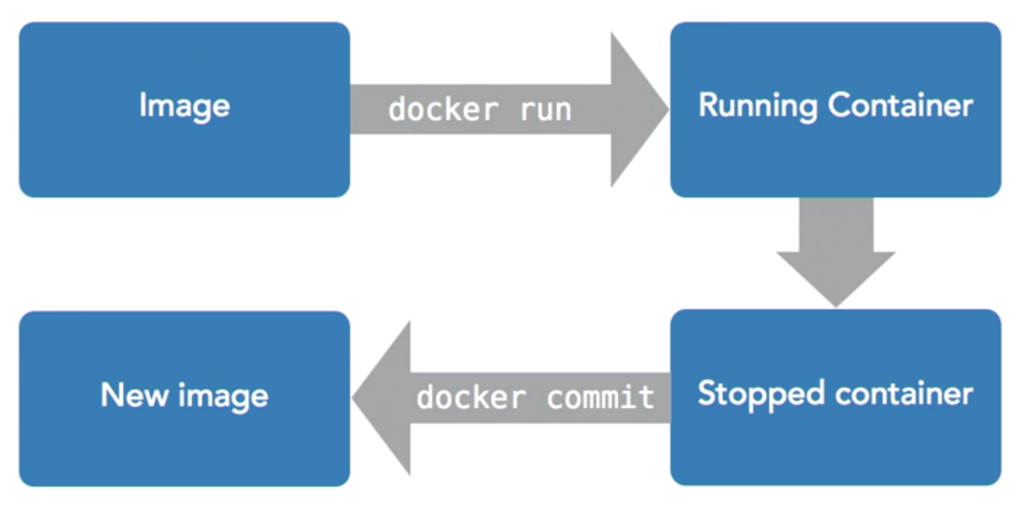
An image contains the application code, a runtime, system tools, and libraries—everything needed to run a piece of software. You build an image once, and you can use it to create many containers.
container
noun
A runnable instance of an image. It's the actual running software created from the image's instructions.
If an image is the blueprint for a house, a container is the actual house built from that blueprint. You can build multiple identical houses (containers) from the same blueprint (image).
Running Your First Container
Let's get Docker running on your machine. The easiest way is to install Docker Desktop, which is available for Mac, Windows, and Linux. You can find the installation instructions on the official Docker website.
Once it's installed, open your terminal and run this command:
docker run hello-world
You should see a message that starts with "Hello from Docker!" This confirms your installation is working correctly. But what did that command actually do? Let's break it down.
- The
dockerclient passed yourrun hello-worldcommand to the Docker daemon. - The daemon searched for an image named
hello-worldon your local machine. - Because it couldn't find one, it connected to Docker Hub (the default registry) and pulled the
hello-worldimage. - Once the image was downloaded, the daemon created a new container from it.
- The daemon ran the container, which executed its program: printing the welcome message.
- After printing the message, the program finished, and the container stopped.
And that's it! You've just run your first containerized application. By packaging software into images and running them as containers, Docker provides consistency and portability, making development and deployment much simpler.
What is the primary problem Docker is designed to solve?
What is the relationship between a Docker image and a Docker container?