Docker and Helm Essentials
Introduction to Docker
What is Docker?
Imagine trying to ship goods across the ocean a century ago. You'd have a chaotic mix of barrels, sacks, and crates of all shapes and sizes. Loading and unloading was slow, inefficient, and unpredictable. Then, the standardized shipping container arrived. Suddenly, everything fit into neat, uniform boxes that could be moved easily by cranes, ships, and trucks anywhere in the world.
Docker does for software what the shipping container did for global trade. It packages an application and all its dependencies—libraries, system tools, code, and runtime—into a single, standardized unit called a container. This solves a classic problem in software development: the dreaded "it works on my machine" issue. By bundling everything together, Docker ensures that an application runs the same way, regardless of where it's deployed.
A Docker container is a lightweight, standalone, executable package of software that includes everything needed to run an application.
Containers vs Virtual Machines
You might be thinking, "Isn't this what virtual machines, or VMs, do?" It's a fair question, but there's a key difference in their approach. A virtual machine emulates an entire computer, including a full copy of an operating system (the "guest" OS) on top of the host machine's OS. This is like putting a complete, separate house inside your existing house. It works, but it's heavy and uses a lot of resources.
Containers, on the other hand, share the host system's operating system kernel. They only package the application and its direct dependencies. This makes them incredibly lightweight and fast. Instead of a whole house, a container is more like a single, self-contained apartment in a larger building. All apartments share the building's main plumbing and electricity (the kernel), but each one is isolated and secure.
This architectural difference is why containers are so efficient. They start in seconds, use less memory, and require less disk space, allowing you to run many more containers on a single machine than you could virtual machines.
The Docker Ecosystem
Docker isn't just one thing; it's a platform with several key components that work together. The core is the Docker Engine, which is the application that runs on your machine and is responsible for building and running containers. It uses a client-server architecture.
You interact with the Docker Engine using the Docker Client, which is the command-line tool you'll use to issue commands like docker run or docker build. The client sends these commands to the Docker Daemon, the background service that manages your images, containers, networks, and storage volumes.
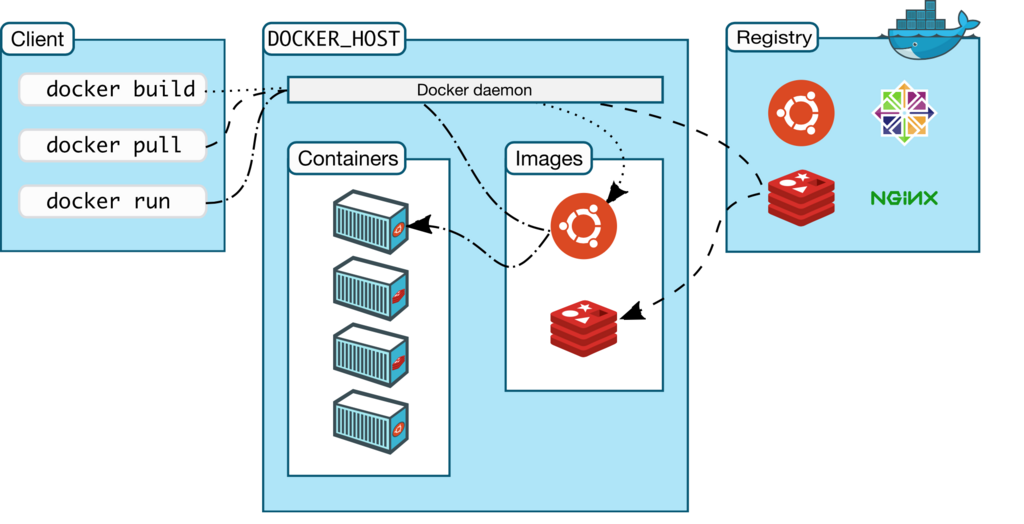
But where do the blueprints for containers come from? They come from Docker Images. An image is a read-only template with instructions for creating a Docker container. Images are often based on other images, with additional customization. For example, you might start with a base Ubuntu image, add a Python runtime, and then add your own application code.
These images are stored in a Docker Registry. The default public registry is Docker Hub, which hosts tens of thousands of official and user-created images you can use as a starting point for your own applications. Think of it like GitHub, but for Docker images.
Finally, for applications that require multiple containers to work together (like a web server, a database, and a caching service), there's Docker Compose. It's a tool for defining and running multi-container applications with a single configuration file. This makes managing complex application setups much simpler.
Ready to check your understanding?
What is the primary problem Docker solves, often referred to as the "it works on my machine" issue?
According to the text's analogy, a Virtual Machine is like a complete house inside another house, while a Docker container is more like a(n)...
By understanding these core concepts, you're ready to start exploring how Docker can streamline your development and deployment workflows.