DNS DHCP IPAM Essentials
Introduction to Network Fundamentals
The Internet's Address Book
Every device connected to a network, from your laptop to a massive web server, needs a unique identifier to communicate. This identifier is called an Internet Protocol (IP) address. Think of it like a mailing address for your computer. It’s a series of numbers that tells other devices where to send information.
Without these addresses, data wouldn't know where to go. A simple request to view a website involves your computer sending a message to a server's IP address and that server sending the website's data back to your IP address. But remembering long strings of numbers for every website you visit would be impossible. That's where a few key services come in to manage everything behind the scenes.
DNS: The Phonebook of the Internet
You don't dial a friend's phone number by remembering the digits; you look up their name in your contacts. The Domain Name System (DNS) works the same way for the internet. It translates human-friendly domain names, like www.google.com, into machine-friendly IP addresses, like 142.250.191.78.
When you type a web address into your browser, a DNS server looks up that name, finds the corresponding IP address, and directs your request to the right server.
This process is fundamental to how we navigate the web. Without DNS, the internet would be a sea of numbers, completely unusable for most people. It's a globally distributed system, meaning there isn't one single DNS server; thousands of them work together to keep the internet running smoothly.
DHCP: Handing Out Addresses
So where does your device get its IP address in the first place? When you connect to a Wi-Fi network at home or a coffee shop, you don't manually type in an IP address. This is thanks to the Dynamic Host Configuration Protocol (DHCP).
Think of a DHCP server as a host at a restaurant. When you (your device) arrive, the host (DHCP server) automatically assigns you a table (an IP address) from a pool of available ones. This assignment, or "lease," is temporary. When you leave the network, your IP address is returned to the pool so it can be assigned to someone else.
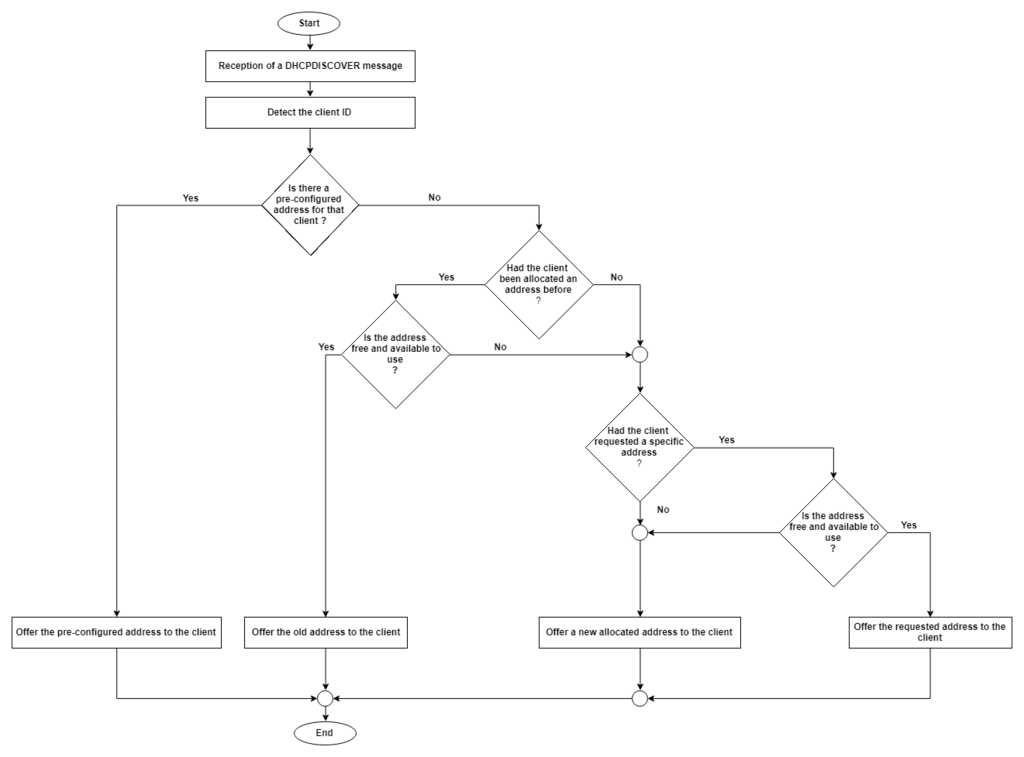
This automation is crucial. It means network administrators don't have to manually configure every single device that joins their network. It allows for efficient use of a limited number of IP addresses and makes connecting to networks seamless for users.
IPAM: The Master Plan
If DNS is the phonebook and DHCP is the address assigner, what keeps track of the entire system? That's IP Address Management (IPAM).
IPAM is not a protocol but a methodology, often supported by software, for planning, tracking, and managing the IP address space in a network. In our restaurant analogy, IPAM is the manager's reservation book and floor plan. It knows how many tables (IP addresses) are in the restaurant, which ones are in use, who is using them, and how many are reserved for future parties (subnets).
Essentially, IPAM provides a single source of truth for a network's address space, integrating with DNS and DHCP to ensure they work together without conflicts.
| Service | Analogy | Core Function |
|---|---|---|
| DNS | Phonebook | Translates names to numbers (IP addresses). |
| DHCP | Restaurant Host | Automatically assigns temporary IP addresses. |
| IPAM | Reservation System | Plans and tracks all IP address usage. |
By using IPAM, administrators can prevent issues like two devices being assigned the same IP address, plan for network growth, and maintain an organized, efficient system. It’s the administrative layer that makes the dynamic actions of DHCP and the lookup function of DNS manageable on a large scale.
These three components—DNS, DHCP, and IPAM—form a foundational trio for network operations. They work in concert to translate human requests, assign necessary addresses, and manage the entire system, making the complex web of network connections feel simple and instant.