Digital Security Essentials
Understanding Digital Security
Your Digital Life
Think about everything you do online. You send emails, chat with friends, shop, pay bills, and share photos. Each of these activities creates a trail of personal information. Digital security is the practice of protecting this information, your online accounts, and your devices from being accessed by people who shouldn't have them.
It’s not just about stopping hackers. It’s about keeping your personal conversations private, ensuring your financial details are safe, and maintaining control over your own digital identity. Without good security habits, you leave the door open to a variety of online threats.
Common Online Threats
The internet has its share of dangers. Understanding them is the first step toward avoiding them. Three of the most common threats are phishing, malware, and data breaches.
Phishing
noun
An attempt to trick someone into revealing sensitive information, such as usernames, passwords, and credit card details, by disguising as a trustworthy entity in an electronic communication.
Phishing attacks are a form of social engineering. Imagine getting an urgent email that looks like it’s from your bank, telling you there’s a problem with your account. It asks you to click a link and log in immediately. The link, however, takes you to a fake website that looks just like the real one. When you enter your username and password, you’re not logging into your bank; you’re handing your credentials directly to a scammer.
The key to spotting phishing is to be skeptical of unexpected or urgent requests for your personal information. Always verify the sender and avoid clicking suspicious links.
Next up is malware, which is short for “malicious software.” This is a broad category of software designed to harm or exploit any programmable device or network. You might know it by other names, like viruses, spyware, or ransomware.
Malware
noun
Software intentionally designed to cause disruption to a computer, server, client, or computer network, leak private information, or gain unauthorized access to information or systems.
Malware can get onto your device if you download a file from an untrustworthy source, click on a malicious ad, or even visit a compromised website. Once installed, it can do things like steal your data, lock your files and demand a ransom, or secretly use your device to attack others.
Finally, there are data breaches. A data breach happens when sensitive information is stolen from a company or organization you trust with your data. This could be a social media platform, an online store, or even a hospital. You might have perfect security habits yourself, but if a company holding your data is breached, your information, including names, email addresses, and passwords, can be exposed and sold online.
Building Your Defenses
While you can't stop data breaches at other companies, you can take powerful steps to protect your accounts. The two most important habits for personal digital security are using strong passwords and enabling two-factor authentication.
By implementing three core practices—using strong, unique passwords; storing them in a password manager; and enabling two-factor authentication—you'll protect yourself from the vast majority of password-related threats.
A password is the key to an online account. If a thief gets your key, they get access. If you use a simple, common password, it's like using a flimsy lock that's easy to pick. And if you use the same password everywhere, a data breach at one company means thieves now have the key to all your accounts. That's why every important account needs its own strong, unique password.
| Weak Passwords | Strong Passwords |
|---|---|
password123 | R7!bZ#9p$vK2@sN |
johndoe | canyon-breeze-glimmer-9 |
qwerty | MyCatIsAFanOfQuantum!4 |
111111 | f@#8kPq&z2^E |
But even a strong password can be stolen. That's where two-factor authentication, or 2FA, comes in. It adds a second layer of security to your accounts.
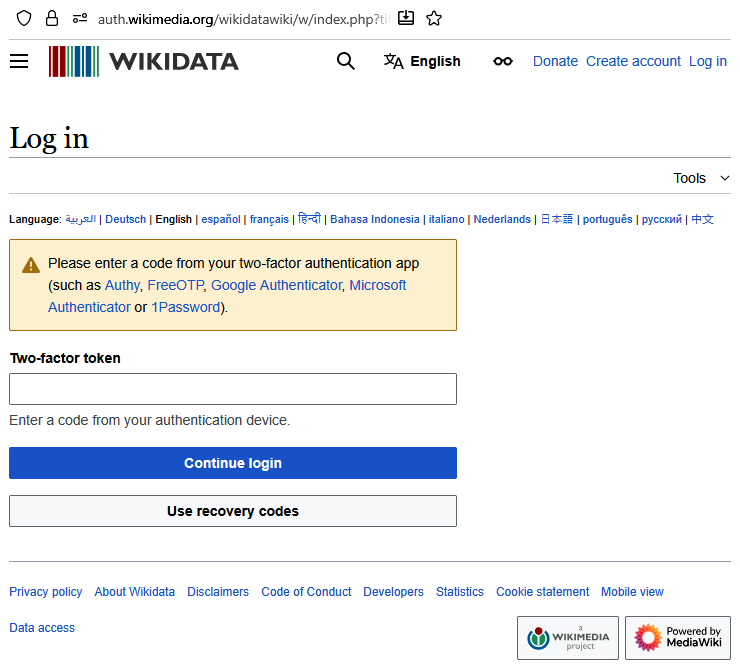
Think of it like a bank safe that requires both a key and a secret code. Your password is the key. The second factor is the secret code, which is usually a temporary number generated by an app on your phone or a physical security key. Even if a thief steals your password, they can't get into your account without also having your phone or security key. This makes it much, much harder for anyone but you to access your accounts.
If a service offers two-factor authentication, you should always enable it. It is one of the single most effective things you can do to protect your online life.
Let's check your understanding of these core concepts.
What is the primary purpose of digital security?
You receive an email that looks like it's from your bank, asking you to click a link to "verify your account details immediately" due to a security alert. This is a classic example of what kind of threat?
Understanding these threats and defenses is the foundation of staying safe online. By being mindful of phishing, avoiding malware, and securing your accounts with strong passwords and 2FA, you make yourself a much harder target for criminals.